Join us at FabCon Atlanta from March 16 - 20, 2026, for the ultimate Fabric, Power BI, AI and SQL community-led event. Save $200 with code FABCOMM.
Register now!The Power BI Data Visualization World Championships is back! Get ahead of the game and start preparing now! Learn more
Hi,
I need some help with how to calculate totals in DAX for YTD products.
I need to report the latest known value for each product. To start with, I created a visual with three columns:
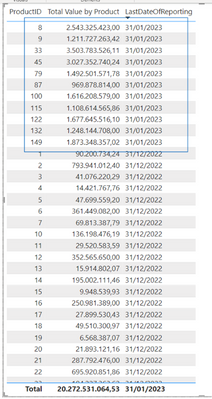
The last known report date is January 31, 2023. For every other product, the last know date of reporting is Dec 31, 2022. Each “Total Value By Product” is dipslayed correctly per product. However, the problem that I can’t solve is the total for all products. The total displayed at the bottom of the table is 20.272.531.064,53, which is only the total for the products for which there is a value on Jan 31 (so products 8, 9, 33, etc). The real total that I am looking to dislay is a little over 40bn.
I know that Power BI has it own logic when it comes to computing totals but I don’t understand how to fix this.
Can anybody help? The code that I am using is the following, using a table called “Data”:
LastDateOfReporting = Calculate(
MAX(Data[ReportingDate]),
ALL(Data[Product.ProductID]),
VALUES(Data[ReportingDate].[Date]))
Total Value by Product =
VAR SelectedPeriod = SELECTEDVALUE('Date Table'[PeriodNumber]) - comment: there is a slicer on this visual which allows users to select either the latest known value for each product or the total values at the end of the previous year.
VAR DayAnnualReporting = Dim_Dates[LastDayOfPreviousYear]
VAR LatestDateInReporting = Dim_Dates[LatestDateInReporting]
VAR LatestDateOfData =
CALCULATE(
MAX(Data[ReportingDate]),
FILTER(Data,Data[Product.ProductID]),
Data[ReportingDate]<=LatestDateInReporting
)
Return
SWITCH(
SelectedPeriod,
1, CALCULATE(SUM(Data[Product Value]), FILTER(Data, Data[ReportingDate] = DayAnnualReporting)),
2, CALCULATE(SUMX(Data,Data[Product Value]), FILTER(Data, Data[ReportingDate].[Date] = LatestDateOfData))
)
And with this, the total at the bottom of the table is wrong.
Any help will be greatly appreciated!
Solved! Go to Solution.
Hi,
I finally managed to fix this using the following two articles with many thanks to the two authors:
Measure Totals, The Final Word - Microsoft Power BI Community
Power BI SUMMARIZE | How to Use SUMMARIZE DAX Function? (wallstreetmojo.com)
I am posting what I did in case it might help someone who is struggling with the same issue.
What I did is add a SUMMARIZE measure as described in the above articles and modify my code accordingly:
- I created a new measure called m_Latest to get the correct totals per row while the total of all rows remains wrong:
m_Latest =
VAR LatestDateOfData =
CALCULATE(
MAX(Data[ReportingDate]),
FILTER(Data,Data[Product.ProductID])
)
Return
CALCULATE(SUMX(Data, Data[Product Value]), FILTER(Data, Data[ReportingDate]=LatestDateOfData)
)
- I then created another measure using SUMMARIZE to put all of the above in a new table:
m_TotalLatestData =
VAR __table = SUMMARIZE(Data,Data[Product.ProductID],"VLatest",'Key Measures'[m_Latest])
RETURN
IF(HASONEVALUE(Data[Product Value]),'Key Measures'[m_Latest],SUMX(__table,[VLatest]))
- I added this to my original code:
Total Value by Product =
VAR SelectedPeriod = SELECTEDVALUE('Date Table'[PeriodNumber])
VAR DayAnnualReporting = Dim_Dates[LastDayOfPreviousYear]
VAR LatestDateOfData =
CALCULATE(
MAX(Data[ReportingDate]),
FILTER(Data,Data[Product.ProductID]),
)
Return
SWITCH(
SelectedPeriod,
1, CALCULATE(SUM(Data[Product Value]), FILTER(Data, Data[ReportingDate] = DayAnnualReporting)),
2, 'Key Measures'[m_TotalLatestData]
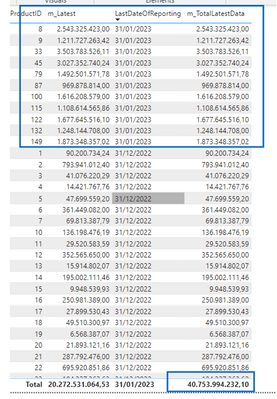
- And it is now giving me what I need:
Hi,
I finally managed to fix this using the following two articles with many thanks to the two authors:
Measure Totals, The Final Word - Microsoft Power BI Community
Power BI SUMMARIZE | How to Use SUMMARIZE DAX Function? (wallstreetmojo.com)
I am posting what I did in case it might help someone who is struggling with the same issue.
What I did is add a SUMMARIZE measure as described in the above articles and modify my code accordingly:
- I created a new measure called m_Latest to get the correct totals per row while the total of all rows remains wrong:
m_Latest =
VAR LatestDateOfData =
CALCULATE(
MAX(Data[ReportingDate]),
FILTER(Data,Data[Product.ProductID])
)
Return
CALCULATE(SUMX(Data, Data[Product Value]), FILTER(Data, Data[ReportingDate]=LatestDateOfData)
)
- I then created another measure using SUMMARIZE to put all of the above in a new table:
m_TotalLatestData =
VAR __table = SUMMARIZE(Data,Data[Product.ProductID],"VLatest",'Key Measures'[m_Latest])
RETURN
IF(HASONEVALUE(Data[Product Value]),'Key Measures'[m_Latest],SUMX(__table,[VLatest]))
- I added this to my original code:
Total Value by Product =
VAR SelectedPeriod = SELECTEDVALUE('Date Table'[PeriodNumber])
VAR DayAnnualReporting = Dim_Dates[LastDayOfPreviousYear]
VAR LatestDateOfData =
CALCULATE(
MAX(Data[ReportingDate]),
FILTER(Data,Data[Product.ProductID]),
)
Return
SWITCH(
SelectedPeriod,
1, CALCULATE(SUM(Data[Product Value]), FILTER(Data, Data[ReportingDate] = DayAnnualReporting)),
2, 'Key Measures'[m_TotalLatestData]
- And it is now giving me what I need:
The Power BI Data Visualization World Championships is back! Get ahead of the game and start preparing now!
| User | Count |
|---|---|
| 39 | |
| 38 | |
| 38 | |
| 28 | |
| 27 |
| User | Count |
|---|---|
| 124 | |
| 88 | |
| 73 | |
| 66 | |
| 65 |