Hello Community,
It will be a long post, sorry guys but I'm really in need of help.
I have a DAX for ranking and segmenting users based on consumption but it has big performance issues. It takes way more than a minute - or it times out - to calculate it on a monthly date range for example.
Below I'll try to add all the details you might need.
Model:
basic calendar table: has a relationship with stream on Date-date
stream table: contains consumption on a daily-user-content-platform level so pretty detailed and huge: about 52m rows for 8 months period
Viewers2 = DISTINCT(stream[gigya_uid]) - list of users with views - has a relationship with stream on uid-uid
UserSegments: contains 4 categories with an upper and lower value
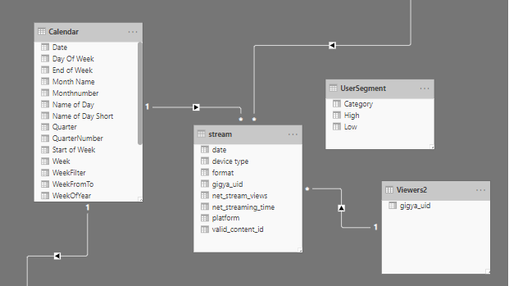
and here is the DAX I use:
the goal is to categorize the users based on their consumption and to tel for instance that the "heavy" category which contains the top 25% of the users in the given time period is responsible for the 70% of the consumption
The idea of the solution comes from the @EnterpriseDNA youtube channel.
//simple sum of views:
Net Stream views = SUM(stream[net_stream_views])
//the rank based on views where I rank the users if they had at least 1 view in the given period:
ViewRank = IF(ISBLANK( [Net Stream views]),BLANK(),
        RANKX(
            FILTER(ALL(Viewers2),NOT( ISBLANK([Net Stream views] ) ) ),[Net Stream views],,DESC,Skip))
//the segmentation where I'm trying to iterate throug the viewers and categorize them
//to the categories located in the UserSegments table based on the useres rank
Segmentation =
VAR RankingDimension = VALUES( Viewers2[gigya_uid] )
VAR TotalCustomers = CALCULATE(COUNTROWS(Viewers2), FILTER( ALL(Viewers2[gigya_uid] ),[Net Stream views] > 0 ))
RETURN
CALCULATE( [Net Stream views],
FILTER( RankingDimension,
COUNTROWS(
FILTER( UserSegment,
[ViewRank] > TotalCustomers * UserSegment[Low]
&& [ViewRank] <= TotalCustomers * UserSegment[High] ) ) > 0 ) )
what I'm trying to get is something like this for example:

Is it possible to optimize this solution to boost performance or to solve it a different way to keep it dynamic?
If you need any other detail don't hesitate to ask. 🙂
Thanks for your time in advance.
Bests,
Barna


