cancel
Showing results for 
Search instead for 
Did you mean: 

The Power BI Data Visualization World Championships is back! Get ahead of the game and start preparing now! Learn more

Reply
miltenburger
Helper V
Helper V

DAX measure total costs based on filters in dashboard

Hi Guys,


I'm working on a project based on costs from my clients. The thing that i come up against is that I have several clients which have debet and credit costs. So first of all, what I want to achieve looks very simple. How many clients do I have that have costs > 0 based on my filters in the dashboard.

I have the following filters: year, product, category, provider.


My dataset:


DatePersNumerProductCategoryCostsProvider
1-1-20171AFirst1001000
4-3-20171AFirst-1001000
6-6-20172BFirst6001043
9-7-20172CSecond3001345
10-10-20173CSecond2501345
1-3-20183CSecond2501200
1-4-20182CSecond2001243
2-4-20182CSecond-2001000
3-4-20181AFirst2001001
10-9-20181BFirst4501001
12-12-20182AFirst1001001


I already created a dax measure, but it seems to go wrong:

MyMeasure = CALCULATE(DISTINCTCOUNT(PersNumber);costs > 0)

What you can see in my table: there are a few clients that have debet and credit costs. For example client 1, his total costs in 2017 = 0, but based on my measure this clients has got some costs (which is logic because there is 1 line which meets the requirements). But his total = 0, so I don't want him to count as a client with costs for this specific year.


Can you guys help me out with this measure? If you need more information, let me know.

1 ACCEPTED SOLUTION
v-yulgu-msft
Microsoft Employee
Microsoft Employee

Hi @miltenburger ,


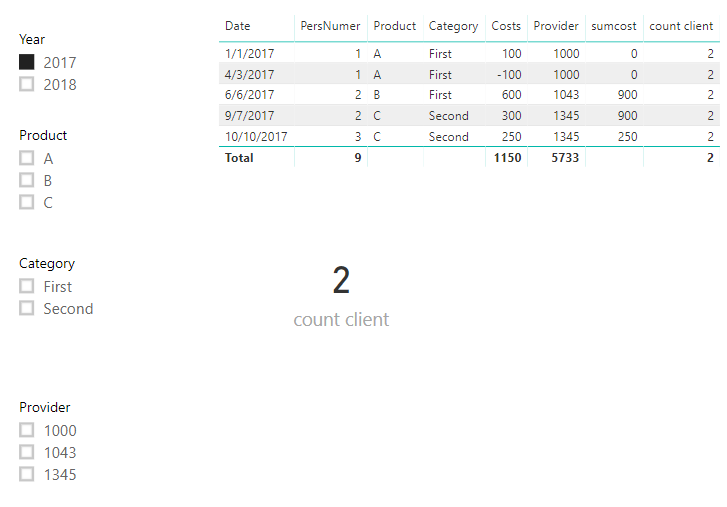
Please refer to below measures.

sumcost =
CALCULATE (
    SUM ( Data_1[Costs] ),
    FILTER (
        ALLSELECTED ( Data_1 ),
        Data_1[PersNumer] = SELECTEDVALUE ( Data_1[PersNumer] )
    )
)

count client =
CALCULATE (
    DISTINCTCOUNT ( Data_1[PersNumer] ),
    FILTER ( ALLSELECTED ( Data_1 ), [sumcost] > 0 )
)

1.PNG

Best regards,

Yuliana Gu

Community Support Team _ Yuliana Gu
If this post helps, then please consider Accept it as the solution to help the other members find it more quickly.

View solution in original post

4 REPLIES 4
v-yulgu-msft
Microsoft Employee
Microsoft Employee

Hi @miltenburger ,


Please refer to below measures.

sumcost =
CALCULATE (
    SUM ( Data_1[Costs] ),
    FILTER (
        ALLSELECTED ( Data_1 ),
        Data_1[PersNumer] = SELECTEDVALUE ( Data_1[PersNumer] )
    )
)

count client =
CALCULATE (
    DISTINCTCOUNT ( Data_1[PersNumer] ),
    FILTER ( ALLSELECTED ( Data_1 ), [sumcost] > 0 )
)

1.PNG

Best regards,

Yuliana Gu

Community Support Team _ Yuliana Gu
If this post helps, then please consider Accept it as the solution to help the other members find it more quickly.

Thank you very much @v-yulgu-msft , this is exactly what I was looking for.

PattemManohar
Community Champion
Community Champion

@miltenburger  Please post the sample data that can be copied.


Did I answer your question? Mark my post as a solution!

Proud to be a PBI Community Champion


@PattemManohar  I've edited my post

Helpful resources

Announcements
Power BI DataViz World Championships

Power BI Dataviz World Championships

The Power BI Data Visualization World Championships is back! Get ahead of the game and start preparing now!

December 2025 Power BI Update Carousel

Power BI Monthly Update - December 2025

Check out the December 2025 Power BI Holiday Recap!

FabCon Atlanta 2026 carousel

FabCon Atlanta 2026

Join us at FabCon Atlanta, March 16-20, for the ultimate Fabric, Power BI, AI and SQL community-led event. Save $200 with code FABCOMM.