FabCon is coming to Atlanta
Join us at FabCon Atlanta from March 16 - 20, 2026, for the ultimate Fabric, Power BI, AI and SQL community-led event. Save $200 with code FABCOMM.
Register now!- Power BI forums
- Get Help with Power BI
- Desktop
- Service
- Report Server
- Power Query
- Mobile Apps
- Developer
- DAX Commands and Tips
- Custom Visuals Development Discussion
- Health and Life Sciences
- Power BI Spanish forums
- Translated Spanish Desktop
- Training and Consulting
- Instructor Led Training
- Dashboard in a Day for Women, by Women
- Galleries
- Data Stories Gallery
- Themes Gallery
- Contests Gallery
- QuickViz Gallery
- Quick Measures Gallery
- Visual Calculations Gallery
- Notebook Gallery
- Translytical Task Flow Gallery
- TMDL Gallery
- R Script Showcase
- Webinars and Video Gallery
- Ideas
- Custom Visuals Ideas (read-only)
- Issues
- Issues
- Events
- Upcoming Events
The Power BI Data Visualization World Championships is back! Get ahead of the game and start preparing now! Learn more
- Power BI forums
- Forums
- Get Help with Power BI
- Desktop
- Re: DAX measure to show last value for every subse...
- Subscribe to RSS Feed
- Mark Topic as New
- Mark Topic as Read
- Float this Topic for Current User
- Bookmark
- Subscribe
- Printer Friendly Page


- Mark as New
- Bookmark
- Subscribe
- Mute
- Subscribe to RSS Feed
- Permalink
- Report Inappropriate Content
DAX measure to show last value for every subsequent month until value is changed
Need help with creating a DAX measure.
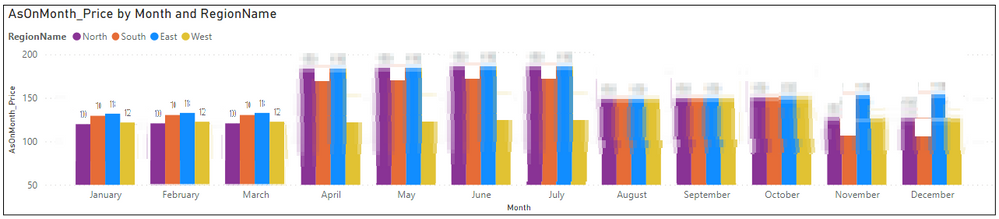
I have a Product, Region dimension and a fact that stores the audit trial of the fluctuating Unit Price in different time period. Lets say, Product A in North region, price in January 2021 was X and it changed to Y in April 2021 and then again to Z in August 2021. In the fact table, there are 3 records for each of those price change. Likewise for other regions and products, the price changed in various intervals. Now, in the Power BI report, if add a clustered column chart for Product A (Slicer Filter) to show MonthName on X axis, RegionName on Legend, and Unit Price in Values field, I would see the value only for January, April and August as shown below. The values for the remaining months in the calendar are not shown unless we duplicate the records for each month in the fact table.

Since the January price X did not change till March, is there any way possible, like using a measure, to show the "as on" unit price, X, for February and March also. And similarly April price Y for April, May and so on until the price changed again. For example (edited in MS Paint):
Here is the link to the pbix and the sample data.
Please help 🙏
Any suggestions to change in the model schema is also highly appriciated 🙏
Solved! Go to Solution.


- Mark as New
- Bookmark
- Subscribe
- Mute
- Subscribe to RSS Feed
- Permalink
- Report Inappropriate Content
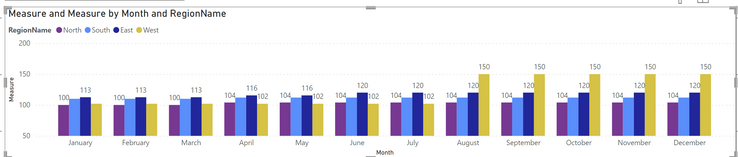
@Sparks here is the measure and the output:
Sum Unit = SUM ( FactPrice[UnitPrice] )

Measure =
COALESCE (
    [Sum Unit],
    CALCULATE (
        LASTNONBLANKVALUE ( MonthYear[MonthYearName], [Sum Unit] ),
        FILTER (
            ALL ( MonthYear ),
            MonthYear[MonthYearName] < MAX ( MonthYear[MonthYearName] )
        )
    )
)
Follow us on LinkedIn and  to our YouTube channel
Learn about conditional formatting at Microsoft Reactor
My latest blog post The Power of Using Calculation Groups with Inactive Relationships (Part 1) (perytus.com) I would ❤ Kudos if my solution helped. 👉 If you can spend time posting the question, you can also make efforts to give Kudos to whoever helped to solve your problem. It is a token of appreciation!
⚡ Visit us at https://perytus.com, your one-stop-shop for Power BI-related projects/training/consultancy.
Subscribe to the @PowerBIHowTo YT channel for an upcoming video on List and Record functions in Power Query!!
Learn Power BI and Fabric - subscribe to our YT channel - Click here: @PowerBIHowTo
If my solution proved useful, I'd be delighted to receive Kudos. When you put effort into asking a question, it's equally thoughtful to acknowledge and give Kudos to the individual who helped you solve the problem. It's a small gesture that shows appreciation and encouragement! ❤
Did I answer your question? Mark my post as a solution. Proud to be a Super User! Appreciate your Kudos 🙂
Feel free to email me with any of your BI needs.


- Mark as New
- Bookmark
- Subscribe
- Mute
- Subscribe to RSS Feed
- Permalink
- Report Inappropriate Content
Hey Guys,
It appears, it is possible to ditch COALESCE() by updating the < to <= in the FILTER() table expression.
MonthYear[MonthYearName] <= MAX
CALCULATE (
    LASTNONBLANKVALUE ( MonthYear[MonthYearName], [Sum Unit] ),
    FILTER (
        ALL ( MonthYear ),
        MonthYear[MonthYearName] <= MAX ( MonthYear[MonthYearName] )
    )
)
- Mark as New
- Bookmark
- Subscribe
- Mute
- Subscribe to RSS Feed
- Permalink
- Report Inappropriate Content
@Sparks what is the flag for it is reinstated?
Subscribe to the @PowerBIHowTo YT channel for an upcoming video on List and Record functions in Power Query!!
Learn Power BI and Fabric - subscribe to our YT channel - Click here: @PowerBIHowTo
If my solution proved useful, I'd be delighted to receive Kudos. When you put effort into asking a question, it's equally thoughtful to acknowledge and give Kudos to the individual who helped you solve the problem. It's a small gesture that shows appreciation and encouragement! ❤
Did I answer your question? Mark my post as a solution. Proud to be a Super User! Appreciate your Kudos 🙂
Feel free to email me with any of your BI needs.
- Mark as New
- Bookmark
- Subscribe
- Mute
- Subscribe to RSS Feed
- Permalink
- Report Inappropriate Content
The flag is set to 'Available' once reinstated as shown below in the dataset

- Mark as New
- Bookmark
- Subscribe
- Mute
- Subscribe to RSS Feed
- Permalink
- Report Inappropriate Content
@Sparks Glad it worked out. I think I will do a video on it and then post it on my youtube channel, do subscribe for it.
On your 2nd point about a discontinued product, what identifies when product is discontinued and when it started again.
Follow us on LinkedIn and to our YouTube channel
Learn about conditional formatting at Microsoft Reactor
My latest blog post The Power of Using Calculation Groups with Inactive Relationships (Part 1) (perytus.com) I would ❤ Kudos if my solution helped. 👉 If you can spend time posting the question, you can also make efforts to give Kudos to whoever helped to solve your problem. It is a token of appreciation!
⚡ Visit us at https://perytus.com, your one-stop-shop for Power BI-related projects/training/consultancy.
Subscribe to the @PowerBIHowTo YT channel for an upcoming video on List and Record functions in Power Query!!
Learn Power BI and Fabric - subscribe to our YT channel - Click here: @PowerBIHowTo
If my solution proved useful, I'd be delighted to receive Kudos. When you put effort into asking a question, it's equally thoughtful to acknowledge and give Kudos to the individual who helped you solve the problem. It's a small gesture that shows appreciation and encouragement! ❤
Did I answer your question? Mark my post as a solution. Proud to be a Super User! Appreciate your Kudos 🙂
Feel free to email me with any of your BI needs.
- Mark as New
- Bookmark
- Subscribe
- Mute
- Subscribe to RSS Feed
- Permalink
- Report Inappropriate Content
In the Fact table, there is a AvailablityFlag field that highlights if the product was discontinued.
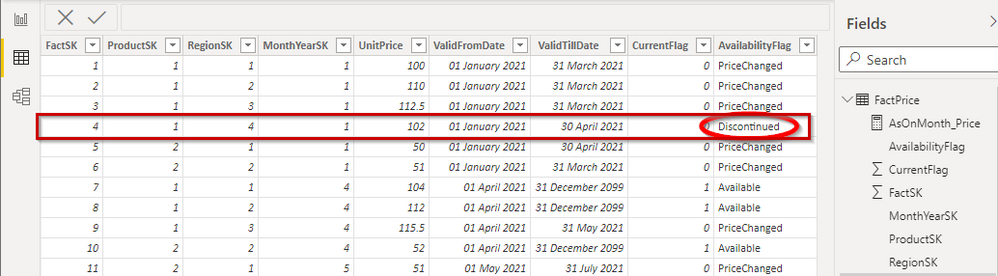
I guess as a dirty workaround, we can add an additional row for Product A and West Region with 0 unit price till the time the product is reintroduced in a later month. But is there a better way of handling within the measure itself?
- Mark as New
- Bookmark
- Subscribe
- Mute
- Subscribe to RSS Feed
- Permalink
- Report Inappropriate Content
@Sparks here is the measure and the output:
Sum Unit = SUM ( FactPrice[UnitPrice] )

Measure =
COALESCE (
    [Sum Unit],
    CALCULATE (
        LASTNONBLANKVALUE ( MonthYear[MonthYearName], [Sum Unit] ),
        FILTER (
            ALL ( MonthYear ),
            MonthYear[MonthYearName] < MAX ( MonthYear[MonthYearName] )
        )
    )
)
Follow us on LinkedIn and to our YouTube channel
Learn about conditional formatting at Microsoft Reactor
My latest blog post The Power of Using Calculation Groups with Inactive Relationships (Part 1) (perytus.com) I would ❤ Kudos if my solution helped. 👉 If you can spend time posting the question, you can also make efforts to give Kudos to whoever helped to solve your problem. It is a token of appreciation!
⚡ Visit us at https://perytus.com, your one-stop-shop for Power BI-related projects/training/consultancy.
Subscribe to the @PowerBIHowTo YT channel for an upcoming video on List and Record functions in Power Query!!
Learn Power BI and Fabric - subscribe to our YT channel - Click here: @PowerBIHowTo
If my solution proved useful, I'd be delighted to receive Kudos. When you put effort into asking a question, it's equally thoughtful to acknowledge and give Kudos to the individual who helped you solve the problem. It's a small gesture that shows appreciation and encouragement! ❤
Did I answer your question? Mark my post as a solution. Proud to be a Super User! Appreciate your Kudos 🙂
Feel free to email me with any of your BI needs.
- Mark as New
- Bookmark
- Subscribe
- Mute
- Subscribe to RSS Feed
- Permalink
- Report Inappropriate Content
Thanks a ton @parry2k !! That was quick turnaround and the solution worked like charm!!
Could you please try to explain the measure calculation, please?
Also, how can I handle the "discontinued product" scenario? For example, Product A was discontinued in West Region from May 2021 to July 2021 and later resumed in August 2021. So, how not to show Product A for West Region in the report for these specific period?

Helpful resources

Power BI Dataviz World Championships
The Power BI Data Visualization World Championships is back! Get ahead of the game and start preparing now!

Power BI Monthly Update - December 2025
Check out the December 2025 Power BI Holiday Recap!

FabCon Atlanta 2026
Join us at FabCon Atlanta, March 16-20, for the ultimate Fabric, Power BI, AI and SQL community-led event. Save $200 with code FABCOMM.

| User | Count |
|---|---|
| 41 | |
| 38 | |
| 36 | |
| 31 | |
| 28 |


| User | Count |
|---|---|
| 129 | |
| 88 | |
| 79 | |
| 68 | |
| 63 |


