Join us at FabCon Vienna from September 15-18, 2025
The ultimate Fabric, Power BI, SQL, and AI community-led learning event. Save €200 with code FABCOMM.
Get registered- Power BI forums
- Get Help with Power BI
- Desktop
- Service
- Report Server
- Power Query
- Mobile Apps
- Developer
- DAX Commands and Tips
- Custom Visuals Development Discussion
- Health and Life Sciences
- Power BI Spanish forums
- Translated Spanish Desktop
- Training and Consulting
- Instructor Led Training
- Dashboard in a Day for Women, by Women
- Galleries
- Data Stories Gallery
- Themes Gallery
- Contests Gallery
- Quick Measures Gallery
- Notebook Gallery
- Translytical Task Flow Gallery
- TMDL Gallery
- R Script Showcase
- Webinars and Video Gallery
- Ideas
- Custom Visuals Ideas (read-only)
- Issues
- Issues
- Events
- Upcoming Events
Enhance your career with this limited time 50% discount on Fabric and Power BI exams. Ends August 31st. Request your voucher.
- Power BI forums
- Forums
- Get Help with Power BI
- Desktop
- DAX measure to concatenate values of a row and tex...
- Subscribe to RSS Feed
- Mark Topic as New
- Mark Topic as Read
- Float this Topic for Current User
- Bookmark
- Subscribe
- Printer Friendly Page

- Mark as New
- Bookmark
- Subscribe
- Mute
- Subscribe to RSS Feed
- Permalink
- Report Inappropriate Content
DAX measure to concatenate values of a row and text
Hello everybody,
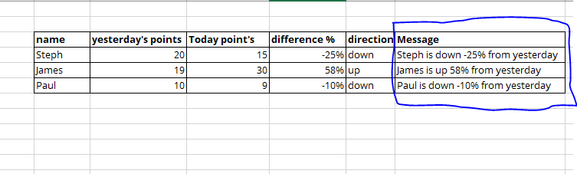
I would like to write a DAX query by Concatenating values from other columns in the same row + text. I would like to create something like the last column (Message).
Basically something like - "Steph is " [direction] [difference %] " from yesterday, "James is " [direction] [difference %] " from yesterday, "Paul is " [direction] [difference %] " from yesterday.
Is it possible to do it in the same DAX measure? and if so, can you please give any suggestions. Counting on you guys.
Solved! Go to Solution.


- Mark as New
- Bookmark
- Subscribe
- Mute
- Subscribe to RSS Feed
- Permalink
- Report Inappropriate Content
Hey,
using this DAX statement to create a calculated column
Text Concat =
"At " & 'ProductCatalog'[PriceDate] & " the Price was " & 'ProductCatalog'[Price]
creates this:
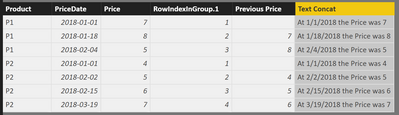
I guess the secret sauce is just the & sign to concatenated as many strings as you need and the referencing the columns in you table like so 'yourtablename'[column1]
Hopefully this is what you are looking for
Regards
Tom
Did I answer your question? Mark my post as a solution, this will help others!
Proud to be a Super User!
I accept Kudos 😉
Hamburg, Germany
- Mark as New
- Bookmark
- Subscribe
- Mute
- Subscribe to RSS Feed
- Permalink
- Report Inappropriate Content
Hey @Anonymous,
I would recommend a calculated column which would be calculated by:
column =
IF(
Table[difference] > 0,
COMBINEVALUES(" ", COMBINEVALUES(" is up ", Table[name], Table[direction]), "from yesterday"),
COMBINEVALUES(" ", COMBINEVALUES(" is down ", Table[name], Table[direction]), "from yesterday")
)
Hope this works for you,
Parker
- Mark as New
- Bookmark
- Subscribe
- Mute
- Subscribe to RSS Feed
- Permalink
- Report Inappropriate Content
Hey @Anonymous,
I would recommend a calculated column which would be calculated by:
column =
IF(
Table[difference] > 0,
COMBINEVALUES(" ", COMBINEVALUES(" is up ", Table[name], Table[direction]), "from yesterday"),
COMBINEVALUES(" ", COMBINEVALUES(" is down ", Table[name], Table[direction]), "from yesterday")
)
Hope this works for you,
Parker


- Mark as New
- Bookmark
- Subscribe
- Mute
- Subscribe to RSS Feed
- Permalink
- Report Inappropriate Content
Can this be performed as a measure?

- Mark as New
- Bookmark
- Subscribe
- Mute
- Subscribe to RSS Feed
- Permalink
- Report Inappropriate Content
Does anyone know how to concatenate the row and text in a measure?
- Mark as New
- Bookmark
- Subscribe
- Mute
- Subscribe to RSS Feed
- Permalink
- Report Inappropriate Content
Hey @renoyzac ,
please be a little more specific on your requirements. The simple answer is: yes, of course!
But then, you have to consider how you want to use this, meaning the combination of visual and measure. This is important, e.g., using the table iterator function CONCATENATEX( ... ) might create "long" strings on the Total line.
I think it's a good idea to start your own thread providing a more detailed description of your requirements and ideally a link that points to pbix file on onedrive or dropbox, that contains sample data but still reflects your data model.
Regards,
Tom
Did I answer your question? Mark my post as a solution, this will help others!
Proud to be a Super User!
I accept Kudos 😉
Hamburg, Germany
- Mark as New
- Bookmark
- Subscribe
- Mute
- Subscribe to RSS Feed
- Permalink
- Report Inappropriate Content
Hey,
using this DAX statement to create a calculated column
Text Concat =
"At " & 'ProductCatalog'[PriceDate] & " the Price was " & 'ProductCatalog'[Price]
creates this:
I guess the secret sauce is just the & sign to concatenated as many strings as you need and the referencing the columns in you table like so 'yourtablename'[column1]
Hopefully this is what you are looking for
Regards
Tom
Did I answer your question? Mark my post as a solution, this will help others!
Proud to be a Super User!
I accept Kudos 😉
Hamburg, Germany
Helpful resources

Power BI Monthly Update - August 2025
Check out the August 2025 Power BI update to learn about new features.

Fabric Community Update - August 2025
Find out what's new and trending in the Fabric community.


| User | Count |
|---|---|
| 78 | |
| 71 | |
| 54 | |
| 51 | |
| 43 |


