FabCon is coming to Atlanta
Join us at FabCon Atlanta from March 16 - 20, 2026, for the ultimate Fabric, Power BI, AI and SQL community-led event. Save $200 with code FABCOMM.
Register now!- Power BI forums
- Get Help with Power BI
- Desktop
- Service
- Report Server
- Power Query
- Mobile Apps
- Developer
- DAX Commands and Tips
- Custom Visuals Development Discussion
- Health and Life Sciences
- Power BI Spanish forums
- Translated Spanish Desktop
- Training and Consulting
- Instructor Led Training
- Dashboard in a Day for Women, by Women
- Galleries
- Data Stories Gallery
- Themes Gallery
- Contests Gallery
- QuickViz Gallery
- Quick Measures Gallery
- Visual Calculations Gallery
- Notebook Gallery
- Translytical Task Flow Gallery
- TMDL Gallery
- R Script Showcase
- Webinars and Video Gallery
- Ideas
- Custom Visuals Ideas (read-only)
- Issues
- Issues
- Events
- Upcoming Events
The Power BI Data Visualization World Championships is back! It's time to submit your entry. Live now!
- Power BI forums
- Forums
- Get Help with Power BI
- Desktop
- DAX (measure) Year Amount Comparison in % (increas...
- Subscribe to RSS Feed
- Mark Topic as New
- Mark Topic as Read
- Float this Topic for Current User
- Bookmark
- Subscribe
- Printer Friendly Page


- Mark as New
- Bookmark
- Subscribe
- Mute
- Subscribe to RSS Feed
- Permalink
- Report Inappropriate Content
DAX (measure) Year Amount Comparison in % (increase and decrease)
Hello all, good afternoon!
I just registered myself in this community. I am a newbie in DAX, but trying to apply as much as possible some daily financial situations I already have. "I think when you have an enviroment at your disposal, this is the best way to put in practice what you are learning and advance your abilities."
So, I am trying to create a measure (according to "Power Pivot and Power BI" book this is the best way and I am trying to avoid Column calculation approach) that will compare all investment BY [PRODUCTS] from 2015 and 2016 in % (both increase and decrease % numbers).
Table Name = 'PILOT';
Column 'PILOT'[YEAR] = 2015 & 2016 values;
Column 'PILOT'[INVESTMENT AMT] = Amounts in BRL;
Column 'PILOT'[PRODUCTS] = All products
Objective: Compare 2015 and 2016 in % to show in a Pivot Table (Power Pivot) increase and decrease scenarios;
Problem found: There are some products that does not have any investment on 2015 and does in 2016. So, the formula has to be dynamically enough to recognize this and show 100% increase and vise versa (-100%).
I do not know how to accomplish this result using DAX in calculated field (Measure). I have tried DIVIDE function, but failed.
Thank you all in advance,
Jaderson Almeida (Jimmy)
Business Coordinator
Solved! Go to Solution.


- Mark as New
- Bookmark
- Subscribe
- Mute
- Subscribe to RSS Feed
- Permalink
- Report Inappropriate Content
- Mark as New
- Bookmark
- Subscribe
- Mute
- Subscribe to RSS Feed
- Permalink
- Report Inappropriate Content
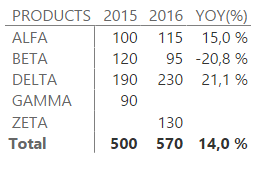
Yeah, of course @bajimmy1983! I just created these three dax calculations:
2015 = CALCULATE(SUM(PILOT[INVESTMENT AMT]);PILOT[YEAR]=2015)
2016 = CALCULATE(SUM(PILOT[INVESTMENT AMT]);PILOT[YEAR]=2016)
YOY(%) = IF(OR(ISBLANK([2015])=TRUE();ISBLANK([2016])=TRUE());BLANK();DIVIDE([2016];[2015])-1) - format percentage with one decimal place
Is it clear? 
You are welcome Jimmy.
Regards.
Pavel
- Mark as New
- Bookmark
- Subscribe
- Mute
- Subscribe to RSS Feed
- Permalink
- Report Inappropriate Content
- Mark as New
- Bookmark
- Subscribe
- Mute
- Subscribe to RSS Feed
- Permalink
- Report Inappropriate Content
YES!! How could you accomplish it? Could you share the DAX formula?
Thanks again!
Business Coordinator
- Mark as New
- Bookmark
- Subscribe
- Mute
- Subscribe to RSS Feed
- Permalink
- Report Inappropriate Content
Yeah, of course @bajimmy1983! I just created these three dax calculations:
2015 = CALCULATE(SUM(PILOT[INVESTMENT AMT]);PILOT[YEAR]=2015)
2016 = CALCULATE(SUM(PILOT[INVESTMENT AMT]);PILOT[YEAR]=2016)
YOY(%) = IF(OR(ISBLANK([2015])=TRUE();ISBLANK([2016])=TRUE());BLANK();DIVIDE([2016];[2015])-1) - format percentage with one decimal place
Is it clear?
You are welcome Jimmy.
Regards.
Pavel
- Mark as New
- Bookmark
- Subscribe
- Mute
- Subscribe to RSS Feed
- Permalink
- Report Inappropriate Content
Perfect solution 🙂 thank you so much once again. I hope one day I can help others like you did.
Business Coordinator


- Mark as New
- Bookmark
- Subscribe
- Mute
- Subscribe to RSS Feed
- Permalink
- Report Inappropriate Content
Is there no embedded formula which could help obtain the same result without having to type the DAX measure. Its Microsoft i am sure you guys can create a code which will help formulate that automatically.

Helpful resources

Power BI Dataviz World Championships
The Power BI Data Visualization World Championships is back! It's time to submit your entry.

Power BI Monthly Update - December 2025
Check out the December 2025 Power BI Holiday Recap!

FabCon Atlanta 2026
Join us at FabCon Atlanta, March 16-20, for the ultimate Fabric, Power BI, AI and SQL community-led event. Save $200 with code FABCOMM.

| User | Count |
|---|---|
| 50 | |
| 43 | |
| 36 | |
| 33 | |
| 30 |


| User | Count |
|---|---|
| 138 | |
| 120 | |
| 60 | |
| 59 | |
| 56 |


