Share feedback directly with Fabric product managers, participate in targeted research studies and influence the Fabric roadmap.
Sign up nowGet Fabric certified for FREE! Don't miss your chance! Learn more
Hi,
I am trying to calculate the below formula in Power BI as a calculated column:
K = ( (C - L) / (H - L) ) * 100
Where:
C = The current closing price (i.e the current row)
L = Lowest closing Price for last 14 days
H = Highest closing price for the last 14 days
Sample Data:
| Date | Closing Price |
| 11/13/2019 | 1589.18 |
| 11/14/2019 | 1588.79 |
| 11/15/2019 | 1596.45 |
| 11/18/2019 | 1592.34 |
| 11/19/2019 | 1598.29 |
| 11/20/2019 | 1591.61 |
| 11/21/2019 | 1583.96 |
| 11/22/2019 | 1588.94 |
| 11/25/2019 | 1621.9 |
| 11/26/2019 | 1624.23 |
| 11/27/2019 | 1634.1 |
| 11/29/2019 | 1624.5 |
| 12/2/2019 | 1607.58 |
| 12/3/2019 | 1602.63 |
| 12/4/2019 | 1613.9 |
| 12/5/2019 | 1614.83 |
| 12/6/2019 | 1633.84 |
| 12/9/2019 | 1629.62 |
| 12/10/2019 | 1631.71 |
I greatly appreceate any help!
Thanks
Solved! Go to Solution.
@Anonymous solution is attached, look at HLC and Calendar table, there are more tables in the file, just ignore those
Subscribe to the @PowerBIHowTo YT channel for an upcoming video on List and Record functions in Power Query!!
Learn Power BI and Fabric - subscribe to our YT channel - Click here: @PowerBIHowTo
If my solution proved useful, I'd be delighted to receive Kudos. When you put effort into asking a question, it's equally thoughtful to acknowledge and give Kudos to the individual who helped you solve the problem. It's a small gesture that shows appreciation and encouragement! ❤
Did I answer your question? Mark my post as a solution. Proud to be a Super User! Appreciate your Kudos 🙂
Feel free to email me with any of your BI needs.
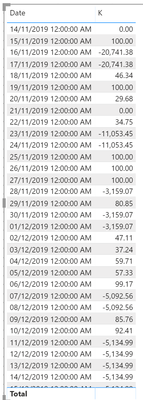
@Anonymous does this looks correct to you
Subscribe to the @PowerBIHowTo YT channel for an upcoming video on List and Record functions in Power Query!!
Learn Power BI and Fabric - subscribe to our YT channel - Click here: @PowerBIHowTo
If my solution proved useful, I'd be delighted to receive Kudos. When you put effort into asking a question, it's equally thoughtful to acknowledge and give Kudos to the individual who helped you solve the problem. It's a small gesture that shows appreciation and encouragement! ❤
Did I answer your question? Mark my post as a solution. Proud to be a Super User! Appreciate your Kudos 🙂
Feel free to email me with any of your BI needs.
@Anonymous solution is attached, look at HLC and Calendar table, there are more tables in the file, just ignore those
Subscribe to the @PowerBIHowTo YT channel for an upcoming video on List and Record functions in Power Query!!
Learn Power BI and Fabric - subscribe to our YT channel - Click here: @PowerBIHowTo
If my solution proved useful, I'd be delighted to receive Kudos. When you put effort into asking a question, it's equally thoughtful to acknowledge and give Kudos to the individual who helped you solve the problem. It's a small gesture that shows appreciation and encouragement! ❤
Did I answer your question? Mark my post as a solution. Proud to be a Super User! Appreciate your Kudos 🙂
Feel free to email me with any of your BI needs.
@parry2k Thanks for your response.
The L and H measures should cosider the previsous 14 days at every row level.
For example, for 12/10/2019 L and H values should take (12/10/2019 to 11/19/2019) date range into calculation.
Similarly, for 12/09/2019 row L and H values should take (12/09/2019 to 11/18/2019) date range.
Any thoughts on this?
Thanks
If you love stickers, then you will definitely want to check out our Community Sticker Challenge!
Check out the January 2026 Power BI update to learn about new features.
| User | Count |
|---|---|
| 65 | |
| 64 | |
| 45 | |
| 21 | |
| 18 |
| User | Count |
|---|---|
| 115 | |
| 114 | |
| 38 | |
| 36 | |
| 26 |