This is best Fabric, Power BI, SQL and AI community event. How do we know? The last event sold out! Save €200 with code FABCMTY200.
Register nowA new Data Days event is coming soon! This time we’re going bigger than ever. Fabric, Power BI, SQL, AI and more. Don't miss out.
Hi guys,
I'm trying to create a DAX measure and hoping someone can help.
As a sample of some dummy date, my data is structured like this:
| ReportDate | ProductCode | Store | Status | Concat Column |
| 15/08/2018 | 10000 | Manchester | Live | 10000Live |
| 15/08/2018 | 10000 | London | Live | 10000Live |
| 15/08/2018 | 10000 | Brighton | Live | 10000Live |
| 15/08/2018 | 15000 | London | Not Live | 15000Not Live |
| 15/08/2018 | 15000 | Manchester | Not Live | 15000Not Live |
| 15/08/2018 | 17000 | London | Live | 17000Live |
| 16/09/2018 | 10000 | Manchester | Live | 10000Live |
| 16/09/2018 | 10000 | London | Live | 10000Live |
| 16/09/2018 | 10000 | Brighton | Live | 10000Live |
| 16/09/2018 | 15000 | London | Live | 15000Live |
| 16/09/2018 | 15000 | Manchester | Live | 15000Live |
| 16/09/2018 | 17000 | London | Live | 17000Live |
| 16/09/2018 | 20000 | London | Live | 20000Live |
What i'm trying to achieve is a metric to see in the previous month (i.e. September), how many new products there were.
A new product is defined as a product code which has its Status = "Live" and was not live in the month before (i.e. August) - either it didnt appear at all, or it had a different status.
My idea at resolving this was:
1) Create the concatenated column above joining the ProductCode and the Status
2) Creating a lookup column so that looks up from the concatenated column, to a filtered version of the above table for the month before (i.e. August)
3) A simple calculate formula, which would count the non-blank cells from the column created in step 2, filtered on previous month (i.e. September).
I have a date dimension which joins to the "ReportDate" column here. The data dimension includes two custom columns:
- "InlastMonth" (i.e. "Yes" for September 2018, "No" for all other dates)
- "TwoMonthsAgo" (i.e. "Yes" for August 2018, "No" for all other dates)
I'm stuck on step 2: "Creating a lookup column so that looks up from the concatenated column, to a filtered version of the above table for the month before ".
Can anyone help (either with this step, or with a better overall solution)?
Dummy model available here:
https://mega.nz/#!zLxxQaRY!FoJzxlXgGSxxxAecDP6iueBIps-0sIwTtYRIGxTWdMM
Thanks in advance
Alex
Solved! Go to Solution.
Hi @alexei7,
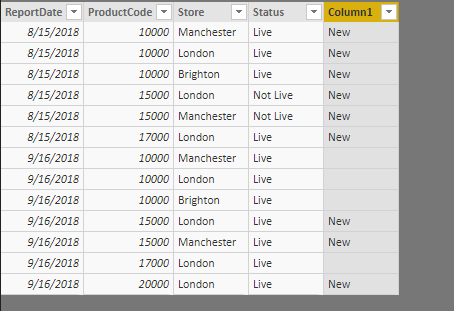
That case, please add a [Rank] column first.
Rank = RANKX ( Products, Products[ReportDate],, ASC, DENSE )
Then, modify the formula in original post as below:
Column1 =
VAR previousstatus =
LOOKUPVALUE (
Products[Status],
Products[ProductCode], Products[ProductCode],
Products[Store], Products[Store],
Products[Rank], Products[Rank] - 1
)
RETURN
IF ( previousstatus = BLANK () || previousstatus = "Not Live", "New", BLANK () )
Best regards,
Yuliana Gu
Hi @alexei7,
I removed the relationship between data table and date dimension table. Then, create below calculated column:
Column1 =
VAR previousstatus =
LOOKUPVALUE (
Products[Status],
Products[ProductCode], Products[ProductCode],
Products[Store], Products[Store],
Products[ReportDate].[MonthNo], Products[ReportDate].[MonthNo] - 1
)
RETURN
IF ( previousstatus = BLANK () || previousstatus = "Not Live", "New", BLANK () )
Best regards,
Yuliana Gu
Hi @v-yulgu-msft,
Thank you for your reply.
Unfortunately this doesnt work - I do need the relationship between the data table and the date dimension table for other calculations in my model/report.
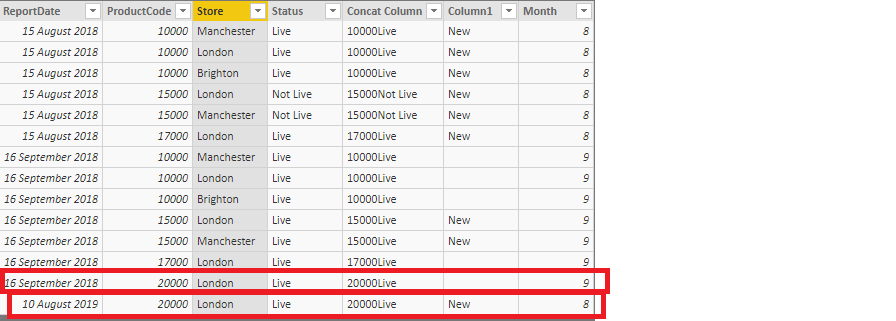
The formula you've provided only takes account of the month number and not the previous month, so if i introduced some more data, i get the following incorrect result:
Here the calculation is taking about only of the month number, so August 2019 is presumed to be before September 2018.
Thanks
Alex
Hi @alexei7,
That case, please add a [Rank] column first.
Rank = RANKX ( Products, Products[ReportDate],, ASC, DENSE )
Then, modify the formula in original post as below:
Column1 =
VAR previousstatus =
LOOKUPVALUE (
Products[Status],
Products[ProductCode], Products[ProductCode],
Products[Store], Products[Store],
Products[Rank], Products[Rank] - 1
)
RETURN
IF ( previousstatus = BLANK () || previousstatus = "Not Live", "New", BLANK () )
Best regards,
Yuliana Gu
I haven't tested this as the user changed requirements a little so I ended up solving this a different way.
Cheers for looking into it though.
Check out the May 2026 Power BI update to learn about new features.
Sign up to receive a private message when registration opens and key events begin.
If you have recently started exploring Fabric, we'd love to hear how it's going. Your feedback can help with product improvements.
| User | Count |
|---|---|
| 32 | |
| 25 | |
| 23 | |
| 22 | |
| 13 |
| User | Count |
|---|---|
| 62 | |
| 47 | |
| 27 | |
| 23 | |
| 19 |