Join us in Barcelona for FabCon and SQLCon, September 28 - October 1, 2026.
This is best Fabric, Power BI, SQL and AI community event. How do we know? The last event sold out! Save €200 with code FABCMTY200.
Register now- Power BI forums
- Get Help with Power BI
- Desktop
- Service
- Report Server
- Power Query
- Mobile Apps
- Developer
- DAX Commands and Tips
- Custom Visuals Development Discussion
- Health and Life Sciences
- Power BI Spanish forums
- Translated Spanish Desktop
- Training and Consulting
- Instructor Led Training
- Dashboard in a Day for Women, by Women
- Galleries
- Data Stories Gallery
- Themes Gallery
- Contests Gallery
- QuickViz Gallery
- Quick Measures Gallery
- Visual Calculations Gallery
- Fabric Apps Gallery
- Notebook Gallery
- Translytical Task Flow Gallery
- TMDL Gallery
- R Script Showcase
- Webinars and Video Gallery
- Ideas
- Custom Visuals Ideas (read-only)
- Issues
- Issues
- Events
- Upcoming Events
July 28 - August 9 | Final Round of the Power BI Dataviz World Championships. This is your chance. Learn more
- Power BI forums
- Forums
- Get Help with Power BI
- Desktop
- Re: DAX help
- Subscribe to RSS Feed
- Mark Topic as New
- Mark Topic as Read
- Float this Topic for Current User
- Bookmark
- Subscribe
- Printer Friendly Page


- Mark as New
- Bookmark
- Subscribe
- Mute
- Subscribe to RSS Feed
- Permalink
- Report Inappropriate Content
DAX help
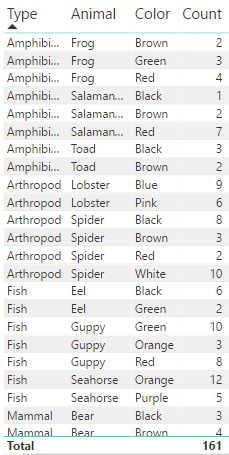
Hello, I am working with a very small data set (see image) and I am trying to find percentages based on filter criteria using DAX.
1. My first equation was to find the total count of each animal, per type and color = 161.
2. Next, I need to find the percentage per animal (count of animal divided by the total number of animals).
3. Last, I need to find the percentage per animal type (count of type divided by the total number of animals).
I have tried using different methods for this equation, but still am not getting the correct formula. Thank you!
Solved! Go to Solution.


- Mark as New
- Bookmark
- Subscribe
- Mute
- Subscribe to RSS Feed
- Permalink
- Report Inappropriate Content
Hi @margeausoboti,
You want to create a calculated column to get the percentage? If it is, please create calculated columns using the fomulas, and check if it works fine.
each type percentage =
CALCULATE ( SUM ( Table[Count] ), ALLEXCEPT ( Table, Table[tipo] ) )
    / SUMX ( ALL ( Table ), Table[Count] )

each Animal percentage =
CALCULATE ( SUM ( Table[Count] ), ALLEXCEPT ( Table, Table[Animal] ) )
    / SUMX ( ALL ( Table ), Table[Count] )

each Color percentage =
CALCULATE ( SUM ( Table[Count] ), ALLEXCEPT ( Table, Table[Color] ) )
    / SUMX ( ALL ( Table ), Table[Count] )
Don't hesitate to ask if you have any other issues.
Best Regards,
Angelia


- Mark as New
- Bookmark
- Subscribe
- Mute
- Subscribe to RSS Feed
- Permalink
- Report Inappropriate Content
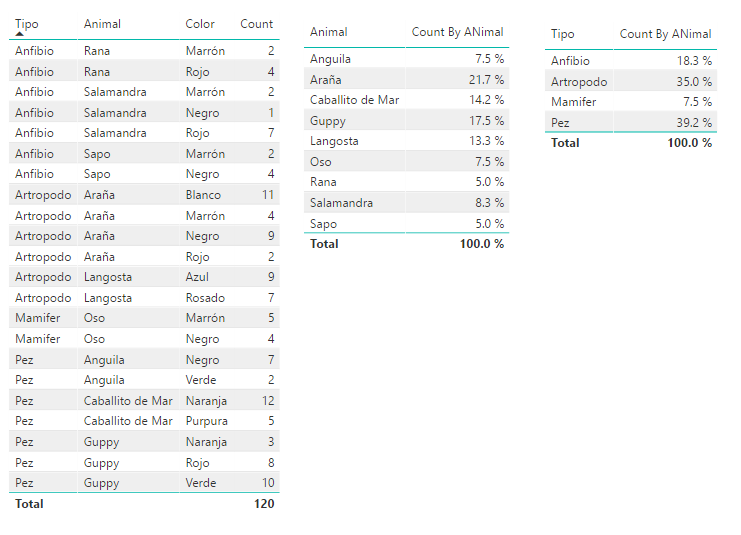
Hi, Try with this Measures:
Count = COUNTROWS(Table1)
Count By ANimal = [Count]/CALCULATE([Count],All(Table1))
Lima - Peru
- Mark as New
- Bookmark
- Subscribe
- Mute
- Subscribe to RSS Feed
- Permalink
- Report Inappropriate Content
Hi,
Thank you for looking into this for me. This it not the calculation that I am looking for. I want the totals of each line percentage. For example, I want to know the percentage of the amount of amphibians. There are 24 amphibians, and 161 animals total. Therefore, I need the calculation to be 24/161=15%. Does that help? I would need to SUM the type then divide by the total amount. Same for animal total, and color total. Thank you!


- Mark as New
- Bookmark
- Subscribe
- Mute
- Subscribe to RSS Feed
- Permalink
- Report Inappropriate Content
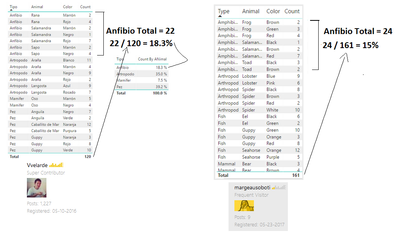
I think Vvelarde has a good answer, there is a difference because of the dataset sample. Check this picture below.
- Mark as New
- Bookmark
- Subscribe
- Mute
- Subscribe to RSS Feed
- Permalink
- Report Inappropriate Content
Thank you everyone for all of your help! I went back and checked it again, I had another filter on my chart. After removing the filter, Angelia's syntax is exactly what I needed to resolve the issue. Can anyone recommend a course that I can take to learn DAX? I am a new user of DAX and would liketo become a super user! Thanks!
- Mark as New
- Bookmark
- Subscribe
- Mute
- Subscribe to RSS Feed
- Permalink
- Report Inappropriate Content
A time ago I found a good youtube channel about Power BI, every fridays there is a new topic about DAX. The Curbal woman has become my favourite : ) . Enjoy it !
- Mark as New
- Bookmark
- Subscribe
- Mute
- Subscribe to RSS Feed
- Permalink
- Report Inappropriate Content
Thank you!
- Mark as New
- Bookmark
- Subscribe
- Mute
- Subscribe to RSS Feed
- Permalink
- Report Inappropriate Content
Hi @margeausoboti,
You want to create a calculated column to get the percentage? If it is, please create calculated columns using the fomulas, and check if it works fine.
each type percentage =
CALCULATE ( SUM ( Table[Count] ), ALLEXCEPT ( Table, Table[tipo] ) )
    / SUMX ( ALL ( Table ), Table[Count] )

each Animal percentage =
CALCULATE ( SUM ( Table[Count] ), ALLEXCEPT ( Table, Table[Animal] ) )
    / SUMX ( ALL ( Table ), Table[Count] )

each Color percentage =
CALCULATE ( SUM ( Table[Count] ), ALLEXCEPT ( Table, Table[Color] ) )
    / SUMX ( ALL ( Table ), Table[Count] )
Don't hesitate to ask if you have any other issues.
Best Regards,
Angelia
- Mark as New
- Bookmark
- Subscribe
- Mute
- Subscribe to RSS Feed
- Permalink
- Report Inappropriate Content
Hi Angelia,
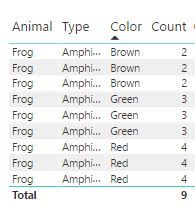
Thank you for your response, you have been very helpful. This isn't however the percentage that I am looking for. I do need a DAX equation. This equation is calculating the row count for each animal, type or color. I also need to take into consideration of the count of animals. So for example, there are 9 frogs, however for each type and color there are different counts (see image). The count at the bottom is showing the number of rows, but I really need the TOTAL of frogs, which is 27. Then 27 divided by the total number of all animals, which is 161. I should get 16.7%. Is this possible to do in DAX? Thanks for all of your help!

Helpful resources

FabCon & SQLCon – Barcelona 2026
Join us in Barcelona for FabCon and SQLCon, the Fabric, Power BI, SQL, and AI community event. Save €200 with code FABCMTY200.

Fabric Community Sticker Challenge - Barcelona 2026
If you love stickers, then you will definitely want to check out our community sticker challenge, Barcelona edition!

Power BI Monthly Update - July 2026
Check out the July 2026 Power BI update to learn about new features.

Power BI DataViz World Championships - June 2026
A new Power BI DataViz World Championship is coming this June! Don't miss out on submitting your entry.

| User | Count |
|---|---|
| 25 | |
| 23 | |
| 19 | |
| 17 | |
| 14 |


| User | Count |
|---|---|
| 24 | |
| 23 | |
| 20 | |
| 20 | |
| 19 |


