FabCon is coming to Atlanta
Join us at FabCon Atlanta from March 16 - 20, 2026, for the ultimate Fabric, Power BI, AI and SQL community-led event. Save $200 with code FABCOMM.
Register now!- Power BI forums
- Get Help with Power BI
- Desktop
- Service
- Report Server
- Power Query
- Mobile Apps
- Developer
- DAX Commands and Tips
- Custom Visuals Development Discussion
- Health and Life Sciences
- Power BI Spanish forums
- Translated Spanish Desktop
- Training and Consulting
- Instructor Led Training
- Dashboard in a Day for Women, by Women
- Galleries
- Data Stories Gallery
- Themes Gallery
- Contests Gallery
- QuickViz Gallery
- Quick Measures Gallery
- Visual Calculations Gallery
- Notebook Gallery
- Translytical Task Flow Gallery
- TMDL Gallery
- R Script Showcase
- Webinars and Video Gallery
- Ideas
- Custom Visuals Ideas (read-only)
- Issues
- Issues
- Events
- Upcoming Events
The Power BI Data Visualization World Championships is back! Get ahead of the game and start preparing now! Learn more
- Power BI forums
- Forums
- Get Help with Power BI
- Desktop
- Re: DAX formula to calculate change from yesterday
- Subscribe to RSS Feed
- Mark Topic as New
- Mark Topic as Read
- Float this Topic for Current User
- Bookmark
- Subscribe
- Printer Friendly Page

- Mark as New
- Bookmark
- Subscribe
- Mute
- Subscribe to RSS Feed
- Permalink
- Report Inappropriate Content
DAX formula to calculate change from yesterday
I have a data set which shows available units by product and day. I would like to add a column which calculates the change in available units for each product from the previous day. What formula would I used to create this column?
Solved! Go to Solution.


- Mark as New
- Bookmark
- Subscribe
- Mute
- Subscribe to RSS Feed
- Permalink
- Report Inappropriate Content
You can do it like this:
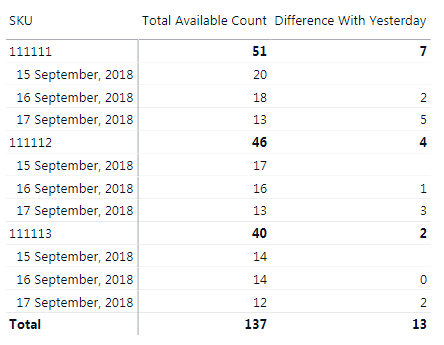
Difference With Yesterday =
SUMX (
SUMMARIZE ( Data, Data[SKU], Data[Day] ),
VAR ThisDay = Data[Day]
VAR YestAmount =
CALCULATE ( SUM ( Data[Available Count] ), Data[Day] = ThisDay - 1 )
RETURN
IF (
ISBLANK ( YestAmount ),
BLANK (),
YestAmount - CALCULATE ( SUM ( Data[Available Count] ) )
)
)
You cannot use the time intelligence PREVIOUSDAY function because you do not have a Date table
Did I answer your question correctly? Mark my answer as a solution!
Proud to be a Datanaut!
- Mark as New
- Bookmark
- Subscribe
- Mute
- Subscribe to RSS Feed
- Permalink
- Report Inappropriate Content
Do you have seperate record for each item for each day? could you please post sample data ( in copy- pastable format) with expected output?
Thanks
Raj
- Mark as New
- Bookmark
- Subscribe
- Mute
- Subscribe to RSS Feed
- Permalink
- Report Inappropriate Content
Day SKU Available count Daily Change
9/15/2018 111111 20
9/15/2018 111112 17
9/15/2018 111113 14
9/16/2018 111111 18 2
9/16/2018 111112 16 1
9/16/2018 111113 14 0
9/17/2018 111111 13 5
9/17/2018 111112 13 3
9/17/2018 111113 12 2
The last column is what I am trying to create.
- Mark as New
- Bookmark
- Subscribe
- Mute
- Subscribe to RSS Feed
- Permalink
- Report Inappropriate Content
You can do it like this if you want to add a calculated column, even though a measure would be better
Column =
VAR PrevVal =
CALCULATE (
SUM ( Data[Available Count] ),
ALLEXCEPT (
Data,
Data[SKU]
),
Data[Day] = EARLIER ( Data[Day] ) - 1
)
RETURN
IF (
ISBLANK ( PrevVal ),
BLANK (),
PrevVal - Data[Available Count]
)
Did I answer your question correctly? Mark my answer as a solution!
Proud to be a Datanaut!
- Mark as New
- Bookmark
- Subscribe
- Mute
- Subscribe to RSS Feed
- Permalink
- Report Inappropriate Content
What would be the measure formula?
- Mark as New
- Bookmark
- Subscribe
- Mute
- Subscribe to RSS Feed
- Permalink
- Report Inappropriate Content
You can do it like this:
Difference With Yesterday =
SUMX (
SUMMARIZE ( Data, Data[SKU], Data[Day] ),
VAR ThisDay = Data[Day]
VAR YestAmount =
CALCULATE ( SUM ( Data[Available Count] ), Data[Day] = ThisDay - 1 )
RETURN
IF (
ISBLANK ( YestAmount ),
BLANK (),
YestAmount - CALCULATE ( SUM ( Data[Available Count] ) )
)
)
You cannot use the time intelligence PREVIOUSDAY function because you do not have a Date table
Did I answer your question correctly? Mark my answer as a solution!
Proud to be a Datanaut!
- Mark as New
- Bookmark
- Subscribe
- Mute
- Subscribe to RSS Feed
- Permalink
- Report Inappropriate Content
Have a look at the PREVIOUSDAY function
https://msdn.microsoft.com/en-us/query-bi/dax/previousday-function-dax?f=255&MSPPError=-2147217396
Did I answer your question correctly? Mark my answer as a solution!
Proud to be a Datanaut!
Helpful resources

Power BI Dataviz World Championships
The Power BI Data Visualization World Championships is back! Get ahead of the game and start preparing now!

Power BI Monthly Update - November 2025
Check out the November 2025 Power BI update to learn about new features.

FabCon Atlanta 2026
Join us at FabCon Atlanta, March 16-20, for the ultimate Fabric, Power BI, AI and SQL community-led event. Save $200 with code FABCOMM.

| User | Count |
|---|---|
| 59 | |
| 46 | |
| 42 | |
| 23 | |
| 17 |


| User | Count |
|---|---|
| 190 | |
| 122 | |
| 96 | |
| 66 | |
| 47 |


