Share feedback directly with Fabric product managers, participate in targeted research studies and influence the Fabric roadmap.
Sign up nowGet Fabric certified for FREE! Don't miss your chance! Learn more
Hi,
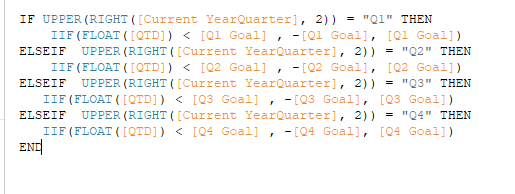
I wrote this formular in Tableau, I try to change it to PowerBI. But it keeps giving me error message. How can I translate this formular to powerBI. thank!
Solved! Go to Solution.
@Anonymous ,
In dax, the syntax is different from tableau, e.g.: In dax, the if condition statement should be like below:
result = if(condition, result1, result2)
About other function and usage of dax, please refer to dax doc below:
https://docs.microsoft.com/en-us/dax/dax-function-reference
Community Support Team _ Jimmy Tao
If this post helps, then please consider Accept it as the solution to help the other members find it more quickly.
It would also be a good idea to use variables, e.g.:
var __Quarter = ...
var __QTD = ...
var __QuarterGoal = SWITCH(__Quarter, "Q1", [Q1 Goal], "Q2", [Q2 Goal], etc.
return __QuarterGoal * IF(__QTD < __QuarterGoal , -1,1)
Hope this helps,
Nathan
@Anonymous ,
In dax, the syntax is different from tableau, e.g.: In dax, the if condition statement should be like below:
result = if(condition, result1, result2)
About other function and usage of dax, please refer to dax doc below:
https://docs.microsoft.com/en-us/dax/dax-function-reference
Community Support Team _ Jimmy Tao
If this post helps, then please consider Accept it as the solution to help the other members find it more quickly.
figured out, need nested if statement. thanks!
It would also be a good idea to use variables, e.g.:
var __Quarter = ...
var __QTD = ...
var __QuarterGoal = SWITCH(__Quarter, "Q1", [Q1 Goal], "Q2", [Q2 Goal], etc.
return __QuarterGoal * IF(__QTD < __QuarterGoal , -1,1)
Hope this helps,
Nathan
Share feedback directly with Fabric product managers, participate in targeted research studies and influence the Fabric roadmap.
If you love stickers, then you will definitely want to check out our Community Sticker Challenge!
Check out the January 2026 Power BI update to learn about new features.
| User | Count |
|---|---|
| 62 | |
| 62 | |
| 42 | |
| 21 | |
| 18 |