Get Fabric or SQL Certified for Free.
Get certified for free when you join Fabric Data Days 2026 and dive into Fabric, Power BI, SQL, AI, and other essential data skills.
Join now- Power BI forums
- Get Help with Power BI
- Desktop
- Service
- Report Server
- Power Query
- Mobile Apps
- Developer
- DAX Commands and Tips
- Custom Visuals Development Discussion
- Health and Life Sciences
- Power BI Spanish forums
- Translated Spanish Desktop
- Training and Consulting
- Instructor Led Training
- Dashboard in a Day for Women, by Women
- Galleries
- Data Stories Gallery
- Themes Gallery
- Contests Gallery
- QuickViz Gallery
- Quick Measures Gallery
- Visual Calculations Gallery
- Notebook Gallery
- Translytical Task Flow Gallery
- TMDL Gallery
- R Script Showcase
- Webinars and Video Gallery
- Ideas
- Custom Visuals Ideas (read-only)
- Issues
- Issues
- Events
- Upcoming Events
July 7 - July 17 | Round 2 of the Power BI Dataviz World Championships. Don't miss your chance! Learn more
- Power BI forums
- Forums
- Get Help with Power BI
- Desktop
- DAX for date difference
- Subscribe to RSS Feed
- Mark Topic as New
- Mark Topic as Read
- Float this Topic for Current User
- Bookmark
- Subscribe
- Printer Friendly Page

- Mark as New
- Bookmark
- Subscribe
- Mute
- Subscribe to RSS Feed
- Permalink
- Report Inappropriate Content
DAX for date difference
Hi,
I have 2 dates "Start Date" and "End Date", I have to create a new column with the difference of these 2 dates as highlighled below.
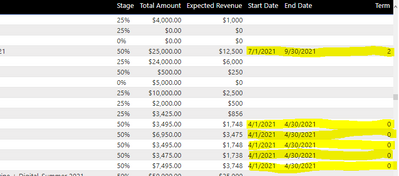
I want the new column to show up as 4/1/2021-4/30/2021=1 and 7/1/2021-9/30/2021=3
Solved! Go to Solution.


- Mark as New
- Bookmark
- Subscribe
- Mute
- Subscribe to RSS Feed
- Permalink
- Report Inappropriate Content
Hi @Anonymous ,
so here is a third variation:
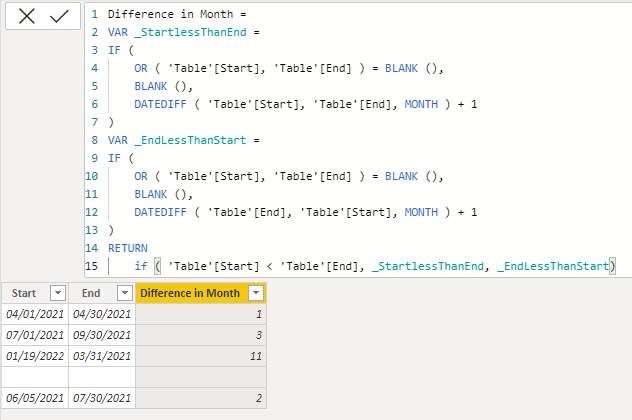
Difference in Month =
VAR _StartLessThanEnd =
IF (
    OR ( 'Table'[Start], 'Table'[End] ) = BLANK (),
    BLANK (),
    DATEDIFF ( 'Table'[Start], 'Table'[End], MONTH ) + 1
)
VAR _EndLessThanStart =
IF (
    OR ( 'Table'[Start], 'Table'[End] ) = BLANK (),
    BLANK (),
    DATEDIFF ( 'Table'[End], 'Table'[Start], MONTH ) + 1
)
RETURN
    if ( 'Table'[Start] < 'Table'[End], _StartlessThanEnd, _EndLessThanStart)
With kind regards from the town where the legend of the 'Pied Piper of Hamelin' is at home
FrankAT (Proud to be a Datanaut)
- Mark as New
- Bookmark
- Subscribe
- Mute
- Subscribe to RSS Feed
- Permalink
- Report Inappropriate Content
Hi @Anonymous
if the absolute number in 'Test Term' is correct and you want only to get reed of the negativ sign then use the following measure:
Difference in Month =
IF (
    OR ( 'Table'[Start], 'Table'[End] ) = BLANK (),
    BLANK (),
    ABS( DATEDIFF ( 'Table'[Start], 'Table'[End], MONTH ) + 1 )
)
With kind regards from the town where the legend of the 'Pied Piper of Hamelin' is at home
FrankAT (Proud to be a Datanaut)
- Mark as New
- Bookmark
- Subscribe
- Mute
- Subscribe to RSS Feed
- Permalink
- Report Inappropriate Content
Hi @FrankAT ,
Thak you for the prompt reply but the value is also wrong for these dates
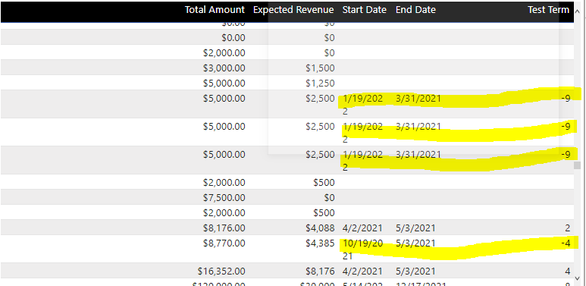
start date =01-19-2022 -end date =03-31-2021 = 11 months but its giving -9

- Mark as New
- Bookmark
- Subscribe
- Mute
- Subscribe to RSS Feed
- Permalink
- Report Inappropriate Content
Hi @Anonymous ,
so here is a third variation:
Difference in Month =
VAR _StartLessThanEnd =
IF (
    OR ( 'Table'[Start], 'Table'[End] ) = BLANK (),
    BLANK (),
    DATEDIFF ( 'Table'[Start], 'Table'[End], MONTH ) + 1
)
VAR _EndLessThanStart =
IF (
    OR ( 'Table'[Start], 'Table'[End] ) = BLANK (),
    BLANK (),
    DATEDIFF ( 'Table'[End], 'Table'[Start], MONTH ) + 1
)
RETURN
    if ( 'Table'[Start] < 'Table'[End], _StartlessThanEnd, _EndLessThanStart)
With kind regards from the town where the legend of the 'Pied Piper of Hamelin' is at home
FrankAT (Proud to be a Datanaut)
- Mark as New
- Bookmark
- Subscribe
- Mute
- Subscribe to RSS Feed
- Permalink
- Report Inappropriate Content
Hi @Anonymous
adjust your formula like this:
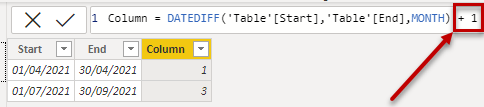
= DATEDIFF('Table'[Start],'Table'[End],MONTH) + 1With kind regards from the town where the legend of the 'Pied Piper of Hamelin' is at home
FrankAT (Proud to be a Datanaut)
- Mark as New
- Bookmark
- Subscribe
- Mute
- Subscribe to RSS Feed
- Permalink
- Report Inappropriate Content
Hi @FrankAT,
I cannot use +1 at the end blanks in start and end dtae columns and they would appear as 1 in my new column.
- Mark as New
- Bookmark
- Subscribe
- Mute
- Subscribe to RSS Feed
- Permalink
- Report Inappropriate Content
Hi @Anonymous ,
use the following solution:
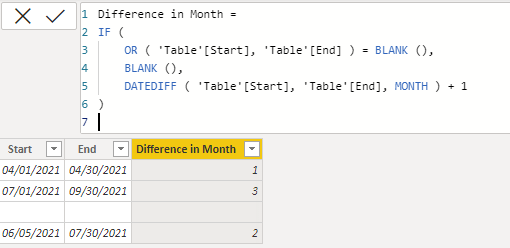
Difference in Month =
IF (
    OR ( 'Table'[Start], 'Table'[End] ) = BLANK (),
    BLANK (),
    DATEDIFF ( 'Table'[Start], 'Table'[End], MONTH ) + 1
)
With kind regards from the town where the legend of the 'Pied Piper of Hamelin' is at home
FrankAT (Proud to be a Datanaut)
- Mark as New
- Bookmark
- Subscribe
- Mute
- Subscribe to RSS Feed
- Permalink
- Report Inappropriate Content
Hi @FrankAT ,
This is working but there is an issue with dates whose end date(day) is greater than start date(day) its givning negative values as highlighted below
Helpful resources

FabCon & SQLCon – Barcelona 2026
Join us in Barcelona for FabCon and SQLCon, the Fabric, Power BI, SQL, and AI community event. Save €200 with code FABCMTY200.

Data Days 2026
Join Data Days 2026: 60 days of free live/on-demand sessions, challenges, study groups, and certification opportunities.

Power BI DataViz World Championships - June 2026
A new Power BI DataViz World Championship is coming this June! Don't miss out on submitting your entry.

| User | Count |
|---|---|
| 27 | |
| 23 | |
| 18 | |
| 18 | |
| 15 |


| User | Count |
|---|---|
| 62 | |
| 44 | |
| 42 | |
| 37 | |
| 37 |


