Don't miss your chance to take the Fabric Data Engineer (DP-600) exam for FREE! Find out how by watching the DP-600 session on-demand now through April 28th.
Learn moreJoin the FabCon + SQLCon recap series. Up next: Power BI, Real-Time Intelligence, IQ and AI, and Data Factory take center stage. All sessions are available on-demand after the live show. Register now
Hi, I hope you can help me with my little problem.
I have this table.
Book Reference # Code Date Amt
Eco Ref01 101 1/1/2020 1,000
Pro Ref01 101 2/5/2020 1,000
Eco Ref02 101 2/1/2020 2,000
Eco Ref02 101 2/3/2020 2,000
My measure are as follows :
EcoAmt = Sumx ( Table , if( Book = "Eco", Table[Amt] , 0 )
ProAmt = Sumx ( Table , if( Book = "Pro", Table[Amt] , 0 )
What i expected my visual table would look like
Ref # Code EcoAmt ProAmt
Ref101 101 1,000 1,000
However, this doesnt seem to be the case. Any ideas on how to fix this?
Any inputs would be greatly appreciated.
Thank you!
Solved! Go to Solution.
@jmcph , This should work. what is the wrong you are getting? You should also get a row for Ref102.
try measure like
Sumx (filter(Table,[Book] = "Eco"), Table[Amt])
Sumx (filter(Table,[Book] = "Pro"), Table[Amt])
Hi, @jmcph
You may create measures as below. The pbix file is attached in the end.
EcoAmt =
CALCULATE(
SUM('Table'[Amt]),
FILTER(
'Table',
[Book]="Eco"
)
) ProAmt =
CALCULATE(
SUM('Table'[Amt]),
FILTER(
'Table',
[Book]="Pro"
)
)
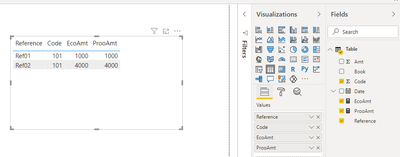
Result:
Best Regards
Allan
If this post helps, then please consider Accept it as the solution to help the other members find it more quickly
Hi, @jmcph
You may create measures as below. The pbix file is attached in the end.
EcoAmt =
CALCULATE(
SUM('Table'[Amt]),
FILTER(
'Table',
[Book]="Eco"
)
) ProAmt =
CALCULATE(
SUM('Table'[Amt]),
FILTER(
'Table',
[Book]="Pro"
)
)
Result:
Best Regards
Allan
If this post helps, then please consider Accept it as the solution to help the other members find it more quickly
@jmcph , This should work. what is the wrong you are getting? You should also get a row for Ref102.
try measure like
Sumx (filter(Table,[Book] = "Eco"), Table[Amt])
Sumx (filter(Table,[Book] = "Pro"), Table[Amt])
Check out the April 2026 Power BI update to learn about new features.
If you have recently started exploring Fabric, we'd love to hear how it's going. Your feedback can help with product improvements.
A new Power BI DataViz World Championship is coming this June! Don't miss out on submitting your entry.
| User | Count |
|---|---|
| 45 | |
| 38 | |
| 34 | |
| 21 | |
| 17 |
| User | Count |
|---|---|
| 68 | |
| 64 | |
| 31 | |
| 26 | |
| 26 |