This is best Fabric, Power BI, SQL and AI community event. How do we know? The last event sold out! Save €200 with code FABCMTY200.
Register nowA new Data Days event is coming soon! This time we’re going bigger than ever. Fabric, Power BI, SQL, AI and more. Don't miss out.
Hi,
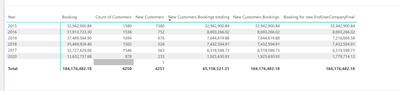
I am trying to count new customers for each year (rule is if they haven't order in last 3 years they are considered new) and my code is shown below but I'm getting this extra 1 that I cannot figure out? Any thoughts?
Solved! Go to Solution.
Hi @parry2k ,
I fixed it by changing VALUES (bold below) to DISTINCT and it worked. I also changed the Date calculation as well.
OLD CODE
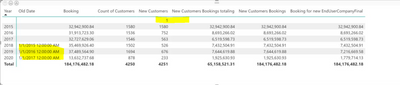
@kelint I'm actually not sure how it is working, can you double-check that old date is getting calculated correctly. Create a new measure and return old date variable, want to see what value it returns.
Subscribe to the @PowerBIHowTo YT channel for an upcoming video on List and Record functions in Power Query!!
Learn Power BI and Fabric - subscribe to our YT channel - Click here: @PowerBIHowTo
If my solution proved useful, I'd be delighted to receive Kudos. When you put effort into asking a question, it's equally thoughtful to acknowledge and give Kudos to the individual who helped you solve the problem. It's a small gesture that shows appreciation and encouragement! ❤
Did I answer your question? Mark my post as a solution. Proud to be a Super User! Appreciate your Kudos 🙂
Feel free to email me with any of your BI needs.
HI @parry2k
Thank you - I think you are correct! I tried what you suggested and here is the result for olddate - any suggestions to fix ?
Hi @parry2k ,
I fixed it by changing VALUES (bold below) to DISTINCT and it worked. I also changed the Date calculation as well.
OLD CODE
@kelint sorry for the late reply, glad it is fixed. cheers!!
Subscribe to the @PowerBIHowTo YT channel for an upcoming video on List and Record functions in Power Query!!
Learn Power BI and Fabric - subscribe to our YT channel - Click here: @PowerBIHowTo
If my solution proved useful, I'd be delighted to receive Kudos. When you put effort into asking a question, it's equally thoughtful to acknowledge and give Kudos to the individual who helped you solve the problem. It's a small gesture that shows appreciation and encouragement! ❤
Did I answer your question? Mark my post as a solution. Proud to be a Super User! Appreciate your Kudos 🙂
Feel free to email me with any of your BI needs.
Check out the May 2026 Power BI update to learn about new features.
Sign up to receive a private message when registration opens and key events begin.
If you have recently started exploring Fabric, we'd love to hear how it's going. Your feedback can help with product improvements.
| User | Count |
|---|---|
| 31 | |
| 26 | |
| 23 | |
| 22 | |
| 13 |
| User | Count |
|---|---|
| 61 | |
| 47 | |
| 27 | |
| 23 | |
| 18 |