FabCon is coming to Atlanta
Join us at FabCon Atlanta from March 16 - 20, 2026, for the ultimate Fabric, Power BI, AI and SQL community-led event. Save $200 with code FABCOMM.
Register now!- Power BI forums
- Get Help with Power BI
- Desktop
- Service
- Report Server
- Power Query
- Mobile Apps
- Developer
- DAX Commands and Tips
- Custom Visuals Development Discussion
- Health and Life Sciences
- Power BI Spanish forums
- Translated Spanish Desktop
- Training and Consulting
- Instructor Led Training
- Dashboard in a Day for Women, by Women
- Galleries
- Data Stories Gallery
- Themes Gallery
- Contests Gallery
- QuickViz Gallery
- Quick Measures Gallery
- Visual Calculations Gallery
- Notebook Gallery
- Translytical Task Flow Gallery
- TMDL Gallery
- R Script Showcase
- Webinars and Video Gallery
- Ideas
- Custom Visuals Ideas (read-only)
- Issues
- Issues
- Events
- Upcoming Events
The Power BI Data Visualization World Championships is back! Get ahead of the game and start preparing now! Learn more
- Power BI forums
- Forums
- Get Help with Power BI
- Desktop
- Re: DAX UNION does not work as expected
- Subscribe to RSS Feed
- Mark Topic as New
- Mark Topic as Read
- Float this Topic for Current User
- Bookmark
- Subscribe
- Printer Friendly Page

- Mark as New
- Bookmark
- Subscribe
- Mute
- Subscribe to RSS Feed
- Permalink
- Report Inappropriate Content
DAX UNION does not work as expected
Hi,
I need to create a table ,every row comes from different sources.
first row from cube1, second row from cube2 etc.
I created a custom table using UNION
Customers=UNION(table1,table2,table3,table4)
table1,2,3 were created as a custom tables using SUMMARIZE()
for example :
table1 = SUMMARIZE('Sales',column1, column2,sum(totalvalue)) - 'Sales' is a real cube
table 4 was created similer using SUMMARIZE BUT as a sourse table , I used a custom table from 2 joined tables.
I tried 2 ways to join the tables: 1) merge query, 2) dax naturalleftouterjoin
Result table 4 is not shown. No errors
Any ideas?
Solved! Go to Solution.
- Mark as New
- Bookmark
- Subscribe
- Mute
- Subscribe to RSS Feed
- Permalink
- Report Inappropriate Content
Hi @Anonymous thank you very much for your suggection. It was sorted. UNION did not work for me so I found the example in internet and it solved my problem
instead of using just Union (table1, table2,table3, table4)
I used Union(table21, table2,table3, SELECTCOLUMNS ( Table4, "Column1", Table4[Column1], "Column2", Table4[Column2], "Column3", Table4[Column3] ) and it works!!!!
)


- Mark as New
- Bookmark
- Subscribe
- Mute
- Subscribe to RSS Feed
- Permalink
- Report Inappropriate Content
Hi @liudmila ,
just out of curiosity, how many tables are "Calculated tables" in your model?
I would be interested to know why did you need to summarize data in a calculated table.
- Mark as New
- Bookmark
- Subscribe
- Mute
- Subscribe to RSS Feed
- Permalink
- Report Inappropriate Content
All of them are calculated tables: table1,table2 table3, table4
I use SUMMARIZE because I need to get sum of totalamount group by date, state etc. I found some examples how to to that using SUMMARIZE. So I created a new table with Date, State, SUM of total amount and then i can play with this table. (This table is not for visualization but for the futher manipulations)
- Mark as New
- Bookmark
- Subscribe
- Mute
- Subscribe to RSS Feed
- Permalink
- Report Inappropriate Content
Ok, I'm just asking because I've been doing some DAX for 5 years now and I can say that every person that I've seen used Summarize inside Calculated table didn't need to use it and it just took additional unnecessary memory inside their model. I'm not saying you are not using it properly, I'm just questioning the idea behind it.
Can you share with us a simple pbix file with data and visual you want to create?
- Mark as New
- Bookmark
- Subscribe
- Mute
- Subscribe to RSS Feed
- Permalink
- Report Inappropriate Content
Thank you for your suggestion, I don't know how i can avoid this step? Definitely I'd like to make the model using the best options but in internet I cannot find anything better.
I will create a simple it will take time 🙂 Thank you.
- Mark as New
- Bookmark
- Subscribe
- Mute
- Subscribe to RSS Feed
- Permalink
- Report Inappropriate Content
Exactly, of course, we can answer your original question related to Union but this won't solve the future issues you'll encounter if your Data model is not designed with best practices 🙂
- Mark as New
- Bookmark
- Subscribe
- Mute
- Subscribe to RSS Feed
- Permalink
- Report Inappropriate Content


- Mark as New
- Bookmark
- Subscribe
- Mute
- Subscribe to RSS Feed
- Permalink
- Report Inappropriate Content
@liudmila , can share how you created table4. if possible some sample data to create the same.
Can you share sample data and sample output in table format? Or a sample pbix after removing sensitive data.
- Mark as New
- Bookmark
- Subscribe
- Mute
- Subscribe to RSS Feed
- Permalink
- Report Inappropriate Content
It works perfectly in my example.
This is my example:
https://drive.google.com/file/d/1TAVWiVqS22K16hPGvk-o86aY-JrvUp6k/view?usp=sharing
- Mark as New
- Bookmark
- Subscribe
- Mute
- Subscribe to RSS Feed
- Permalink
- Report Inappropriate Content
Hi @liudmila ,
Please update the formula of calculated table AllDays_Tax as below:
AllDays_Tax =
VAR A =
    SELECTCOLUMNS (
        Flowers,
        "Month_Year", Flowers[Date].[Month] & Flowers[Date].[Year],
        "Date", Flowers[Date],
        "Value", BLANK ()
    )
VAR B =
    SELECTCOLUMNS (
        Tax,
        "Month_Year", Tax[Date].[Month] & Tax[Date].[Year],
        "Date", BLANK (),
        "Value", Tax[Value]
    )
VAR Result =
    DISTINCT ( UNION ( FILTER ( A, NOT ( ISBLANK ( [Date] ) ) ), B ) )
RETURN
    Result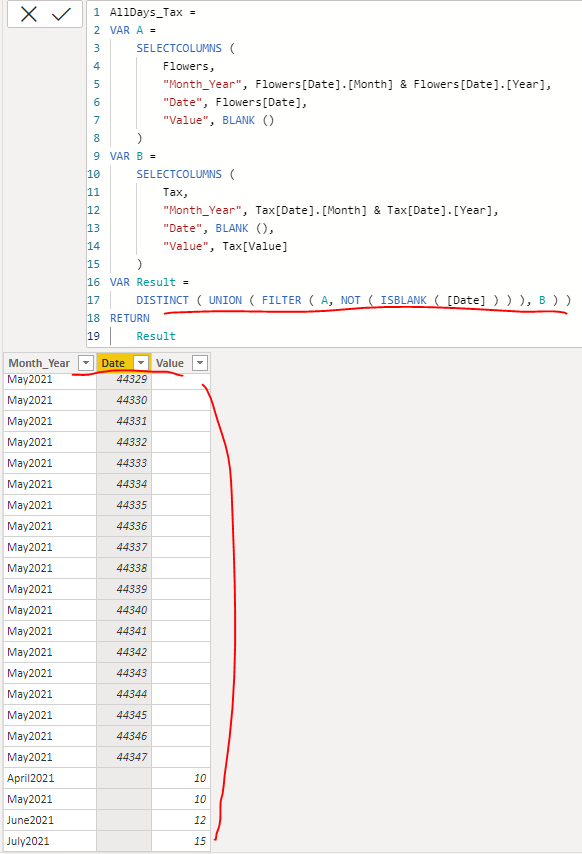
If the above one is not working, could you please tell me what's your final expected result with the backend logic and function? I want to check whether we can achieve it only by creating measures or calculated columns... Thank you.
Best Regards
- Mark as New
- Bookmark
- Subscribe
- Mute
- Subscribe to RSS Feed
- Permalink
- Report Inappropriate Content
Hi @Anonymous thank you very much for your suggection. It was sorted. UNION did not work for me so I found the example in internet and it solved my problem
instead of using just Union (table1, table2,table3, table4)
I used Union(table21, table2,table3, SELECTCOLUMNS ( Table4, "Column1", Table4[Column1], "Column2", Table4[Column2], "Column3", Table4[Column3] ) and it works!!!!
)

Helpful resources

Power BI Dataviz World Championships
The Power BI Data Visualization World Championships is back! Get ahead of the game and start preparing now!

Power BI Monthly Update - December 2025
Check out the December 2025 Power BI Holiday Recap!

FabCon Atlanta 2026
Join us at FabCon Atlanta, March 16-20, for the ultimate Fabric, Power BI, AI and SQL community-led event. Save $200 with code FABCOMM.

| User | Count |
|---|---|
| 39 | |
| 37 | |
| 33 | |
| 32 | |
| 29 |


| User | Count |
|---|---|
| 133 | |
| 88 | |
| 85 | |
| 68 | |
| 64 |


