cancel
Showing results for 
Search instead for 
Did you mean: 

The Power BI Data Visualization World Championships is back! Get ahead of the game and start preparing now! Learn more

Reply
Anonymous
Not applicable

DAX Switch is picking up Blank values in 0 to 1 Range

Hi,


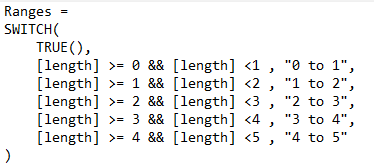
I am working on a report and have a measured column like this:

armughan_0-1632324725545.png

this column is ranges for distribution but the problem is, dax picks up blank values and place them in 0 to 1 and it messes up everything.

Also, if I use ISBLANK then 0-1 is missing and there is no option to see it in visuals.


please help.


1 ACCEPTED SOLUTION
Anonymous
Not applicable

Hi @Anonymous 

Create a calculated column like this :

Ranges 1 = SWITCH(TRUE(),ISBLANK('Table'[length]),BLANK(),
                       'Table'[length]>=0 && 'Table'[length]<1,"0 to 1",
                       'Table'[length]>=1 && 'Table'[length]<2,"1 to 2",
                       'Table'[length]>=2 && 'Table'[length]<3,"2 to 3",
                       'Table'[length]>=3 && 'Table'[length]<4,"3 to 4",
                       'Table'[length]>=4 && 'Table'[length]<5,"4 to 5")

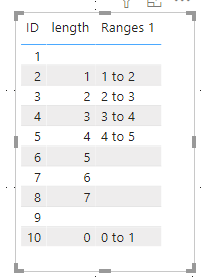
The final result is as shown :

Ailsamsft_0-1632798473226.png

I have attached my pbix file ,you can refer to it .


Best Regards

Community Support Team _ Ailsa Tao

If this post helps, then please consider Accept it as the solution to help the other members find it more quickly.

View solution in original post

2 REPLIES 2
Anonymous
Not applicable

Hi @Anonymous 

Create a calculated column like this :

Ranges 1 = SWITCH(TRUE(),ISBLANK('Table'[length]),BLANK(),
                       'Table'[length]>=0 && 'Table'[length]<1,"0 to 1",
                       'Table'[length]>=1 && 'Table'[length]<2,"1 to 2",
                       'Table'[length]>=2 && 'Table'[length]<3,"2 to 3",
                       'Table'[length]>=3 && 'Table'[length]<4,"3 to 4",
                       'Table'[length]>=4 && 'Table'[length]<5,"4 to 5")

The final result is as shown :

Ailsamsft_0-1632798473226.png

I have attached my pbix file ,you can refer to it .


Best Regards

Community Support Team _ Ailsa Tao

If this post helps, then please consider Accept it as the solution to help the other members find it more quickly.

amitchandak
Super User
Super User

@Anonymous , Can you share a sample pbix after removing sensitive data.


Add first condition like

isblank([Length]), blank() ,

Share with Power BI Enthusiasts: Full Power BI Video (20 Hours) YouTube
Microsoft Fabric Series 60+ Videos YouTube
Microsoft Fabric Hindi End to End YouTube

Helpful resources

Announcements
Power BI DataViz World Championships

Power BI Dataviz World Championships

The Power BI Data Visualization World Championships is back! Get ahead of the game and start preparing now!

December 2025 Power BI Update Carousel

Power BI Monthly Update - December 2025

Check out the December 2025 Power BI Holiday Recap!

FabCon Atlanta 2026 carousel

FabCon Atlanta 2026

Join us at FabCon Atlanta, March 16-20, for the ultimate Fabric, Power BI, AI and SQL community-led event. Save $200 with code FABCOMM.

Users online (4,591)