cancel
Showing results for 
Search instead for 
Did you mean: 

The Power BI Data Visualization World Championships is back! Get ahead of the game and start preparing now! Learn more

Reply
joyhackett
Helper II
Helper II

DAX - Return values that contain ALL of the values selected in a multi-select slicer

Hi,


I'd like to be able to select from a multi-select list and return the values that include all of my selections. 


I have a table like this:

PRODUCTINGREDIENTID_CONCAT
Smoothie ACA,C
Smoothie ABA,B
Smoothie ACDA,C,D


I also have a table like this:

PRODUCTINGREDIENTID
Smoothie ACA
Smoothie ACC
Smoothie ABA
Smoothie ABB
Smoothie ACDA
Smoothie ACDC
Smoothie ACDD


and a dimension like this:

INGREDIENTIDINGREDIENT
AApples
BBananas
CCucumbers
DDairy


When the user selects Apples and Cucumbers from the ingredient slicer, I want to return the products that have BOTH A and C:

Smoothie ACA,C


If anyone has a solution, please let me know!

Thanks in advance 🙂 Joy

1 ACCEPTED SOLUTION
bolfri
Solution Sage
Solution Sage

Hi,


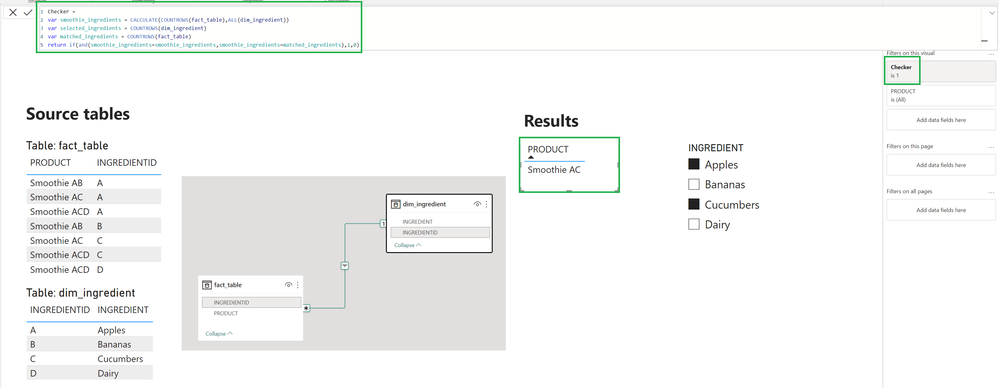
I've used only table 2 (fact_table) and 3 (dim_ingredient)

bolfri_0-1673478127006.png

Measure:

Checker = 
var smoothie_ingredients = CALCULATE(COUNTROWS(fact_table),ALL(dim_ingredient))
var selected_ingredients = COUNTROWS(dim_ingredient)
var matched_ingredients = COUNTROWS(fact_table)
return if(and(smoothie_ingredients=smoothie_ingredients,smoothie_ingredients=matched_ingredients),1,0)


Preq:

- user need to select all ingredients in smoothie (so we need to know how many ingredients smoothie has)

- user can't select additional ingredient (so we need to know how many is selected and how many is machted)


If numer of ingredients are equal to selected ingredients and all maches then 1 else 0. 🙂 I've just filtered product with 1.


Did I answer your question? Mark my post as a solution!

Proud to be a Super User!


View solution in original post

4 REPLIES 4
bolfri
Solution Sage
Solution Sage

Hi,


I've used only table 2 (fact_table) and 3 (dim_ingredient)

bolfri_0-1673478127006.png

Measure:

Checker = 
var smoothie_ingredients = CALCULATE(COUNTROWS(fact_table),ALL(dim_ingredient))
var selected_ingredients = COUNTROWS(dim_ingredient)
var matched_ingredients = COUNTROWS(fact_table)
return if(and(smoothie_ingredients=smoothie_ingredients,smoothie_ingredients=matched_ingredients),1,0)


Preq:

- user need to select all ingredients in smoothie (so we need to know how many ingredients smoothie has)

- user can't select additional ingredient (so we need to know how many is selected and how many is machted)


If numer of ingredients are equal to selected ingredients and all maches then 1 else 0. 🙂 I've just filtered product with 1.


Did I answer your question? Mark my post as a solution!

Proud to be a Super User!


This is great! And super clean! 

Thank you so much 🙂

Sorry, I found a bug in my own solution.


Before:

return if(and(smoothie_ingredients=smoothie_ingredients,smoothie_ingredients=matched_ingredients),1,0)
 

After:

return if(and(smoothie_ingredients=selected_ingredients,smoothie_ingredients=matched_ingredients),1,0)
 
Now logic is correct and it will work perfectly 😉


Checker = 
var smoothie_ingredients = CALCULATE(COUNTROWS(fact_table),ALL(dim_ingredient))
var selected_ingredients = COUNTROWS(dim_ingredient)
var matched_ingredients = COUNTROWS(fact_table)
return if(and(smoothie_ingredients=selected_ingredients,smoothie_ingredients=matched_ingredients),1,0)


Did I answer your question? Mark my post as a solution!

Proud to be a Super User!


Haha - Yes, I noticed that too. Actually, when  I c/p your measure and changed out the table/column names, I inadvertetly fixed it. 🙂 Thanks again!

Helpful resources

Announcements
Power BI DataViz World Championships

Power BI Dataviz World Championships

The Power BI Data Visualization World Championships is back! Get ahead of the game and start preparing now!

December 2025 Power BI Update Carousel

Power BI Monthly Update - December 2025

Check out the December 2025 Power BI Holiday Recap!

FabCon Atlanta 2026 carousel

FabCon Atlanta 2026

Join us at FabCon Atlanta, March 16-20, for the ultimate Fabric, Power BI, AI and SQL community-led event. Save $200 with code FABCOMM.