cancel
Showing results for 
Search instead for 
Did you mean: 

The Power BI Data Visualization World Championships is back! Get ahead of the game and start preparing now! Learn more

Reply
sokatenaj
Advocate II
Advocate II

DAX RLS Trouble

Hi Folks,


Been trying to create this RLS model in one of my dashboards. We have 32 companies using various letter combos. Typically if people only need access to certain companies I would do:


[Company] IN {"B", "D", "Z"} 


or if they do not need access to 1 company but everything else I would do:


[Company] <> "B"


However, I have to assign a user access to not see 6 companies. I tried doing the following and it didn't work:


[Company] NOT IN {"A", "C", "E", "I", "BA", "BG"}  


The only way I can seem to get it work is if I do somethigng like: 


[Company] <> "A" && [Company] <> "C", etc


There has to be an easier way....what am I missing here? 


1 ACCEPTED SOLUTION

I think you could use


not([Company] IN {"A", "C", "E", "I", "BA", "BG"})


View solution in original post

4 REPLIES 4
v-huizhn-msft
Microsoft Employee
Microsoft Employee

Hi @sokatenaj,

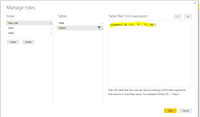
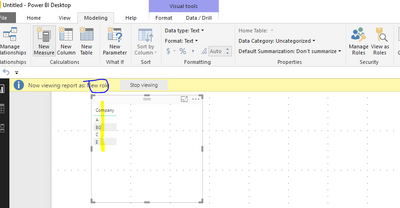
IN function works in DAX filter, you can use IN including all accessed companies as picture1 shown. I test it and work as picture2 shown.

picture1picture1    picture2picture2

For Row Level Security, please review this blog, which describe it in detailed steps.

Best Regards,

Angelia

Hi @v-huizhn-msft,


Thanks for this. However, I know how to do that part. What I can't seem to get work right is to say it is NOT those companies. 

I want to write something along the lines of:


[Company] NOT IN {"A", "C", "E", "I", "BA", "BG"}  


I just don't understand why it isn't working. I tried it so many ways, but the only way I can get it to work is if I do:


[Company] <> "A" && [Company] <> "C", etc


That surely can't be the only way. 

I think you could use


not([Company] IN {"A", "C", "E", "I", "BA", "BG"})


@gooranga1 That was exactly what I needed. I did not think I could add "Not()" in that context. That is really helpful and it worked like a charm. Thank you!

Helpful resources

Announcements
Power BI DataViz World Championships

Power BI Dataviz World Championships

The Power BI Data Visualization World Championships is back! Get ahead of the game and start preparing now!

December 2025 Power BI Update Carousel

Power BI Monthly Update - December 2025

Check out the December 2025 Power BI Holiday Recap!

FabCon Atlanta 2026 carousel

FabCon Atlanta 2026

Join us at FabCon Atlanta, March 16-20, for the ultimate Fabric, Power BI, AI and SQL community-led event. Save $200 with code FABCOMM.