cancel
Showing results for 
Search instead for 
Did you mean: 

The Power BI Data Visualization World Championships is back! Get ahead of the game and start preparing now! Learn more

Reply
wshanewood1
Regular Visitor

DAX RANKX Question

DAX Gurus, I need some help please.  (I created some general data to use an example of my problem. )

Table1
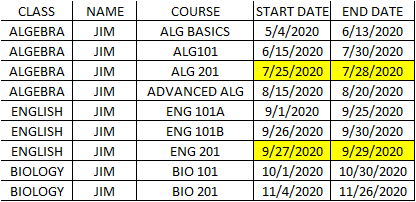
table1.png

First, I am trying to get the rank or order of each class start date by name and class. But if the same student in the same class has a start date and an end date that is earlier than a previous end date (same name and class) then remove it and don't rank it (example of this occurance is highlighted yellow).


I have been able to rank it with a calcuated column,

(=(RANKX(FILTER(TABLE1,TABLE1[NAME]=EARLIER(TABLE1[NAME])),[START DATE],[START Date],ASC))),

Next I was able to create a measure to remove the start date if it is earlier than the end date with a measure (have not attempted the end date, but should be similar).  I was going to create measure with a line for each rank and started with 3 because I found an occurance with rank 3 in my data.

=Remove date:=if(and(TABLE1[Sum of Rank]=3,(CALCULATE(sum([START DATE]),TABLE1[CDP Category Sequence Occuring]=3))<(CALCULATE(sum([END DATE]),TABLE1[RANK]=2))),BLANK(),MIN([START DATE]))
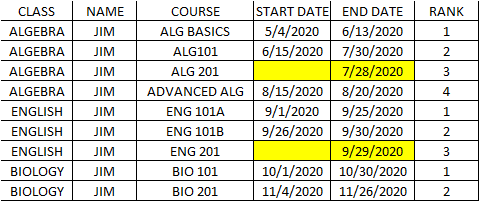
 

table2.png

But I cannot figure out how to not show the rows where the same student in the same class has a start date and an end date that is earlier than a previous end date (same name and class) and rank it afterwards.


table3.png

This is what I would like it to look like.

I hope this makes sense. I am new to DAX and new this POWER BI Community so  I hope you can understand what I am trying to do.

Thanks for any help.

1 ACCEPTED SOLUTION
Anonymous
Not applicable

Hi @wshanewood1 ,


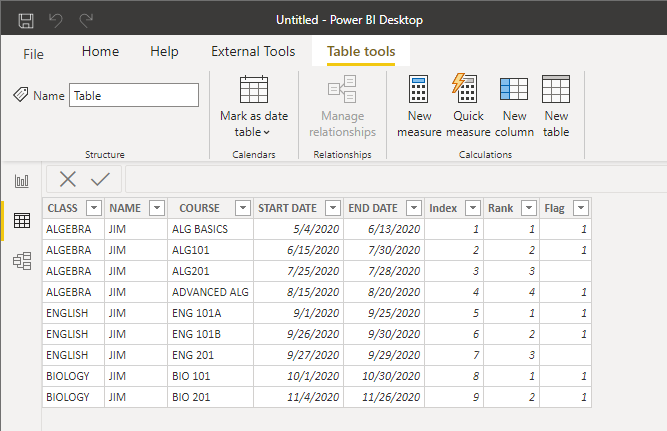
Create a sorted calculated column by class and name.


Rank = 
RANKX (
    FILTER (
        ALL ( 'Table' ),
        'Table'[CLASS] = EARLIER ( 'Table'[CLASS] )
            && 'Table'[NAME] = EARLIER ( 'Table'[NAME] )
    ),
    [START DATE],
    ,
    ASC,
    DENSE
)


Create a Flag column whose start date and end date are greater than the previous end date.


Flag = 
VAR _endpre =
    CALCULATE (
        MAX ( 'Table'[END DATE] ),
        FILTER (
            'Table',
            [NAME] = EARLIER ( 'Table'[NAME] )
                && 'Table'[CLASS] = EARLIER ( 'Table'[CLASS] )
                && 'Table'[Rank]
                    = EARLIER ( 'Table'[Rank] ) - 1
        )
    )
RETURN
    IF ( [START DATE] > _endpre && [END DATE] > _endpre, 1 )


29.png


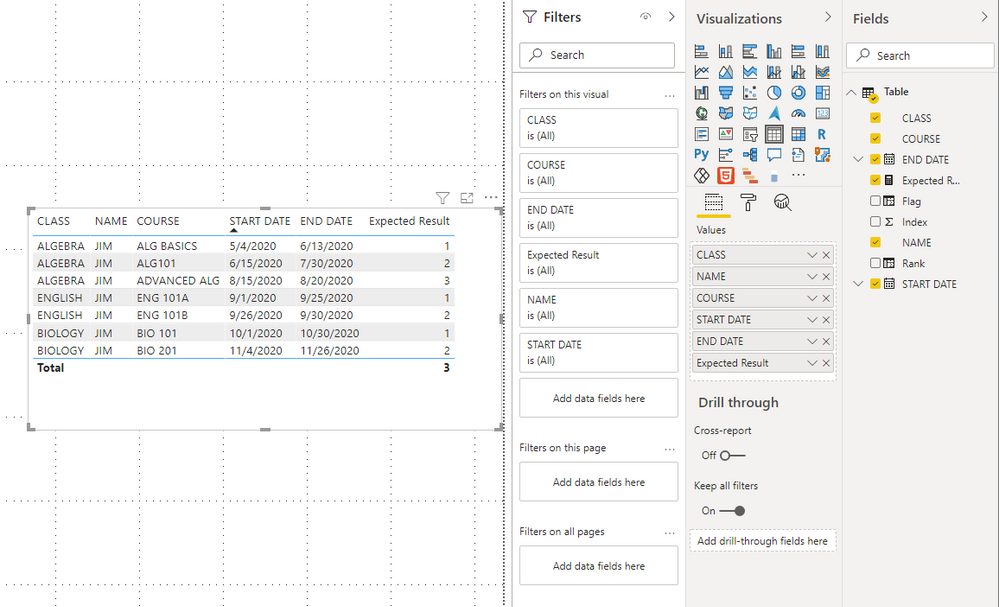
Create a measure to get the result.


Expected Result = 
IF (
    MAX ( 'Table'[Flag] ) <> BLANK (),
    RANKX (
        FILTER (
            ALL ( 'Table' ),
            [CLASS] = MAX ( 'Table'[CLASS] )
                && [NAME] = MAX ( 'Table'[NAME] )
                && [Flag] <> BLANK ()
        ),
        CALCULATE ( MAX ( 'Table'[START DATE] ) ),
        ,
        ASC,
        DENSE
    )
)


30.png


You can check details from the attachment.


Best Regards,

Stephen Tao


If this post helps, then please consider Accept it as the solution to help the other members find it more quickly.

View solution in original post

2 REPLIES 2
Anonymous
Not applicable

Hi @wshanewood1 ,


Create a sorted calculated column by class and name.


Rank = 
RANKX (
    FILTER (
        ALL ( 'Table' ),
        'Table'[CLASS] = EARLIER ( 'Table'[CLASS] )
            && 'Table'[NAME] = EARLIER ( 'Table'[NAME] )
    ),
    [START DATE],
    ,
    ASC,
    DENSE
)


Create a Flag column whose start date and end date are greater than the previous end date.


Flag = 
VAR _endpre =
    CALCULATE (
        MAX ( 'Table'[END DATE] ),
        FILTER (
            'Table',
            [NAME] = EARLIER ( 'Table'[NAME] )
                && 'Table'[CLASS] = EARLIER ( 'Table'[CLASS] )
                && 'Table'[Rank]
                    = EARLIER ( 'Table'[Rank] ) - 1
        )
    )
RETURN
    IF ( [START DATE] > _endpre && [END DATE] > _endpre, 1 )


29.png


Create a measure to get the result.


Expected Result = 
IF (
    MAX ( 'Table'[Flag] ) <> BLANK (),
    RANKX (
        FILTER (
            ALL ( 'Table' ),
            [CLASS] = MAX ( 'Table'[CLASS] )
                && [NAME] = MAX ( 'Table'[NAME] )
                && [Flag] <> BLANK ()
        ),
        CALCULATE ( MAX ( 'Table'[START DATE] ) ),
        ,
        ASC,
        DENSE
    )
)


30.png


You can check details from the attachment.


Best Regards,

Stephen Tao


If this post helps, then please consider Accept it as the solution to help the other members find it more quickly.

lbendlin
Super User
Super User

Please provide sample data in usable format (not as a picture) .

Helpful resources

Announcements
Power BI DataViz World Championships

Power BI Dataviz World Championships

The Power BI Data Visualization World Championships is back! Get ahead of the game and start preparing now!

December 2025 Power BI Update Carousel

Power BI Monthly Update - December 2025

Check out the December 2025 Power BI Holiday Recap!

FabCon Atlanta 2026 carousel

FabCon Atlanta 2026

Join us at FabCon Atlanta, March 16-20, for the ultimate Fabric, Power BI, AI and SQL community-led event. Save $200 with code FABCOMM.