cancel
Showing results for 
Search instead for 
Did you mean: 

The Power BI Data Visualization World Championships is back! Get ahead of the game and start preparing now! Learn more

Reply
richardnlove918
Frequent Visitor

DAX Question

Hi all,


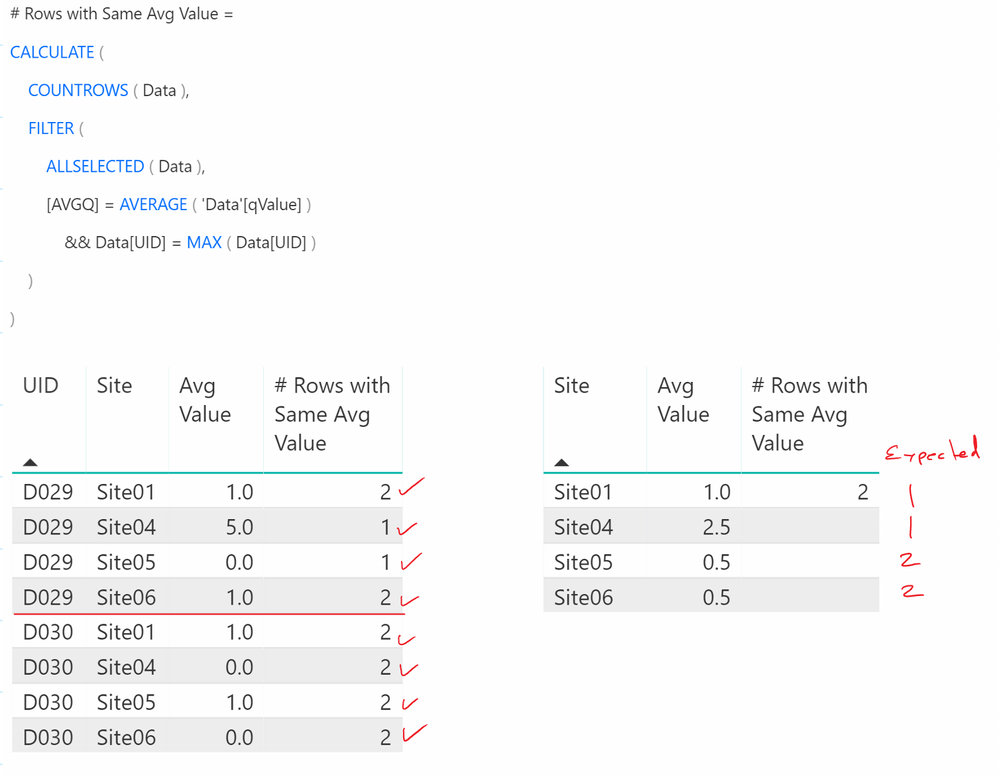
I have a DAX expression which is providing incorrect results for aggregated data as shown in the table to the right in the image below.
 

2019-03-20_17-16-58.png


I am looking to count instances of values so in the table to the left for UID D029 there are 2 instances of Avg Value = 1.0, 1 instance of Avg Value = 5.0 and 1 instance of Avg Value 0.0.  Similarly for UID D030 there are 2 instances of 1.0 and 2 instances of 0.0.


When I aggregrate the data however, the table on the right expressess the average over both UIDs and I should see 1 instance of 1.0, 1 instance of 2.5 and 2 instances of 0.5.


Could someone please provide me with the corrected DAX function? 


Here is the code to create the dataset:

let
    Source = Table.FromRows(Json.Document(Binary.Decompress(Binary.FromText("i45WcjEwslTSUTIE4uDMklQDQ6VYHbioKUzUBFnUACZqiiwKN8EMKmpsgM1csKgBurmoak2xqgWaGwsA", BinaryEncoding.Base64), Compression.Deflate)), let _t = ((type text) meta [Serialized.Text = true]) in type table [UID = _t, qValue = _t, Site = _t]),
    #"Changed Type" = Table.TransformColumnTypes(Source,{{"Group", type text}, {"UID", type text}, {"qValue", Int64.Type}, {"PerRnk", type number}, {"Site", type text}, {"Year", type text}}),
    #"Removed Columns" = Table.RemoveColumns(#"Changed Type",{"Group", "PerRnk", "Year"})
in
    #"Removed Columns"


Here is the DAX measure I would like to correct:

# Rows with Same Avg Value = 
CALCULATE (
    COUNTROWS (Data),
    FILTER (
        ALLSELECTED (Data),
        [AVGQ] = AVERAGE ( 'Data'[qValue])
        && Data[UID] = MAX ( Data[UID] )
    
    )
)

Thank you so much,

Richard


1 ACCEPTED SOLUTION
TeigeGao
Solution Sage
Solution Sage

Hi richardnlove918,

According to your description, my understanding is that you want to count the same average value base on the site column, in this scenario, we can create another measure to calculate this:

Firstly, we can create a calculated column like below:

Avg of Site = CALCULATE(AVERAGE(Data[qValue]),FILTER(ALL(Data),Data[Site] = EARLIER(Data[Site])))

Then we can create a measure on the above calculated column:

Measure = CALCULATE(DISTINCTCOUNT(Data[Site]),FILTER(ALL(Data),Data[Avg of Site] = MIN(Data[Avg of Site])))

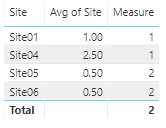
The result will like below:

111.png

Best Regards,
Teige

View solution in original post

1 REPLY 1
TeigeGao
Solution Sage
Solution Sage

Hi richardnlove918,

According to your description, my understanding is that you want to count the same average value base on the site column, in this scenario, we can create another measure to calculate this:

Firstly, we can create a calculated column like below:

Avg of Site = CALCULATE(AVERAGE(Data[qValue]),FILTER(ALL(Data),Data[Site] = EARLIER(Data[Site])))

Then we can create a measure on the above calculated column:

Measure = CALCULATE(DISTINCTCOUNT(Data[Site]),FILTER(ALL(Data),Data[Avg of Site] = MIN(Data[Avg of Site])))

The result will like below:

111.png

Best Regards,
Teige

Helpful resources

Announcements
Power BI DataViz World Championships

Power BI Dataviz World Championships

The Power BI Data Visualization World Championships is back! Get ahead of the game and start preparing now!

December 2025 Power BI Update Carousel

Power BI Monthly Update - December 2025

Check out the December 2025 Power BI Holiday Recap!

FabCon Atlanta 2026 carousel

FabCon Atlanta 2026

Join us at FabCon Atlanta, March 16-20, for the ultimate Fabric, Power BI, AI and SQL community-led event. Save $200 with code FABCOMM.