cancel
Showing results for 
Search instead for 
Did you mean: 

Learn from the best! Meet the four finalists headed to the FINALS of the Power BI Dataviz World Championships! Register now

Reply
Madhumitha_Mano
Frequent Visitor

DAX Query

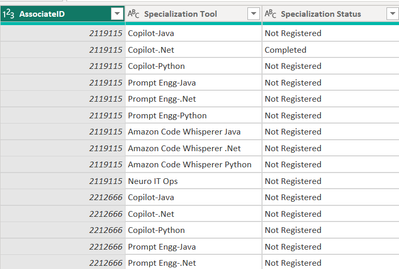
I have some unpivoted data - 1 column of Attribute and 1 column of Value.  The programs have 5 status - Completed, In Progress, Not registered, etc. How do i calculate just the total completions in one tool, say Copilot java?  
What I'm planning to calculate
Copilot - Java : Completed 
Copilot - Java : Registered

Copilot - Java : Not Registered

Madhumitha_Mano_0-1710836624883.png


1 ACCEPTED SOLUTION
Anonymous
Not applicable

Hi @Madhumitha_Mano ,

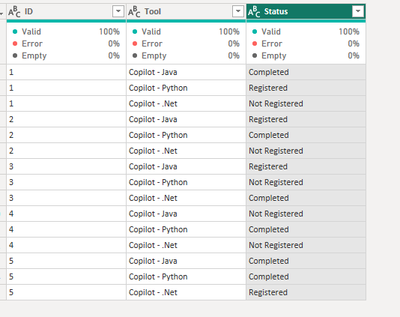
Here is my sample data:

vjunyantmsft_0-1710897113765.png


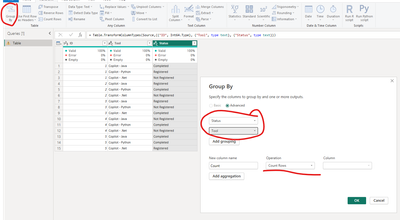
You can easily accomplish this with the Group by feature in Power Query:

vjunyantmsft_1-1710897152096.png

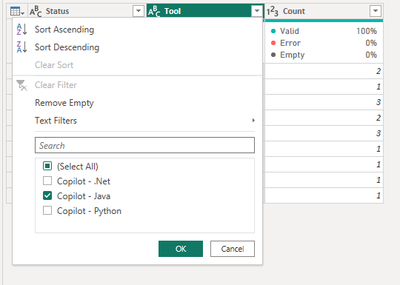
And just filter Tool = Copilot - Java:

vjunyantmsft_2-1710897194347.png

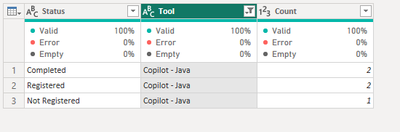
And the final output is as below:

vjunyantmsft_3-1710897214274.png


And if you want to use DAX, just use this measure:

Measure = COUNT('Table (2)'[Status])

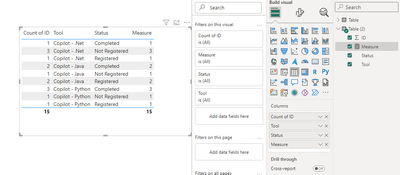
Put all of the columns and measure into a table visual:

vjunyantmsft_0-1710897400603.png

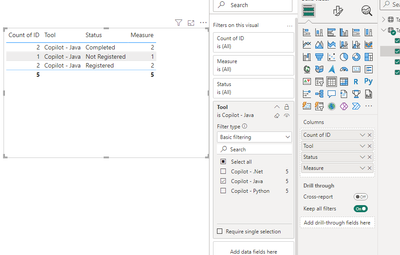
And filter  Tool = Copilot - Java:

vjunyantmsft_1-1710897431642.png


Best Regards,
Dino Tao
If this post helps, then please consider Accept it as the solution to help the other members find it more quickly.

View solution in original post

1 REPLY 1
Anonymous
Not applicable

Hi @Madhumitha_Mano ,

Here is my sample data:

vjunyantmsft_0-1710897113765.png


You can easily accomplish this with the Group by feature in Power Query:

vjunyantmsft_1-1710897152096.png

And just filter Tool = Copilot - Java:

vjunyantmsft_2-1710897194347.png

And the final output is as below:

vjunyantmsft_3-1710897214274.png


And if you want to use DAX, just use this measure:

Measure = COUNT('Table (2)'[Status])

Put all of the columns and measure into a table visual:

vjunyantmsft_0-1710897400603.png

And filter  Tool = Copilot - Java:

vjunyantmsft_1-1710897431642.png


Best Regards,
Dino Tao
If this post helps, then please consider Accept it as the solution to help the other members find it more quickly.

Helpful resources

Announcements
Join our Fabric User Panel

Join our Fabric User Panel

Share feedback directly with Fabric product managers, participate in targeted research studies and influence the Fabric roadmap.

February Power BI Update Carousel

Power BI Monthly Update - February 2026

Check out the February 2026 Power BI update to learn about new features.