Hi @lbendlin ... a null/blank value would be legitimate (user may not want to filter on something).
For context, this is for a paginated report in a Power BI report. User will have a visual and this would be so they could see the detail behind a particular data point in that visual. Passing parameters into a paginated report has been the biggest pain in the a$$ I've encountered in months...
In this article it says "use the query designer for the data source to help build a parameterized query". So I used the query designer and now I have this...
DEFINE
VAR vFromCalendarFullDate1 =
IF (
    PATHLENGTH ( @FromCalendarFullDate ) = 1,
    IF (
        @FromCalendarFullDate <> "",
        @FromCalendarFullDate,
        BLANK ()
    ),
    IF (
        PATHITEM (
            @FromCalendarFullDate,
            2
        ) <> "",
        PATHITEM (
            @FromCalendarFullDate,
            2
        ),
        BLANK ()
    )
)
VAR vFromCalendarFullDate1ALL =
PATHLENGTH ( @FromCalendarFullDate ) > 1
    && PATHITEM (
        @FromCalendarFullDate,
        1,
        1
    ) < 1
VAR vToCalendarFullDate1 =
IF (
    PATHLENGTH ( @ToCalendarFullDate ) = 1,
    IF (
        @ToCalendarFullDate <> "",
        @ToCalendarFullDate,
        BLANK ()
    ),
    IF (
        PATHITEM (
            @ToCalendarFullDate,
            2
        ) <> "",
        PATHITEM (
            @ToCalendarFullDate,
            2
        ),
        BLANK ()
    )
)
VAR vToCalendarFullDate1ALL =
PATHLENGTH ( @ToCalendarFullDate ) > 1
    && PATHITEM (
        @ToCalendarFullDate,
        1,
        1
    ) < 1
EVALUATE
	SUMMARIZECOLUMNS(
		'Placements'[placementID],
		'Verticals'[Vertical],
		'Branches'[Branch],
		'EmploymentTypes'[employmentType],
		'Placements'[status],
		'Placements'[dateAdded],
		'Placements'[dateBegin],
		'Placements'[dateEnd],
		'Clients'[name],
		'JobOrders'[title],
		'Users'[name],
		FILTER(
			VALUES('Calendar'[FullDate]),
			(vFromCalendarFullDate1ALL || 'Calendar'[FullDate] >= DATEVALUE(vFromCalendarFullDate1) + TIMEVALUE(vFromCalendarFullDate1)) &&
			(vToCalendarFullDate1ALL || 'Calendar'[FullDate] <= DATEVALUE(vToCalendarFullDate1) + TIMEVALUE(vToCalendarFullDate1))
		),
		RSCustomDaxFilter(@VerticalsVertical,EqualToCondition,[Verticals].[Vertical],String),
		RSCustomDaxFilter(@BranchesBranch,EqualToCondition,[Branches].[Branch],String),
		RSCustomDaxFilter(@MidAtlanticmidatlantic,EqualToCondition,[MidAtlantic].[midatlantic],String),
		RSCustomDaxFilter(@EmploymentTypesemploymentType,EqualToCondition,[EmploymentTypes].[employmentType],String),
		FILTER(
			VALUES('Departments'[Department]),
			('Departments'[Department] <> "BEA") && ('Departments'[Department] <> "Corp") && ('Departments'[Department] <> "IR")
		),
		FILTER(
			VALUES('Clients'[clientCorporationID]),
			('Clients'[clientCorporationID] <> 169298) && ('Clients'[clientCorporationID] <> 234729)
		),
		FILTER(
			VALUES('Placements'[terminationReason]),
			('Placements'[terminationReason] <> "Did Not Start") && ('Placements'[terminationReason] <> "DNS")
		),
		FILTER(
			VALUES('Placements'[isDeleted]),
			('Placements'[isDeleted] = False)
		)
	)
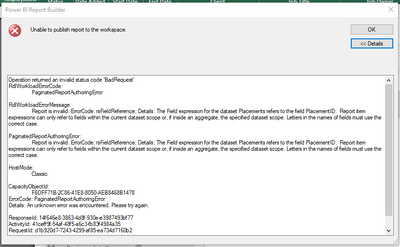
But when I try to publish the paginated report to the Power BI service, error.