Join us at FabCon Atlanta from March 16 - 20, 2026, for the ultimate Fabric, Power BI, AI and SQL community-led event. Save $200 with code FABCOMM.
Register now!The Power BI Data Visualization World Championships is back! Get ahead of the game and start preparing now! Learn more
Hello,
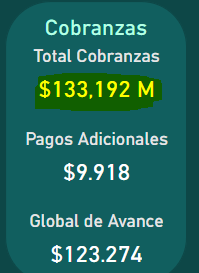
I´m trying to put a dot separator where it is a comma (like the two examples in the bottom of the image), but I don´t know how to do it:
This is the measure that i have created for the line "Total Cobranzas". I need an M to appear next to the number:
Solved! Go to Solution.
@Anonymous Check this solution:
https://community.powerbi.com/t5/Desktop/change-format-by-using-dot-instead-of-comma/m-p/372348
|
** If you liked my solution, please give it a thumbs up. And if I did answer your question, please mark this post as a solution, so that it comes in top of the search and help others. Thank you ! Good Luck 👍 |
@Anonymous Check this solution:
https://community.powerbi.com/t5/Desktop/change-format-by-using-dot-instead-of-comma/m-p/372348
|
** If you liked my solution, please give it a thumbs up. And if I did answer your question, please mark this post as a solution, so that it comes in top of the search and help others. Thank you ! Good Luck 👍 |
The Power BI Data Visualization World Championships is back! Get ahead of the game and start preparing now!
| User | Count |
|---|---|
| 41 | |
| 38 | |
| 36 | |
| 30 | |
| 28 |
| User | Count |
|---|---|
| 128 | |
| 88 | |
| 79 | |
| 67 | |
| 62 |