FabCon is coming to Atlanta
Join us at FabCon Atlanta from March 16 - 20, 2026, for the ultimate Fabric, Power BI, AI and SQL community-led event. Save $200 with code FABCOMM.
Register now!- Power BI forums
- Get Help with Power BI
- Desktop
- Service
- Report Server
- Power Query
- Mobile Apps
- Developer
- DAX Commands and Tips
- Custom Visuals Development Discussion
- Health and Life Sciences
- Power BI Spanish forums
- Translated Spanish Desktop
- Training and Consulting
- Instructor Led Training
- Dashboard in a Day for Women, by Women
- Galleries
- Data Stories Gallery
- Themes Gallery
- Contests Gallery
- QuickViz Gallery
- Quick Measures Gallery
- Visual Calculations Gallery
- Notebook Gallery
- Translytical Task Flow Gallery
- TMDL Gallery
- R Script Showcase
- Webinars and Video Gallery
- Ideas
- Custom Visuals Ideas (read-only)
- Issues
- Issues
- Events
- Upcoming Events
The Power BI Data Visualization World Championships is back! Get ahead of the game and start preparing now! Learn more
- Power BI forums
- Forums
- Get Help with Power BI
- Desktop
- Re: DAX Measure - Distinct Count YTD Values
- Subscribe to RSS Feed
- Mark Topic as New
- Mark Topic as Read
- Float this Topic for Current User
- Bookmark
- Subscribe
- Printer Friendly Page

- Mark as New
- Bookmark
- Subscribe
- Mute
- Subscribe to RSS Feed
- Permalink
- Report Inappropriate Content
DAX Measure - Distinct Count YTD Values
Hi!
I'm trying to find the distinct number of times a customer places an order YTD.
So far I have this formula which is giving me a discount count of ALL of that customers orders up to today:
=CALCULATE(DISTINCTCOUNT(AS400_Transactions[Order_Date Recalc]), AS400_Transactions[Order_Date Recalc]<= DATE(YEAR(TODAY()),MONTH(TODAY()),DAY(TODAY())))
I don't know what to add so that it only counts YTD and not everything in the past. Order_Date Recalc is just all the order dates tied to customer IDs for the past 3 years.
Thank you!!
Solved! Go to Solution.


- Mark as New
- Bookmark
- Subscribe
- Mute
- Subscribe to RSS Feed
- Permalink
- Report Inappropriate Content
@Anonymous , have tried datesytd with date table ?
YTD Sales = CALCULATE(DISTINCTCOUNT(AS400_Transactions[Order_Date Recalc]),DATESYTD('Date'[Date],"12/31"))
To get the best of the time intelligence function. Make sure you have a date calendar and it has been marked as the date in model view. Also, join it with the date column of your fact/s. Refer :radacad sqlbi My Video Series Appreciate your Kudos.


- Mark as New
- Bookmark
- Subscribe
- Mute
- Subscribe to RSS Feed
- Permalink
- Report Inappropriate Content
Hi cy115,
Alternatively, this could be a solution as well:
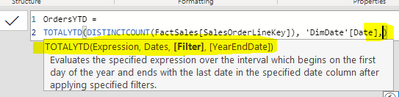
OrdersYTD =
TOTALYTD(DISTINCTCOUNT(FactSales[SalesOrderLineKey]), 'DimDate'[Date])

Regards,
Tim
Did I answer your question? Mark my post as a solution!
Proud to be a Super User!
- Mark as New
- Bookmark
- Subscribe
- Mute
- Subscribe to RSS Feed
- Permalink
- Report Inappropriate Content
Hi Tim,
That worked too - thank you! Using this method, how would I look at how many transactions happened for FY 2020?
- Mark as New
- Bookmark
- Subscribe
- Mute
- Subscribe to RSS Feed
- Permalink
- Report Inappropriate Content
Hi cy115,
The TOTALYTD function allows you to customize the year end with additional input to allow for FY and such (image 1).
SQLBI has some more in-depth info regarding this so I'd check this article out for some more details if you'd like to try that method: The hidden secrets of TOTALYTD - SQLBI
Regards,
Tim
Did I answer your question? Mark my post as a solution!
Proud to be a Super User!
- Mark as New
- Bookmark
- Subscribe
- Mute
- Subscribe to RSS Feed
- Permalink
- Report Inappropriate Content
I just did this and it seems to work! It does seem to be lining up with my data but if you have a moment would love a confirmation from you as I'm pretty new to DAX.
=TOTALYTD(DISTINCTCOUNT(AS400_Transactions[ORDER_DATE]),SAMEPERIODLASTYEAR('Calendar Transaction'[Date]))
- Mark as New
- Bookmark
- Subscribe
- Mute
- Subscribe to RSS Feed
- Permalink
- Report Inappropriate Content
@Anonymous , have tried datesytd with date table ?
YTD Sales = CALCULATE(DISTINCTCOUNT(AS400_Transactions[Order_Date Recalc]),DATESYTD('Date'[Date],"12/31"))
To get the best of the time intelligence function. Make sure you have a date calendar and it has been marked as the date in model view. Also, join it with the date column of your fact/s. Refer :radacad sqlbi My Video Series Appreciate your Kudos.
- Mark as New
- Bookmark
- Subscribe
- Mute
- Subscribe to RSS Feed
- Permalink
- Report Inappropriate Content
THANK YOU so much! That did work! If I want to do it for all of 2020, should I just do SAMEPERIODLASTYEAR in place of DATESYTD?
- Mark as New
- Bookmark
- Subscribe
- Mute
- Subscribe to RSS Feed
- Permalink
- Report Inappropriate Content
@Anonymous , try like
Last YTD Sales = CALCULATE(DISTINCTCOUNT(AS400_Transactions[Order_Date Recalc]),,DATESYTD(dateadd('Date'[Date],-1,Year),"12/31"))
example to restrict
LYTD QTY forced=
var _max = date(year(today())-1,month(today()),day(today()))
return
if(max('Date'[Date])<=_max, CALCULATE(Sum('order'[Qty]),DATESYTD(dateadd('Date'[Date],-1,year)),'Date'[Date]<=_max), blank())
//OR
//CALCULATE(Sum('order'[Qty]),DATESYTD(dateadd('Date'[Date],-1,year)),'Date'[Date]<=_max)
//TOTALYTD(Sum('order'[Qty]),dateadd('Date'[Date],-1,year),'Date'[Date]<=_max)
- Mark as New
- Bookmark
- Subscribe
- Mute
- Subscribe to RSS Feed
- Permalink
- Report Inappropriate Content
Hi amitchandak,
Thanks so much for your help so far. For YTD-1, i just tried this formula that you suggested above:
=CALCULATE(DISTINCTCOUNT(AS400_Transactions[ORDER_DATE],DATESYTD(DATEADD('Calendar Transaction'[Date],-1,Year),"12/31") )) but it is showing errors.
I also tried the restrictions but its not working either.
- Mark as New
- Bookmark
- Subscribe
- Mute
- Subscribe to RSS Feed
- Permalink
- Report Inappropriate Content
Hmm, this didn't seem to work for YTD-1. Now its filling in a minimum of "1" value for every single customer even if they didnt purchase that year at all.
=CALCULATE(DISTINCTCOUNT(AS400_Transactions[Order_Date Recalc]), DATESYTD(DATEADD('Calendar Transaction'[Date],-1,YEAR),"12/31"))
Helpful resources

Power BI Dataviz World Championships
The Power BI Data Visualization World Championships is back! Get ahead of the game and start preparing now!

Power BI Monthly Update - December 2025
Check out the December 2025 Power BI Holiday Recap!

FabCon Atlanta 2026
Join us at FabCon Atlanta, March 16-20, for the ultimate Fabric, Power BI, AI and SQL community-led event. Save $200 with code FABCOMM.

| User | Count |
|---|---|
| 39 | |
| 37 | |
| 33 | |
| 32 | |
| 29 |


| User | Count |
|---|---|
| 133 | |
| 88 | |
| 85 | |
| 68 | |
| 64 |


