cancel
Showing results for 
Search instead for 
Did you mean: 

The Power BI Data Visualization World Championships is back! Get ahead of the game and start preparing now! Learn more

Reply
RemiAnthonise
Helper V
Helper V

DAX: IF 'inside' SWITCH

Hi guys, 


I have this DAX:


Aantal dagen einde contract =
SWITCH (
TRUE ();
ISBLANK(TODAY()); 0; 'Vehicles'[Eind leasecontract] > TODAY(); DATEDIFF ( TODAY(); 'Vehicles'[Eind leasecontract]; DAY );
0
)


What I want is:

If 'tot einde contract' = -1 till -5000: I want this actual number. If the value is < -5000 I want "blank" because column 'Eind leasecontract' is blank, it gives me 01-01-1900. 

So I want something like:


Aantal dagen einde contract = 
SWITCH (
TRUE ();
ISBLANK(TODAY()); 0; 'Vehicles'[Eind leasecontract] > TODAY(); DATEDIFF ( TODAY(); 'Vehicles'[Eind leasecontract]; DAY ); [b]IF 'Vehicles'[Eind leasecontract] < - 5000;  "blank"; 0[/b]
)


These are my columns.
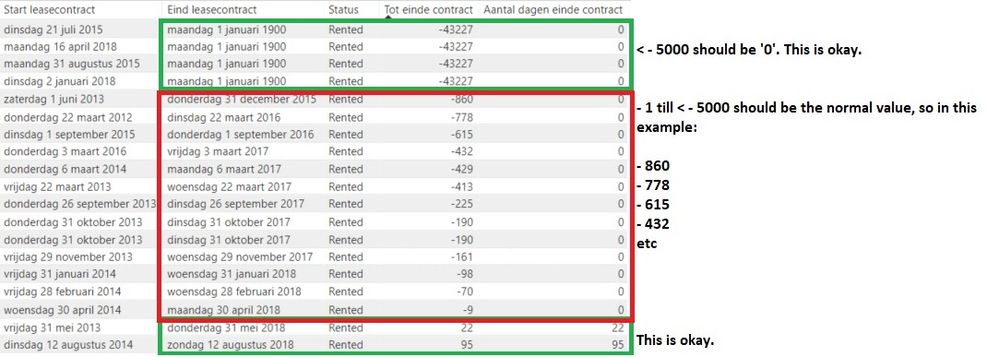
 

DaysTillEnd.jpg


Besides that, as you can see in the screenshot for the upper values, I got date ' maandag 1 januari 1900', which is 01-01-1900. In my database it's a blank, Power BI gives me 01-01-1900 set. I would like to see a blank. If this is possible, I think I don't have to handle the previous problem because it won't calculate Datediff Today from blank.

1 ACCEPTED SOLUTION
v-jiascu-msft
Microsoft Employee
Microsoft Employee

Hi @RemiAnthonise,


If you want to replace the "01-01-1900" with blanks, you can try the following two methods.

1. Change it in the data source. If there are some non-date values in the date column?

2. Replace it in the Query Editor.

Regarding to the DAX formula, 

1. ISBLANK(TODAY()) is always false.

Can you share a sample?


Best Regards,

Dale

Community Support Team _ Dale
If this post helps, then please consider Accept it as the solution to help the other members find it more quickly.

View solution in original post

2 REPLIES 2
v-jiascu-msft
Microsoft Employee
Microsoft Employee

Hi @RemiAnthonise,


If you want to replace the "01-01-1900" with blanks, you can try the following two methods.

1. Change it in the data source. If there are some non-date values in the date column?

2. Replace it in the Query Editor.

Regarding to the DAX formula, 

1. ISBLANK(TODAY()) is always false.

Can you share a sample?


Best Regards,

Dale

Community Support Team _ Dale
If this post helps, then please consider Accept it as the solution to help the other members find it more quickly.

hi @v-jiascu-msft , I've replaced values in the query editor. I tried everything as a replacing value except 'null'. I thought this would give me 'null' as a text but it's a blank field.

Problem solved!

Helpful resources

Announcements
Power BI DataViz World Championships

Power BI Dataviz World Championships

The Power BI Data Visualization World Championships is back! Get ahead of the game and start preparing now!

November Power BI Update Carousel

Power BI Monthly Update - November 2025

Check out the November 2025 Power BI update to learn about new features.

FabCon Atlanta 2026 carousel

FabCon Atlanta 2026

Join us at FabCon Atlanta, March 16-20, for the ultimate Fabric, Power BI, AI and SQL community-led event. Save $200 with code FABCOMM.