cancel
Showing results for 
Search instead for 
Did you mean: 

July 7 - July 17 | Round 2 of the Power BI Dataviz World Championships. Don't miss your chance! Learn more

Reply
Anonymous
Not applicable

DAX Help

I'm not entirely sure this is possible, but I'll give it a shot.


A little background, the relevant dataset involved is a:

  • Customer Dimension table 
  • Item Sales Fact Table
  • Date Table 

Each are connected through Primary Keys (CustID, DateID, Item ID, etc.)


A part of my goal is to be able to display a Customer's Grand total of sales over a filtered date range for only that date range.

Example 1: 

DAX-help.PNGI can achieve this only if the above customer's sales occurred between 1/1/18 - 1/23/18. If they had sales any other time outside of those dates, those additional sales would be included.


 Example 2:
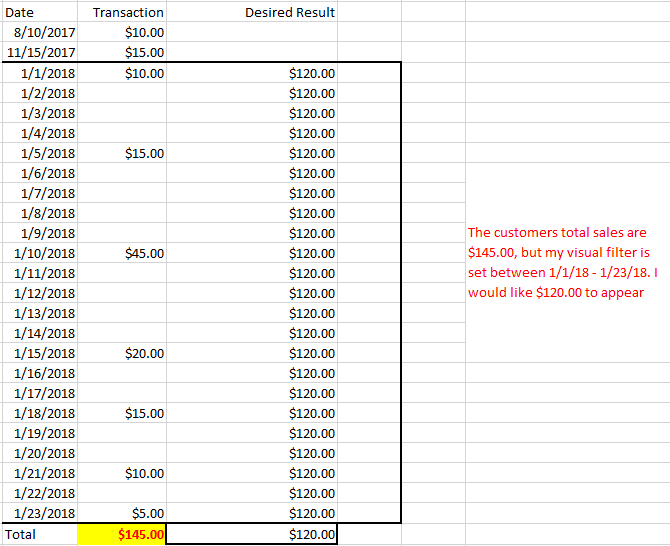
 

DAX-help2.PNG


This is the formula I'm currently stuck with which if used in example 2 would return $145.00

Sales TEST =
CALCULATE (
    SUMX (
        VALUES ( 'fct Item Sales'[CustID] ) ,
        SUM ( 'fct Item Sales'[SalesAmount] )
    ) ,
    dim_dates[date1]
)

Is there any way to create a measure that will change based on external visual/page/report level date filters, but not based on the rows of dates within the visual? Again I understand this may not be possible or there may be another solution I haven't thought of, but I'm kind of at a loss in accomplishing this. 


1 ACCEPTED SOLUTION
Anonymous
Not applicable

For anyone checking this thread I was able to use a What-If Parameter to make something pretty close to what I was looking for.

View solution in original post

4 REPLIES 4
Anonymous
Not applicable

@Anonymous I may be wrong but I don't think it's possible to do that, the value of a calculated column cannot changed by the selected option of a slicer or visual/page/report filter.

Anonymous
Not applicable

For anyone checking this thread I was able to use a What-If Parameter to make something pretty close to what I was looking for.

v-yuta-msft
Community Support
Community Support

Hi CRamirez,


Modify more measure as below and check if it can meet your requirement:


Sales TEST =
CALCULATE (
    SUMX (
        VALUES ( 'fct Item Sales'[CustID] ),
        SUM ( 'fct Item Sales'[SalesAmount] )
    ),
    ALLSELECTED ( dim_dates[date1] )
)

Regards,

Jimmy Tao

Anonymous
Not applicable

@v-yuta-msft,


I apoligize, I needed this to work as a calculated column in order to use as a filter. This measure you have does work perfectly for this specific use-case but I completely misstated my requirement. Is there anyway to have this functionality as a calculated column?


My end goal is being able to use the numeric slicer to show total customer sales for selected dates. The slider would then be able to be used to filter out customers based on cumulative sales over dynamic time ranges. 

Helpful resources

Announcements
Fabric Data Days is here Carousel

Data Days 2026

Don't miss out on Data Days, June 15 through August 7. Learn Fabric, Power BI, SQL, AI and more.

Power BI DataViz World Championships carousel

Power BI DataViz World Championships - June 2026

A new Power BI DataViz World Championship is coming this June! Don't miss out on submitting your entry.