Don't miss your chance to take the Fabric Data Engineer (DP-700) exam on us!
Learn moreNext up in the FabCon + SQLCon recap series: The roadmap for Microsoft SQL and Maximizing Developer experiences in Fabric. All sessions are available on-demand after the live show. Register now
Hi Community,
I am looking for possible solutions for the below example;
Desired 1st step:
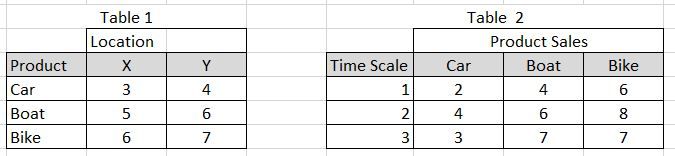
Using Table 2 above I would like to return the difference in sales between each product for Time Scale 1 vs. Time Scale 3
Desired 2nd step:
After creating a scatter plot using the X and Y locations in Table 1, I would to use the data retrieve in step one to "size" the dots on the scatter plot. How do I create a relationship to associate these tables and establish the correct relationship for this visual?
Any help or an example .pbix file of a similar scenario would be of great help!!
On which Condition this two tables are joining.
I would like for them to be joined by product.
Can you share the structure of the tables.
I'm open to any solutions that may lead to a working example, but I do not have the ability to combine the native tables.
If you have recently started exploring Fabric, we'd love to hear how it's going. Your feedback can help with product improvements.
A new Power BI DataViz World Championship is coming this June! Don't miss out on submitting your entry.
Share feedback directly with Fabric product managers, participate in targeted research studies and influence the Fabric roadmap.
| User | Count |
|---|---|
| 56 | |
| 47 | |
| 44 | |
| 20 | |
| 20 |
| User | Count |
|---|---|
| 73 | |
| 72 | |
| 34 | |
| 33 | |
| 31 |