FabCon is coming to Atlanta
Join us at FabCon Atlanta from March 16 - 20, 2026, for the ultimate Fabric, Power BI, AI and SQL community-led event. Save $200 with code FABCOMM.
Register now!- Power BI forums
- Get Help with Power BI
- Desktop
- Service
- Report Server
- Power Query
- Mobile Apps
- Developer
- DAX Commands and Tips
- Custom Visuals Development Discussion
- Health and Life Sciences
- Power BI Spanish forums
- Translated Spanish Desktop
- Training and Consulting
- Instructor Led Training
- Dashboard in a Day for Women, by Women
- Galleries
- Data Stories Gallery
- Themes Gallery
- Contests Gallery
- QuickViz Gallery
- Quick Measures Gallery
- Visual Calculations Gallery
- Notebook Gallery
- Translytical Task Flow Gallery
- TMDL Gallery
- R Script Showcase
- Webinars and Video Gallery
- Ideas
- Custom Visuals Ideas (read-only)
- Issues
- Issues
- Events
- Upcoming Events
Vote for your favorite vizzies from the Power BI Dataviz World Championship submissions. Vote now!
- Power BI forums
- Forums
- Get Help with Power BI
- Desktop
- Re: DAX Help: Extract value based on last executio...
- Subscribe to RSS Feed
- Mark Topic as New
- Mark Topic as Read
- Float this Topic for Current User
- Bookmark
- Subscribe
- Printer Friendly Page

- Mark as New
- Bookmark
- Subscribe
- Mute
- Subscribe to RSS Feed
- Permalink
- Report Inappropriate Content
DAX Help: Extract value based on last execution
Hi,
I have a below scenario:
| Timestamp | CaseID | CaseTitle | Status |
| 8-16-2017 5:00 | 1 | TestCase A | Pass |
| 8-16-2017 5:00 | 2 | TestCase B | Pass |
| 8-16-2017 5:00 | 3 | TestCase C | Pass |
| 8-16-2017 5:00 | 4 | TestCase D | FAIL |
| 8-16-2017 5:00 | 5 | TestCase E | FAIL |
| 8-16-2017 10:00 | 1 | TestCase A | Pass |
| 8-16-2017 10:00 | 2 | TestCase B | FAIL |
| 8-16-2017 10:00 | 3 | TestCase C | FAIL |
| 8-16-2017 10:00 | 4 | TestCase D | FAIL |
| 8-16-2017 10:00 | 5 | TestCase E | FAIL |
One set of cases executed twice daily. I need to show the count of Pass/Fail based on the last execution.
How can I achieve this?
Currently i group them via date, it shows me 4 pass and 6 fail,.
The desired output should be 1 Pass/ 4 Fail
Solved! Go to Solution.


- Mark as New
- Bookmark
- Subscribe
- Mute
- Subscribe to RSS Feed
- Permalink
- Report Inappropriate Content
Hey,
maybe this would be a solution, I'm counting the caseid (distinct count) to get the numbers in this table
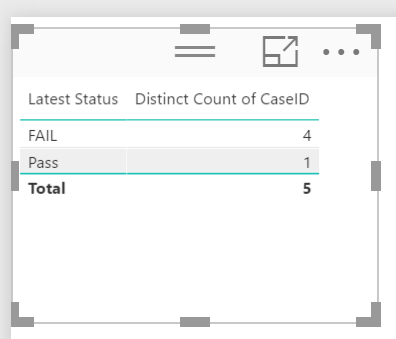
I did not use a measure I just changed the Aggregate function in the visuals pane and renamed the column in the visual
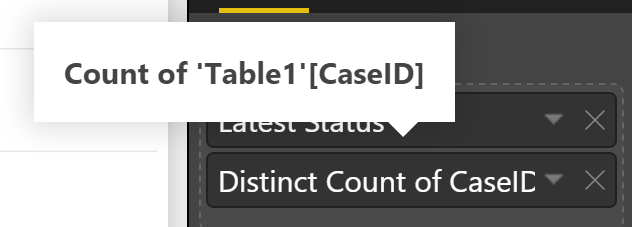
Maybe now I'm getting closer
Did I answer your question? Mark my post as a solution, this will help others!
Proud to be a Super User!
I accept Kudos 😉
Hamburg, Germany
- Mark as New
- Bookmark
- Subscribe
- Mute
- Subscribe to RSS Feed
- Permalink
- Report Inappropriate Content
Hey,
I created a calculated column using this DAX
Latest Status =
var currentCaseID = 'Table1'[CaseID]
var maxTimeStamp = CALCULATE(
    MAX('Table1'[Timestamp])
    ,ALLEXCEPT('Table1',Table1[CaseID],Table1[CaseTitle])
)
return
LOOKUPVALUE(Table1[Status], 'Table1'[Timestamp], maxtimestamp, Table1[CaseID], currentCaseID)
The values for this column will look like this
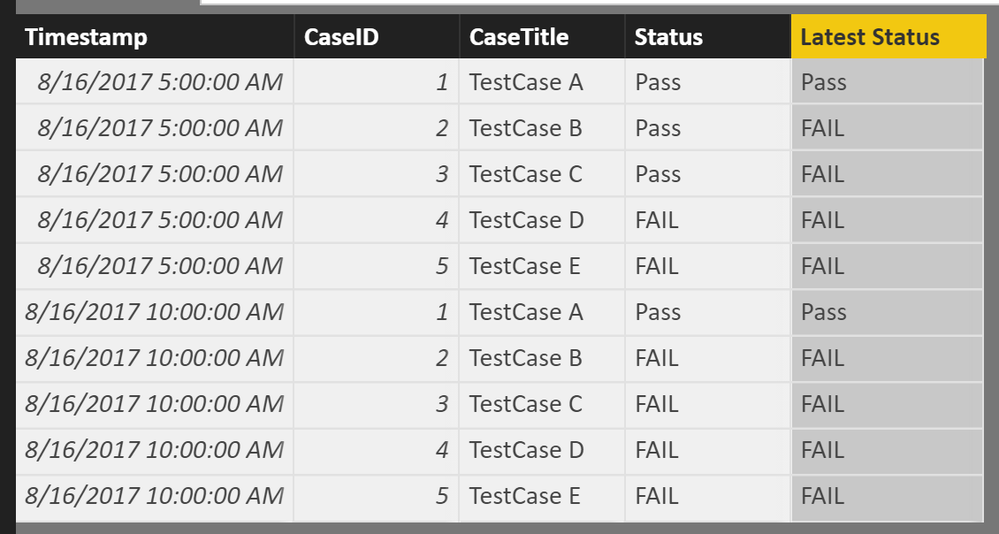
A possible visualization could be

Hope this helps somehow
Did I answer your question? Mark my post as a solution, this will help others!
Proud to be a Super User!
I accept Kudos 😉
Hamburg, Germany
- Mark as New
- Bookmark
- Subscribe
- Mute
- Subscribe to RSS Feed
- Permalink
- Report Inappropriate Content
How can I achieve the desired result?
Its still going to show me 2 pass 8 Fail
- Mark as New
- Bookmark
- Subscribe
- Mute
- Subscribe to RSS Feed
- Permalink
- Report Inappropriate Content
Hey,
can you please share which approach you are using and provide an image of your visualization.
Cheers
Did I answer your question? Mark my post as a solution, this will help others!
Proud to be a Super User!
I accept Kudos 😉
Hamburg, Germany
- Mark as New
- Bookmark
- Subscribe
- Mute
- Subscribe to RSS Feed
- Permalink
- Report Inappropriate Content
I used your approach only, and get the last status successfully,
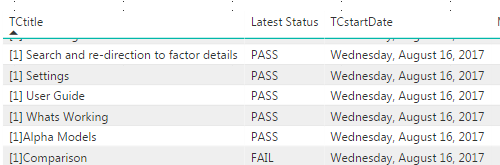
Now i need to show the Numbers, or passing percentage/pie chart, and that is causing a problem.
- Mark as New
- Bookmark
- Subscribe
- Mute
- Subscribe to RSS Feed
- Permalink
- Report Inappropriate Content
Hey,
maybe this would be a solution, I'm counting the caseid (distinct count) to get the numbers in this table
I did not use a measure I just changed the Aggregate function in the visuals pane and renamed the column in the visual
Maybe now I'm getting closer
Did I answer your question? Mark my post as a solution, this will help others!
Proud to be a Super User!
I accept Kudos 😉
Hamburg, Germany
- Mark as New
- Bookmark
- Subscribe
- Mute
- Subscribe to RSS Feed
- Permalink
- Report Inappropriate Content
Thank you so much,
I took the hint from smoupre solution and create a measure like:
FAIL= CALCULATE(DISTINCTCOUNT(testcasetbl[TCtitle]),FILTER('SmokeCase',[Latest Status]="FAIL"))
But your solution is definitely much simpler. Thanks a alot.
- Mark as New
- Bookmark
- Subscribe
- Mute
- Subscribe to RSS Feed
- Permalink
- Report Inappropriate Content
Glad we were able to help once again.
Maybe you also consider to create another measure lilke this
No of Cases =
CALCULATE(
	DISTINCTCOUNT('Table1'[CaseID])
)
Personally I find such a measure really beneficial in combination with columns like "latest status"
Cheers
Did I answer your question? Mark my post as a solution, this will help others!
Proud to be a Super User!
I accept Kudos 😉
Hamburg, Germany
- Mark as New
- Bookmark
- Subscribe
- Mute
- Subscribe to RSS Feed
- Permalink
- Report Inappropriate Content
How can I achieve the desired result?
Its still going to show me 2 pass 8 Fail

- Mark as New
- Bookmark
- Subscribe
- Mute
- Subscribe to RSS Feed
- Permalink
- Report Inappropriate Content
This should be giving you the desired results since your date col also got time. If not, may be put the time of execution in a seperate col and then group the data based upon date and later by time .
- Mark as New
- Bookmark
- Subscribe
- Mute
- Subscribe to RSS Feed
- Permalink
- Report Inappropriate Content
- Can you please help me with how to group the data based upon date and later by time?
- Mark as New
- Bookmark
- Subscribe
- Mute
- Subscribe to RSS Feed
- Permalink
- Report Inappropriate Content
Please forgive my slow thinking, but I have no idea what is do mean by grouping, please provide a visual like so
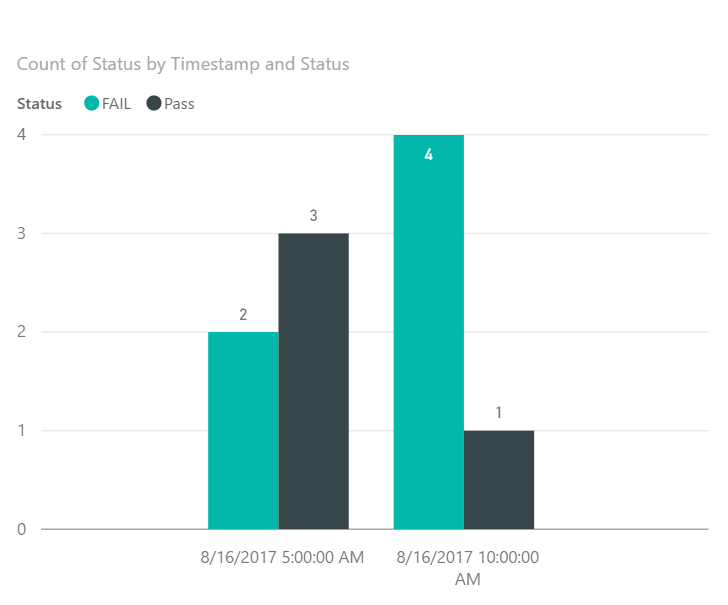
And also provide input what approach of the suggestions you are using
Did I answer your question? Mark my post as a solution, this will help others!
Proud to be a Super User!
I accept Kudos 😉
Hamburg, Germany
- Mark as New
- Bookmark
- Subscribe
- Mute
- Subscribe to RSS Feed
- Permalink
- Report Inappropriate Content
I just wanted to show Pass/Fail in Pie Chart rather than column chart.


- Mark as New
- Bookmark
- Subscribe
- Mute
- Subscribe to RSS Feed
- Permalink
- Report Inappropriate Content
you could also do this @cshashank
create the max date
(its a measure)
lastdate = max(Table1[Timestamp])
and then create another measure
Measure 2 = CALCULATE(COUNTROWS('Table1'), FILTER('Table1', Table1[Timestamp] = max(Table1[Timestamp])))
place them both on a visual
If I took the time to answer your question and I came up with a solution, please mark my post as a solution and /or give kudos freely for the effort 🙂 Thank you!
Proud to be a Super User!

- Mark as New
- Bookmark
- Subscribe
- Mute
- Subscribe to RSS Feed
- Permalink
- Report Inappropriate Content
How about some measures like this:
Pass = CALCULATE(COUNTA('Cases'[Status]),FILTER('Cases','Cases'[Timestamp]=MAX('Cases'[Timestamp])),FILTER('Cases',[Status]="Pass") )

Fail = CALCULATE(COUNTA('Cases'[Status]),FILTER('Cases','Cases'[Timestamp]=MAX('Cases'[Timestamp])),FILTER('Cases',[Status]="Fail") )
Follow on LinkedIn
@ me in replies or I'll lose your thread!!!
Instead of a Kudo, please vote for this idea
Become an expert!: Enterprise DNA
External Tools: MSHGQM
YouTube Channel!: Microsoft Hates Greg
Latest book!: DAX For Humans
DAX is easy, CALCULATE makes DAX hard...
Helpful resources

Power BI Dataviz World Championships
Vote for your favorite vizzies from the Power BI World Championship submissions!

Join our Community Sticker Challenge 2026
If you love stickers, then you will definitely want to check out our Community Sticker Challenge!

Power BI Monthly Update - January 2026
Check out the January 2026 Power BI update to learn about new features.

FabCon Atlanta 2026
Join us at FabCon Atlanta, March 16-20, for the ultimate Fabric, Power BI, AI and SQL community-led event. Save $200 with code FABCOMM.

| User | Count |
|---|---|
| 56 | |
| 52 | |
| 45 | |
| 17 | |
| 16 |


| User | Count |
|---|---|
| 108 | |
| 108 | |
| 39 | |
| 33 | |
| 25 |


