Don't miss your chance to take the Fabric Data Engineer (DP-600) exam for FREE! Find out how by watching the DP-600 session on-demand now through April 28th.
Learn moreJoin the FabCon + SQLCon recap series. Up next: Power BI, Real-Time Intelligence, IQ and AI, and Data Factory take center stage. All sessions are available on-demand after the live show. Register now
Community,
I currently have three tables. I would like to use two of the tables to define a variable, then apply the variable along with values in the third table to calculate a value.
Below are the tables and what I would like to achieve, but getting the DAX correct has been a bit of a struggle, any help would be much appreciated. (Also in the example included, I would not have the option to merge any of the tables)
Create a Measure, CL_ATD1
Solved! Go to Solution.
Hi,
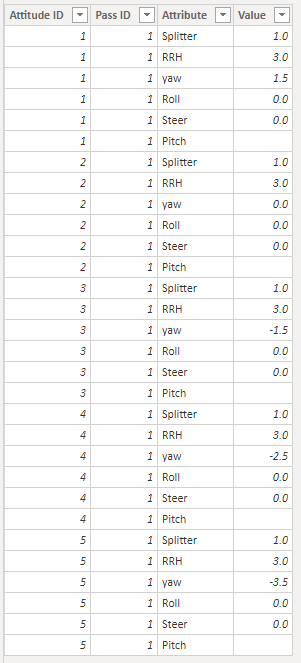
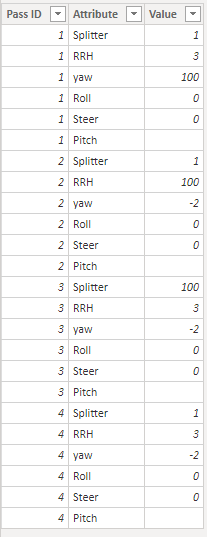
Please unpivot table ATD and table PassID first:
Table ATD: Table PassID:
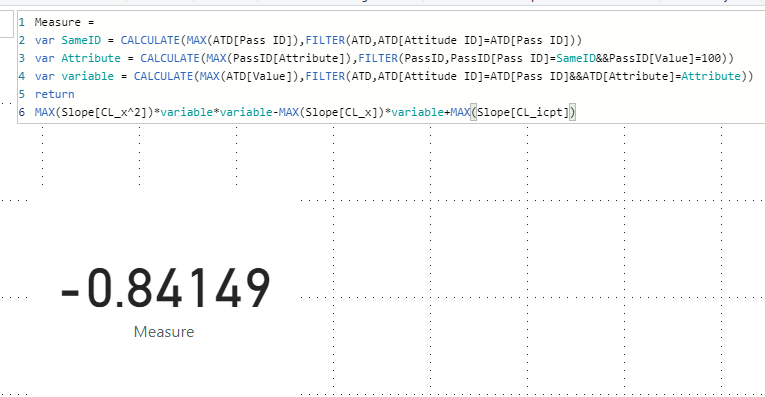
Then try this measure:
Measure =
var SameID = CALCULATE(MAX(ATD[Pass ID]),FILTER(ATD,ATD[Attitude ID]=ATD[Pass ID]))
var Attribute = CALCULATE(MAX(PassID[Attribute]),FILTER(PassID,PassID[Pass ID]=SameID&&PassID[Value]=100))
var variable = CALCULATE(MAX(ATD[Value]),FILTER(ATD,ATD[Attitude ID]=ATD[Pass ID]&&ATD[Attribute]=Attribute))
return
MAX(Slope[CL_x^2])*variable*variable-MAX(Slope[CL_x])*variable+MAX(Slope[CL_icpt])Choose a card visual, the result shows:
Here is my test pbix file:
Hope this helps.
Best Regards,
Giotto Zhi
Hi,
Please unpivot table ATD and table PassID first:
Table ATD: Table PassID:
Then try this measure:
Measure =
var SameID = CALCULATE(MAX(ATD[Pass ID]),FILTER(ATD,ATD[Attitude ID]=ATD[Pass ID]))
var Attribute = CALCULATE(MAX(PassID[Attribute]),FILTER(PassID,PassID[Pass ID]=SameID&&PassID[Value]=100))
var variable = CALCULATE(MAX(ATD[Value]),FILTER(ATD,ATD[Attitude ID]=ATD[Pass ID]&&ATD[Attribute]=Attribute))
return
MAX(Slope[CL_x^2])*variable*variable-MAX(Slope[CL_x])*variable+MAX(Slope[CL_icpt])Choose a card visual, the result shows:
Here is my test pbix file:
Hope this helps.
Best Regards,
Giotto Zhi
Do you have any thoughts on how to modify the DAX to solve for each of the different "Attitude ID"? The current DAX only solves for one of the "Attitude ID".
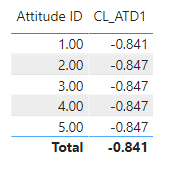
I would like to end up with a table that looks something like this (CL_ATD1 is your measure in the original post), but with the correct calculated values. (In this example the variables need to muptiple with would be 1.5, 0, -1.5, -2.5, -3.5)
I have tried introducing some HASONEVALUE in to the DAX but no luck in getting the correct values yet. Any help with this would be much appreciated. Also if you like I can make this a new post.
Thanks!
Check out the April 2026 Power BI update to learn about new features.
If you have recently started exploring Fabric, we'd love to hear how it's going. Your feedback can help with product improvements.
A new Power BI DataViz World Championship is coming this June! Don't miss out on submitting your entry.
| User | Count |
|---|---|
| 48 | |
| 40 | |
| 38 | |
| 20 | |
| 17 |
| User | Count |
|---|---|
| 68 | |
| 65 | |
| 30 | |
| 26 | |
| 25 |