cancel
Showing results for 
Search instead for 
Did you mean: 

Get Fabric Certified for FREE during Fabric Data Days. Don't miss your chance! Request now

Reply
pmadam
Helper II
Helper II

DAX HELP

I want to create Previous month sales measure. so i created Latest month and previous month measures.

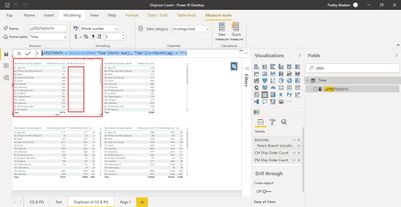
But when i create final measure to calculate sales for Previous month i get blank values


Below are the measures


LATESTMONTH = CALCULATE(MAX('Time'[Month Num]),'Time'[CurrMonthFlag] = "Y")
ans)8
 
 
Previous Month = latestmonth -1 
ans)7
 
PM Ship Order Count =
CALCULATE([Ship Order Count],FILTER('Time', 'Time'[Month Num] = [PreviousMonth]))
 
now.jpg
 
 
Please help.
Prathy
 
 
1 ACCEPTED SOLUTION
v-deddai1-msft
Community Support
Community Support

Hi @pmadam ,


Would you please change your two measure to:


LATESTMONTH = CALCULATE(MAX('Time'[Month Num]),ALL('Time'),'Time'[CurrMonthFlag] = "Y")
PM Ship Order Count =
CALCULATE([Ship Order Count],FILTER(ALL('Time'), 'Time'[Month Num] = [PreviousMonth]))


If this post helps, then please consider Accept it as the solution to help the other members find it more quickly.


Best Regards,

Dedmon Dai

View solution in original post

3 REPLIES 3
v-deddai1-msft
Community Support
Community Support

Hi @pmadam ,


Would you please change your two measure to:


LATESTMONTH = CALCULATE(MAX('Time'[Month Num]),ALL('Time'),'Time'[CurrMonthFlag] = "Y")
PM Ship Order Count =
CALCULATE([Ship Order Count],FILTER(ALL('Time'), 'Time'[Month Num] = [PreviousMonth]))


If this post helps, then please consider Accept it as the solution to help the other members find it more quickly.


Best Regards,

Dedmon Dai

Greg_Deckler
Community Champion
Community Champion

@pmadam Not really enough information to go on, please first check if your issue is a common issue listed here: https://community.powerbi.com/t5/Community-Blog/Before-You-Post-Read-This/ba-p/1116882

Also, please see this post regarding How to Get Your Question Answered Quickly: https://community.powerbi.com/t5/Community-Blog/How-to-Get-Your-Question-Answered-Quickly/ba-p/38490

The most important parts are:
1. Sample data as text, use the table tool in the editing bar
2. Expected output from sample data
3. Explanation in words of how to get from 1. to 2.


That said, You may find this helpful - https://community.powerbi.com/t5/Community-Blog/To-bleep-With-Time-Intelligence/ba-p/1260000

Also, see if my Time Intelligence the Hard Way provides a different way of accomplishing what you are going for.

https://community.powerbi.com/t5/Quick-Measures-Gallery/Time-Intelligence-quot-The-Hard-Way-quot-TIT...


Follow on LinkedIn
@ me in replies or I'll lose your thread!!!
Instead of a Kudo, please vote for this idea
Become an expert!: Enterprise DNA
External Tools: MSHGQM
YouTube Channel!: Microsoft Hates Greg
Latest book!:
DAX For Humans

DAX is easy, CALCULATE makes DAX hard...
amitchandak
Super User
Super User

@pmadam , You can use time intelligence with a date calendar

MTD Sales = CALCULATE(SUM(Sales[Sales Amount]),DATESMTD('Date'[Date]))
last MTD Sales = CALCULATE(SUM(Sales[Sales Amount]),DATESMTD(dateadd('Date'[Date],-1,MONTH)))
Last month value =  CALCULATE(sum('table'[total hours value]),previousmonth('Date'[Date]))
last MTD (complete) Sales =  CALCULATE(SUM(Sales[Sales Amount]),DATESMTD(ENDOFMONTH(dateadd('Date'[Date],-1,MONTH))))
last year MTD Sales = CALCULATE(SUM(Sales[Sales Amount]),DATESMTD(dateadd('Date'[Date],-12,MONTH)))
last year MTD (complete) Sales =  CALCULATE(SUM(Sales[Sales Amount]),DATESMTD(ENDOFMONTH(dateadd('Date'[Date],-12,MONTH))))
Month behind Sales = CALCULATE(SUM(Sales[Sales Amount]),dateadd('Date'[Date],-1,Month))
Year behind Sales = CALCULATE(SUM(Sales[Sales Amount]),dateadd('Date'[Date],-1,Year))
Next month value =  CALCULATE(sum('table'[total hours value]),nextmonth('Date'[Date]))


diff = [MTD Sales]-[last MTD Sales]
diff % = divide([MTD Sales]-[last MTD Sales],[last MTD Sales])


https://medium.com/@amitchandak.1978/power-bi-mtd-questions-time-intelligence-3-5-64b0b4a4090e


To get the best of the time intelligence function. Make sure you have a date calendar and it has been marked as the date in model view. Also, join it with the date column of your fact/s. Refer :
https://radacad.com/creating-calendar-table-in-power-bi-using-dax-functions
https://www.archerpoint.com/blog/Posts/creating-date-table-power-bi
https://www.sqlbi.com/articles/creating-a-simple-date-table-in-dax/

See if my webinar on Time Intelligence can help: https://community.powerbi.com/t5/Webinars-and-Video-Gallery/PowerBI-Time-Intelligence-Calendar-WTD-Y...


Appreciate your Kudos.

Share with Power BI Enthusiasts: Full Power BI Video (20 Hours) YouTube
Microsoft Fabric Series 60+ Videos YouTube
Microsoft Fabric Hindi End to End YouTube

Helpful resources

Announcements
November Power BI Update Carousel

Power BI Monthly Update - November 2025

Check out the November 2025 Power BI update to learn about new features.

Fabric Data Days Carousel

Fabric Data Days

Advance your Data & AI career with 50 days of live learning, contests, hands-on challenges, study groups & certifications and more!

FabCon Atlanta 2026 carousel

FabCon Atlanta 2026

Join us at FabCon Atlanta, March 16-20, for the ultimate Fabric, Power BI, AI and SQL community-led event. Save $200 with code FABCOMM.

Top Solution Authors
Top Kudoed Authors