cancel
Showing results for 
Search instead for 
Did you mean: 

Level up your Power BI skills this month - build one visual each week and tell better stories with data! Get started

Reply
Anonymous
Not applicable

DAX Group by - Direct Query

How to do group by using DAX in Direct Query Mode?

3 REPLIES 3
TeigeGao
Solution Sage
Solution Sage

Hi @Anonymous ,

There are many methods to do the group by using DAX in Direct Query mode:

1. Create a calculated table using the SUMMARIZE() function, please refer to the following DAX query:

table =
SUMMARIZE (
    historysales,
    historysales[Age],
    "Amount", COUNTROWS ( historysales )
)

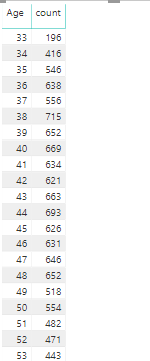
2. Create a measure to represent it in a visual like table:

count =
CALCULATE (
    COUNTROWS ( historysales ),
    FILTER ( ALL ( historysales ), historysales[Age] = MIN ( historysales[Age] ) )
)

The result will like below: 

RDCMan_q44wjnhW5T.png

Best Regards,

Teige

Anonymous
Not applicable

@Teige Thank You for the example! I am not able to use Summarize and Groupby Functions in PowerBI Desktop Jan 2019 version for some reason those functions are greyed out. From your example in Calculate please kindly suggest if the Count 196 is the same for the ages 33, 34 then it would show count value as 196 for age 33 only in the result, it will omit age 34. How could I have both ages in the results of the count values is same. I am doing group by on 3 columns. Please suggest, I would highly appreciate your input! Thank You!


count =
CALCULATE (
    COUNTROWS ( historysales ),
    FILTER ( ALL ( historysales ), historysales[Age] = MIN ( historysales[Age] ) )
)


Anonymous
Not applicable

@Anonymous 

That's a very vague question.

There is a groupby function.


Thanks!
A

Helpful resources

Announcements
April Power BI Update Carousel

Power BI Monthly Update - April 2026

Check out the April 2026 Power BI update to learn about new features.

Fabric SQL PBI Data Days

Data Days 2026 coming soon!

Sign up to receive a private message when registration opens and key events begin.

New to Fabric survey Carousel

New to Fabric Survey

If you have recently started exploring Fabric, we'd love to hear how it's going. Your feedback can help with product improvements.

Power BI DataViz World Championships carousel

Power BI DataViz World Championships - June 2026

A new Power BI DataViz World Championship is coming this June! Don't miss out on submitting your entry.