Join us at FabCon Atlanta from March 16 - 20, 2026, for the ultimate Fabric, Power BI, AI and SQL community-led event. Save $200 with code FABCOMM.
Register now!Get Fabric Certified for FREE during Fabric Data Days. Don't miss your chance! Request now
Hi,
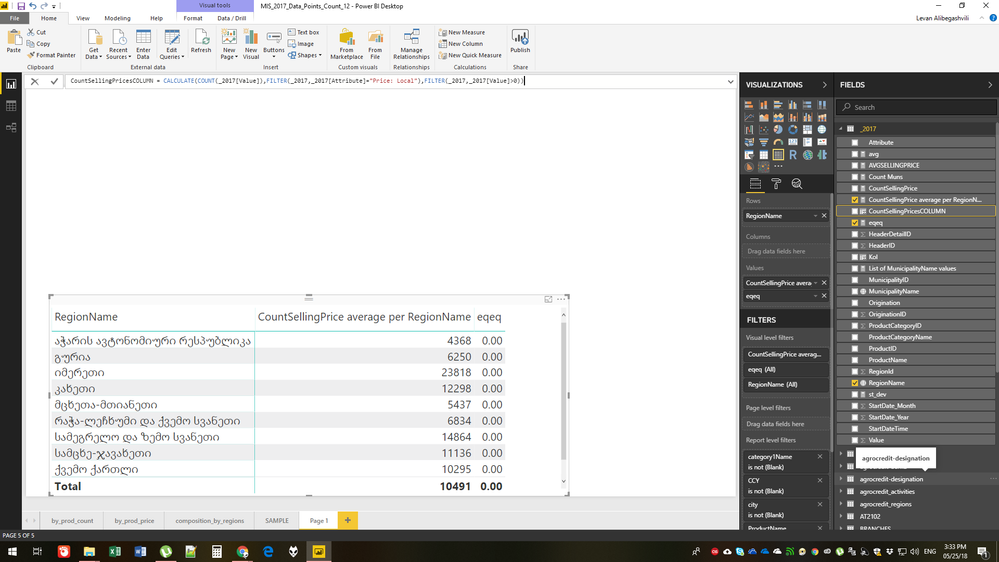
I am trying to calculate standard deviations within groups for the values. Problem is that these values are initially prices, I need the count for the prices, ie, how many price observarions were in certain municipalities, and then apply STDEV on them against average counts of price observations for the region, where the municipalities fall.
I can not seem to get hold on the count values of prices to apply further calculations to them, STDEV or anything.
In Excel this is quite easy, I am attaching the sample file ST DEV on COUNTS with edit permission so that anyone can explore the forumlas, but in Power BI Desktop I was unable to recreate the same result. I am kind of intermediate level user, but still could not make it work.
Your help would be much appreciated.
Best,
Levan
Hi @Anonymous
If you use CALCULATE(Count(YourTable[Price]);YourTable[MunicipalityName]=MunicipalityName) does it work ?
- Quentin
Also, does not work new calculated column with same formula.
eqeq = STDEV.P(_2017[CountSellingPricesCOLUMN])
Hi @quentin_vigne,
I used this formula to obtain counts, but then I can't use these values to apply STDEV formula.
CountSellingPrice = CALCULATE(COUNT(_2017[Value]),FILTER(_2017,_2017[Attribute]="Price: Local"),FILTER(_2017,_2017[Value]>0))
Check out the November 2025 Power BI update to learn about new features.
Advance your Data & AI career with 50 days of live learning, contests, hands-on challenges, study groups & certifications and more!