FabCon is coming to Atlanta
Join us at FabCon Atlanta from March 16 - 20, 2026, for the ultimate Fabric, Power BI, AI and SQL community-led event. Save $200 with code FABCOMM.
Register now!- Power BI forums
- Get Help with Power BI
- Desktop
- Service
- Report Server
- Power Query
- Mobile Apps
- Developer
- DAX Commands and Tips
- Custom Visuals Development Discussion
- Health and Life Sciences
- Power BI Spanish forums
- Translated Spanish Desktop
- Training and Consulting
- Instructor Led Training
- Dashboard in a Day for Women, by Women
- Galleries
- Data Stories Gallery
- Themes Gallery
- Contests Gallery
- QuickViz Gallery
- Quick Measures Gallery
- Visual Calculations Gallery
- Notebook Gallery
- Translytical Task Flow Gallery
- TMDL Gallery
- R Script Showcase
- Webinars and Video Gallery
- Ideas
- Custom Visuals Ideas (read-only)
- Issues
- Issues
- Events
- Upcoming Events
The Power BI Data Visualization World Championships is back! Get ahead of the game and start preparing now! Learn more
- Power BI forums
- Forums
- Get Help with Power BI
- Desktop
- DAX, Find MAX value of a Measure
- Subscribe to RSS Feed
- Mark Topic as New
- Mark Topic as Read
- Float this Topic for Current User
- Bookmark
- Subscribe
- Printer Friendly Page


- Mark as New
- Bookmark
- Subscribe
- Mute
- Subscribe to RSS Feed
- Permalink
- Report Inappropriate Content
DAX, Find MAX value of a Measure
Hi Everyone!
I'm having issue to solve one problem.
I'm having next report:

Sales[Percent] is a Measure:
Percent = SUM(Sales[Sum])/SUM(FilialsSales[Sum])
Okay, it works.
Now I need to find MAX value of Sales[Percent] (it will be 0,198).. And devide each Percent value by MAX value of [Percent]:
0,184/0,198; 0,157/0,198; 0,038/0,198; .... etc
But I don't know how to find MAX.. Is it really? Help me please! =(
Maybe I chose wrong way?((
P.S.
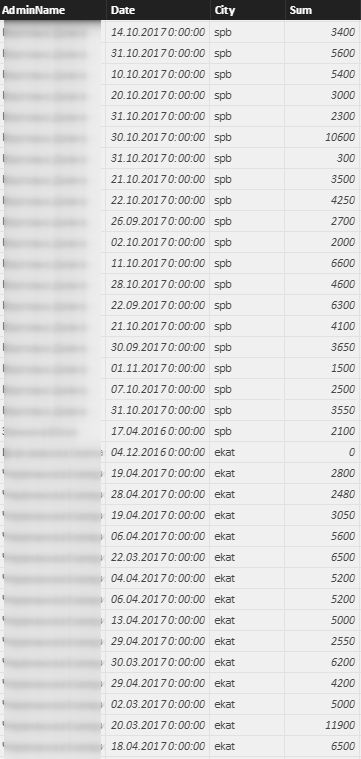
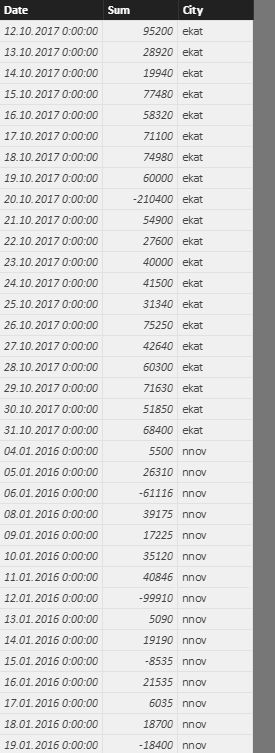
Data of tables(not full, only part):
Sales :
FilialSales:
Solved! Go to Solution.


- Mark as New
- Bookmark
- Subscribe
- Mute
- Subscribe to RSS Feed
- Permalink
- Report Inappropriate Content
Hi @SerG
Try this one
Percent / Max Percent =
DIVIDE (
    [Percent],
    MAXX (
        ADDCOLUMNS (
            SUMMARIZE (
                ALLSELECTED ( Sales ),
                [AdminName],
                Cities[City],
                "SUM", SUM ( Sales[Sum] )
            ),
            "Percent", CALCULATE ( SUM ( Sales[Sum] ) ) / CALCULATE ( SUM ( FilialsSales[Sum] ) )
        ),
        [Percent]
    )
)
Regards
Zubair
Please try my custom visuals

- Mark as New
- Bookmark
- Subscribe
- Mute
- Subscribe to RSS Feed
- Permalink
- Report Inappropriate Content
Hi, I'm having a similar problem.
I have items with a profit margin. I calculated via measure the rank of the profit margin and would now like to divide the rank number by the maximum number of rank.
Any hints?

- Mark as New
- Bookmark
- Subscribe
- Mute
- Subscribe to RSS Feed
- Permalink
- Report Inappropriate Content
Hi @SerG,
If you can please share this file to onedrive/google drive, I can't get your file through that link.
In my opinion, I'd like to suggest you to create a summary table as variable in your measure, then use it to result the max percent.
Sample: not so sure if it suitable for your situation.
Max Percent =
SUMX (
    SUMMARIZE (
        ALLSELECTED ( Table ),
        Table[AdminName],
        Table[City],
        "SUM",SUM(Table[SUM]),
        "Percent", [Percent]
    ),
    [Percent]
)
Regards,
Xiaoxin Sheng
- Mark as New
- Bookmark
- Subscribe
- Mute
- Subscribe to RSS Feed
- Permalink
- Report Inappropriate Content
@Anonymous
Unfortunately your formula doesn't work for my situation =(
- Mark as New
- Bookmark
- Subscribe
- Mute
- Subscribe to RSS Feed
- Permalink
- Report Inappropriate Content
Hi @SerG,
I modify my formula to summary calculated result as the variable table, then use maxx function to get the max result from summary table.
Max Percent =
MAXX (
    SUMMARIZE (
        ALLSELECTED ( Sales ),
        [AdminName],
        [City],
        "SUM Sales", SUM ( [Sum] ),
        "SUM Filials", SUMX (
            FILTER ( ALL ( FilialsSales ), FilialsSales[City] = Sales[City] ),
            FilialsSales[Sum]
        )
    ),
    [SUM Sales] / [SUM Filials]
)

Notice: if your data contains any privacy data, please do mask sensitive data before sharing.
Regards,
Xiaoxin Sheng
- Mark as New
- Bookmark
- Subscribe
- Mute
- Subscribe to RSS Feed
- Permalink
- Report Inappropriate Content
@Anonymous
Thanks!!
But it doesn't work, when I'm changing a Period =(((
- Mark as New
- Bookmark
- Subscribe
- Mute
- Subscribe to RSS Feed
- Permalink
- Report Inappropriate Content
Hi @SerG
Try this one
Percent / Max Percent =
DIVIDE (
    [Percent],
    MAXX (
        ADDCOLUMNS (
            SUMMARIZE (
                ALLSELECTED ( Sales ),
                [AdminName],
                Cities[City],
                "SUM", SUM ( Sales[Sum] )
            ),
            "Percent", CALCULATE ( SUM ( Sales[Sum] ) ) / CALCULATE ( SUM ( FilialsSales[Sum] ) )
        ),
        [Percent]
    )
)
Regards
Zubair
Please try my custom visuals
- Mark as New
- Bookmark
- Subscribe
- Mute
- Subscribe to RSS Feed
- Permalink
- Report Inappropriate Content
Regards
Zubair
Please try my custom visuals
- Mark as New
- Bookmark
- Subscribe
- Mute
- Subscribe to RSS Feed
- Permalink
- Report Inappropriate Content
@Anonymous
Thank U very much!! You helped me a lot! It's awesome 😃
- Mark as New
- Bookmark
- Subscribe
- Mute
- Subscribe to RSS Feed
- Permalink
- Report Inappropriate Content
- Mark as New
- Bookmark
- Subscribe
- Mute
- Subscribe to RSS Feed
- Permalink
- Report Inappropriate Content


- Mark as New
- Bookmark
- Subscribe
- Mute
- Subscribe to RSS Feed
- Permalink
- Report Inappropriate Content
Hi,
Share the link from where i can download the pbix file.
Regards,
Ashish Mathur
http://www.ashishmathur.com
https://www.linkedin.com/in/excelenthusiasts/
- Mark as New
- Bookmark
- Subscribe
- Mute
- Subscribe to RSS Feed
- Permalink
- Report Inappropriate Content
Hi! Here is the link to download the pbix file:
dropmefiles\.com\/wKFH1
PS
Remove "\" from the link
- Mark as New
- Bookmark
- Subscribe
- Mute
- Subscribe to RSS Feed
- Permalink
- Report Inappropriate Content
Hi,
I get a message saying that the file is corrupt.
Regards,
Ashish Mathur
http://www.ashishmathur.com
https://www.linkedin.com/in/excelenthusiasts/
Helpful resources

Power BI Dataviz World Championships
The Power BI Data Visualization World Championships is back! Get ahead of the game and start preparing now!

Power BI Monthly Update - November 2025
Check out the November 2025 Power BI update to learn about new features.

FabCon Atlanta 2026
Join us at FabCon Atlanta, March 16-20, for the ultimate Fabric, Power BI, AI and SQL community-led event. Save $200 with code FABCOMM.

| User | Count |
|---|---|
| 59 | |
| 46 | |
| 42 | |
| 23 | |
| 18 |


| User | Count |
|---|---|
| 190 | |
| 122 | |
| 96 | |
| 66 | |
| 47 |


