cancel
Showing results for 
Search instead for 
Did you mean: 

The Power BI Data Visualization World Championships is back! Get ahead of the game and start preparing now! Learn more

Reply
Anonymous
Not applicable

DAX Filter

HI Guys,


I have a quick question:
- Lets say I filtered my entire report on Calendar Date is in "Previous Week"

- But I need one of my measures to check if something was assorted in the last 6 months


I used the formula:

Assortment = CALCULATE([Assorted], all('Calendar'), DATESBETWEEN('Calendar'[Calendar Date], today() -180, today()))
 
Is the measure actually calculating on the last 6 months or is the report level filter only limitting it to previous week data ? If the latter, then how do I proceed
1 ACCEPTED SOLUTION
Anonymous
Not applicable

@Anonymous 

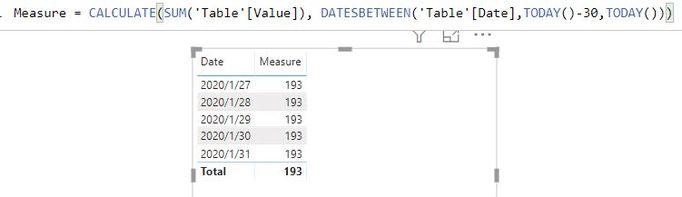
The page filter only changes the displayed visual, the calculating result still take the last 6 months value.

For example, I have a measure calculate the last month value, when I set page filter to before 2020/2/1. The result 193 doesn't change, only the visual is filtered. 

6.JPG


Best, regards

Paul Zheng

View solution in original post

4 REPLIES 4
Anonymous
Not applicable

@Anonymous 

The page filter only changes the displayed visual, the calculating result still take the last 6 months value.

For example, I have a measure calculate the last month value, when I set page filter to before 2020/2/1. The result 193 doesn't change, only the visual is filtered. 

6.JPG


Best, regards

Paul Zheng

Anonymous
Not applicable

Hi Paul, 


That's what I thought thanks a lot for confirming ! 😄 


The weird thing is that for another measure of the same type, I was trying to sum all shipments that were made in the last three weeks. Knowing that weeknum([Last Saturday]) is 8 and that the visual is filtered on week 8 data only (Variable Fiscal Week is set to Previous Week), I assumed that the below formula would give me the result the sum of shipments made on week 6, 7 and 8. Unfortunately, it only sums the shipments made on week 8, thus limited by the report level filter. 😞 


Transit = CALCULATE(SUM(Shipments[Gross Units]),

ALL('Calendar'[Variable Fiscal Week]), 

filter(all('Calendar'),'Calendar'[Calendar Week] > (weeknum([LastSaturday],1) - 3) && 'Calendar'[Fiscal Week Num] <= (WEEKNUM([LastSaturday],1)))


Data:  I have

Calendar week = 6   -> Shipments = 6 units

Calendar week = 7   -> Shipments = 3 units

Calendar week = 8   -> Shipments = 12 units


But Transit measure results in 12 (shipments on week 8, Weeknum of last saturday)

Instead of summing of the three and be 21 units


Any idea on why it is doing this and how to resolve ? would greatly appreciate


amitchandak
Super User
Super User

Seems fine or you can try like example below

Rolling 6 = CALCULATE(sum(Sales[Sales Amount]),DATESINPERIOD('Date'[Date],today(),-6,MONTH))

Share with Power BI Enthusiasts: Full Power BI Video (20 Hours) YouTube
Microsoft Fabric Series 60+ Videos YouTube
Microsoft Fabric Hindi End to End YouTube
Greg_Deckler
Community Champion
Community Champion

I would expect that the ALL should get rid of the page level filter if it is filtering the Calendar table.


Follow on LinkedIn
@ me in replies or I'll lose your thread!!!
Instead of a Kudo, please vote for this idea
Become an expert!: Enterprise DNA
External Tools: MSHGQM
YouTube Channel!: Microsoft Hates Greg
Latest book!:
DAX For Humans

DAX is easy, CALCULATE makes DAX hard...

Helpful resources

Announcements
Power BI DataViz World Championships

Power BI Dataviz World Championships

The Power BI Data Visualization World Championships is back! Get ahead of the game and start preparing now!

December 2025 Power BI Update Carousel

Power BI Monthly Update - December 2025

Check out the December 2025 Power BI Holiday Recap!

FabCon Atlanta 2026 carousel

FabCon Atlanta 2026

Join us at FabCon Atlanta, March 16-20, for the ultimate Fabric, Power BI, AI and SQL community-led event. Save $200 with code FABCOMM.