Don't miss your chance to take the Fabric Data Engineer (DP-600) exam for FREE! Find out how by watching the DP-600 session on-demand now through April 28th.
Learn moreJoin the FabCon + SQLCon recap series. Up next: Power BI, Real-Time Intelligence, IQ and AI, and Data Factory take center stage. All sessions are available on-demand after the live show. Register now
Hi all,
I have a visual that is filtered to display only values from categories C, H and I.
It is operated by a switch that selects a measure to apply to the visual based on a slicer.
Anyway, for one measure, I have to apply an additional filter, the category "I". In the sense that I doesn't get displayed anymore
I tried it using this formula:
Solved! Go to Solution.
@Anonymous
The are two errors in the measure:
1) ALLEXCEPT requires a table reference and a column reference. This function removes the filters on the specified table except for the column included). So in your example, the expression would read
ALLEXCEPT(UNION, UNION[DocCa]).
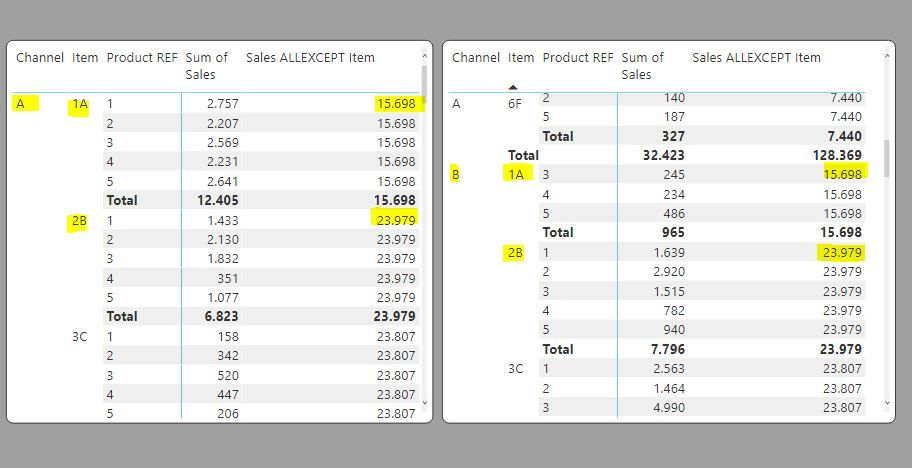
In the following example you can see how it works. The measure reads:
Sales ALLEXCEPT Item =
CALCULATE ( [Sum of Sales], ALLEXCEPT ( Actuals1, Actuals1[Item] ) )
And this is what you get:
So the expression removes all filters from the table except the filte on "Item". Therefore the total sum is by item only (regardless of Channel or Product Ref. (A bit like grouping totals)
So this is not the function you need to filter out rows with "I"
2) When specifying a text value as a reference in an expression, you need to wrap it in "". So in this case it would be "I"
If you want to filter out rows with "I", try:
€ Net Value = CALCULATE(SUM(Distincttable[Euro]),
FILTER('UNION',
'UNION'[DocCa] <> "I"))
Proud to be a Super User!
Paul on Linkedin.
Try this.
€ Net Value = CALCULATE(SUM(Distincttable[Euro]), FILTER(ALLEXCEPT('UNION', 'UNION'[DocCa]) 'UNION'[DocCa]= "I"))
Proud to be a Super User!
@Anonymous
The are two errors in the measure:
1) ALLEXCEPT requires a table reference and a column reference. This function removes the filters on the specified table except for the column included). So in your example, the expression would read
ALLEXCEPT(UNION, UNION[DocCa]).
In the following example you can see how it works. The measure reads:
Sales ALLEXCEPT Item =
CALCULATE ( [Sum of Sales], ALLEXCEPT ( Actuals1, Actuals1[Item] ) )
And this is what you get:
So the expression removes all filters from the table except the filte on "Item". Therefore the total sum is by item only (regardless of Channel or Product Ref. (A bit like grouping totals)
So this is not the function you need to filter out rows with "I"
2) When specifying a text value as a reference in an expression, you need to wrap it in "". So in this case it would be "I"
If you want to filter out rows with "I", try:
€ Net Value = CALCULATE(SUM(Distincttable[Euro]),
FILTER('UNION',
'UNION'[DocCa] <> "I"))
Proud to be a Super User!
Paul on Linkedin.
First off, thank all commentators for the answer however I think yours is the best and most explaining one.
For people who might happen to have the same problem:
It is mandatory that you use "<>" to filter not for I but exclude I.
Thank you very much!
@Anonymous , try like
€ Net Value = CALCULATE(SUM(Distincttable[Euro]), FILTER('UNION', 'UNION'[DocCa] = "I"),ALLEXCEPT('UNION', 'UNION'[DocCa]))
Check out the April 2026 Power BI update to learn about new features.
If you have recently started exploring Fabric, we'd love to hear how it's going. Your feedback can help with product improvements.
A new Power BI DataViz World Championship is coming this June! Don't miss out on submitting your entry.
| User | Count |
|---|---|
| 42 | |
| 37 | |
| 34 | |
| 21 | |
| 16 |
| User | Count |
|---|---|
| 65 | |
| 62 | |
| 31 | |
| 26 | |
| 25 |