cancel
Showing results for 
Search instead for 
Did you mean: 

Join the FabCon + SQLCon recap series. Up next: Power BI, Real-Time Intelligence, IQ and AI, and Data Factory take center stage. All sessions are available on-demand after the live show. Register now

Reply
jbrinker
Frequent Visitor

DAX Expression for a Simple Calculation

Hi,


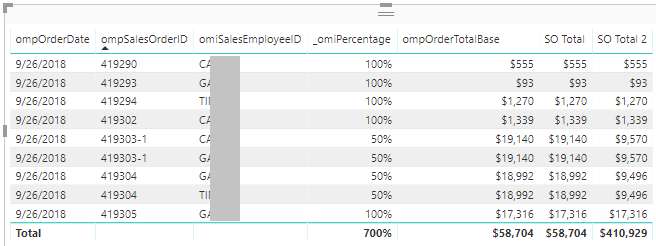
Sorry for the simple question but I am new to DAX.  I am simply trying to multiple two columns from different table but the Total is not computed as expected.  From the image below I would like to multiple  _omiPercentage with ompOrderTotalBase.  The fields are located in two different tables.  As you can see below the correct value is used for SO Total 2 rows but the Total is not correct. 


SO Total 2 = [SO Total] * [SO Percentage] where 
       SO Total = SUM(SalesOrders[ompOrderTotalBase]
       SO Percentage = SUM(SalesOrderSalesPeople[_omiPercentage])
 

What is the correct expression to use for this case.  Any assistance is greatly appreciated!


PowerBI Formula Problem.png


Thanks in advance,


Jeff 

1 ACCEPTED SOLUTION
v-yuta-msft
Community Support
Community Support

@jbrinker ,


Suppose the relationship between table 'SalesOrders' and 'SalesOrderSalesPeople' is many to one, you may modify measure using DAX like pattern below and check if the total is correct:


SO Total =
SUMX (
    'SalesOrderSalesPeople',
    [_omiPercentage] * RELATED ( SalesOrders[ompOrderTotalBase] )
)

Community Support Team _ Jimmy Tao

If this post helps, then please consider Accept it as the solution to help the other members find it more quickly.

View solution in original post

2 REPLIES 2
v-yuta-msft
Community Support
Community Support

@jbrinker ,


Suppose the relationship between table 'SalesOrders' and 'SalesOrderSalesPeople' is many to one, you may modify measure using DAX like pattern below and check if the total is correct:


SO Total =
SUMX (
    'SalesOrderSalesPeople',
    [_omiPercentage] * RELATED ( SalesOrders[ompOrderTotalBase] )
)

Community Support Team _ Jimmy Tao

If this post helps, then please consider Accept it as the solution to help the other members find it more quickly.

Perfect.  Thanks!

Helpful resources

Announcements
April Power BI Update Carousel

Power BI Monthly Update - April 2026

Check out the April 2026 Power BI update to learn about new features.

New to Fabric survey Carousel

New to Fabric Survey

If you have recently started exploring Fabric, we'd love to hear how it's going. Your feedback can help with product improvements.

Power BI DataViz World Championships carousel

Power BI DataViz World Championships - June 2026

A new Power BI DataViz World Championship is coming this June! Don't miss out on submitting your entry.

FabCon and SQLCon Highlights Carousel

FabCon &SQLCon Highlights

Experience the highlights from FabCon & SQLCon, available live and on-demand starting April 14th.