Join us at FabCon Atlanta from March 16 - 20, 2026, for the ultimate Fabric, Power BI, AI and SQL community-led event. Save $200 with code FABCOMM.
Register now!Get Fabric Certified for FREE during Fabric Data Days. Don't miss your chance! Request now
Hey All,
Having an issue when viewing qualified personnel. Some people have zero, they are indicated in a column as "No License", However when someone has a qualification, and for each of those qualifications, the same column will indicate "License". The issue I have when creating a measure, it counts all the times "License" is there, not simply the one time, so I can't give the answer to "How many people do we have with a license"
COMPANY LAST NAME LICENSE QUALIFICATION
A Garth License Truck
A Garth License Van
B Vander License Truck
C Anders No License
D Dunn License Truck
D Clark License Truck
D Clark License Van
So when I do the Table using the Companies, and how many licensed personnel they have it should display
A 1
B 1
C 0
D 2
Any help is appreciated, I'm not sure how to use Distinct Count and Count Rows together, and using Filter doesn't seem to help either.
Solved! Go to Solution.
Hi @TimsLanding ,
You can try using the below DAX
Create a Calculated Measure as shown below
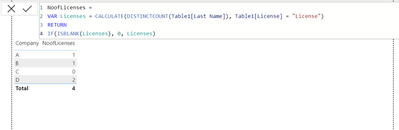
NoofLicenses =
VAR Licenses = CALCULATE(DISTINCTCOUNT(Table1[Last Name]), Table1[License] = "License")
RETURN
IF(ISBLANK(Licenses), 0, Licenses)
The Output looks as follows
Regards,
Thanks so much! I kept thinking I needed to use the Company in the equation, your equation works great!
Hi @TimsLanding ,
You can try using the below DAX
Create a Calculated Measure as shown below
NoofLicenses =
VAR Licenses = CALCULATE(DISTINCTCOUNT(Table1[Last Name]), Table1[License] = "License")
RETURN
IF(ISBLANK(Licenses), 0, Licenses)
The Output looks as follows
Regards,
Check out the November 2025 Power BI update to learn about new features.
Advance your Data & AI career with 50 days of live learning, contests, hands-on challenges, study groups & certifications and more!