cancel
Showing results for 
Search instead for 
Did you mean: 

Data Days is here! Join us now for 60+ days of learning, challenges, and connection. Learn more

Reply
Anonymous
Not applicable

DAX - Create New Table with variable table

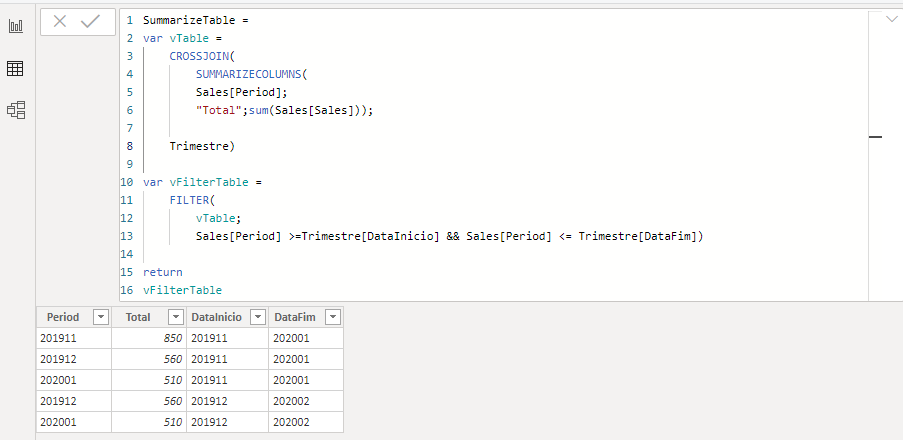
I would like to create a sumarize table through a temporary table using only one dax formula.

Example:
Table - Trimestre

DataInicioDataFim
201911202001
201912202002


Table - Sales
PeriodSales

PeriodSales
201910100
201910200
201910300
201911400
201911450
201912460
201912100
202001250
202001260


Summarize Table


Dax1.PNG


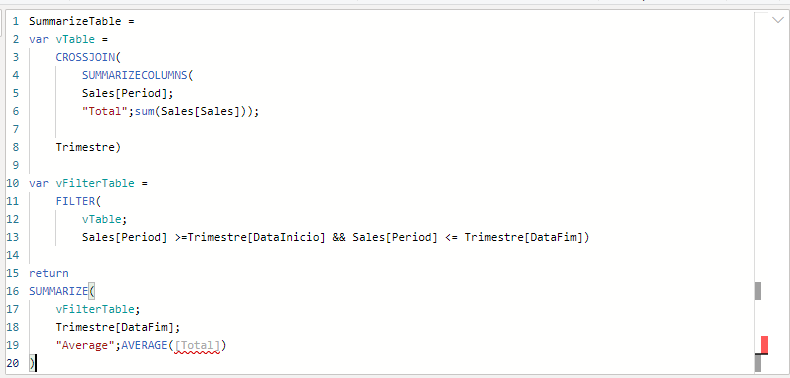
I would like to use the table created in the variable "vFilterTable" to calculate de average of [Total] columns by [DataFim] columns directly in this same dax formula. My ideia it was use de function summarizecolumns like below, but it´s not permited. Is there any way to have this summarize result without create another table?

Dax2.PNG

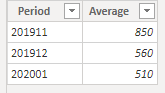
The result that I spect is that:
Dax3.PNG

1 ACCEPTED SOLUTION
smpa01
Community Champion
Community Champion

Can you please try using after VAR vfiltertable


VAR _x = groupby(vfiltertable,[datafim],"Average", AVERAGEX(CURRENTGROUP(),[total])

RETURN

VAR _x


========================
Did I answer your question? Mark my post as a solution!
Proud to be a Super User
My Custom Visualization Projects
• Plotting Live Sound: Live Sound
• Beautiful News: Women in Parliament, Energy Mix, Shrinking Armies
• Visual Capitalist: Working Hrs
• Others: Easing Graph, Animated Calendar
MayViz Submissions
• Week 1: View
• Week 2: View
• Week 3: View
• Week 4: View
========================

View solution in original post

3 REPLIES 3
amitchandak
Super User
Super User

In place of Average([Total]) use AverageX(_vTable,[Total])

Share with Power BI Enthusiasts: Full Power BI Video (20 Hours) YouTube
Microsoft Fabric Series 60+ Videos YouTube
Microsoft Fabric Hindi End to End YouTube
smpa01
Community Champion
Community Champion

Can you please try using after VAR vfiltertable


VAR _x = groupby(vfiltertable,[datafim],"Average", AVERAGEX(CURRENTGROUP(),[total])

RETURN

VAR _x


========================
Did I answer your question? Mark my post as a solution!
Proud to be a Super User
My Custom Visualization Projects
• Plotting Live Sound: Live Sound
• Beautiful News: Women in Parliament, Energy Mix, Shrinking Armies
• Visual Capitalist: Working Hrs
• Others: Easing Graph, Animated Calendar
MayViz Submissions
• Week 1: View
• Week 2: View
• Week 3: View
• Week 4: View
========================
Anonymous
Not applicable

It´s works perfectly.
I didn´t espected that would be so easy. I liked it

Thanks. 

Helpful resources

Announcements
Fabric Data Days is here Carousel

Fabric Data Days 2026

Don't miss out on Data Days, June 15 through August 7. Learn Fabric, Power BI, SQL, AI and more.

May Power BI Update Carousel

Power BI Monthly Update - May 2026

Check out the May 2026 Power BI update to learn about new features.

Power BI DataViz World Championships carousel

Power BI DataViz World Championships - June 2026

A new Power BI DataViz World Championship is coming this June! Don't miss out on submitting your entry.