Join us at FabCon Atlanta from March 16 - 20, 2026, for the ultimate Fabric, Power BI, AI and SQL community-led event. Save $200 with code FABCOMM.
Register now!The Power BI Data Visualization World Championships is back! Get ahead of the game and start preparing now! Learn more
Hi All,
Coming from a T-SQL background I am not sure of the syntax I need.
I need two fields in the same visual which counts the rows form the table.
CoffeeMobile with OrderSource =1 and the other 'CoffeeFront' Ordersource = 0 with both using promotion id 20282 where the store like '%SA' and store in ('Broken Hill').
I have written the following DAX, which is missing the store requirements.
CoffeeFront = CALCULATE(COUNT('adeadhoc_20170510_203451_gma_mobile_ordering_master_filtered_de20170510_csv'[order_unique_id]),FILTER('adeadhoc_20170510_203451_gma_mobile_ordering_master_filtered_de20170510_csv','adeadhoc_20170510_203451_gma_mobile_ordering_master_filtered_de20170510_csv'[promotion_id] = 20282),FILTER('adeadhoc_20170510_203451_gma_mobile_ordering_master_filtered_de20170510_csv','adeadhoc_20170510_203451_gma_mobile_ordering_master_filtered_de20170510_csv'[order_order_src] = 0))CoffeeMobile = CALCULATE(COUNT('adeadhoc_20170510_203451_gma_mobile_ordering_master_filtered_de20170510_csv'[order_unique_id]),FILTER('adeadhoc_20170510_203451_gma_mobile_ordering_master_filtered_de20170510_csv','adeadhoc_20170510_203451_gma_mobile_ordering_master_filtered_de20170510_csv'[promotion_id] = 20282),FILTER('adeadhoc_20170510_203451_gma_mobile_ordering_master_filtered_de20170510_csv','adeadhoc_20170510_203451_gma_mobile_ordering_master_filtered_de20170510_csv'[order_order_src] = 1))Any aisstance would be great, Thanks
Solved! Go to Solution.
@Anonymous
Hi,
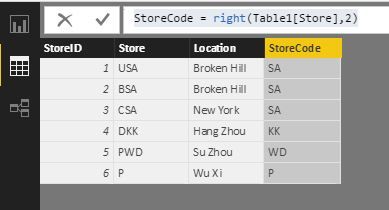
Which table are the stores and store locations in. If they are in a sole table, we need to create relationships with the current table. Then we add a calculated column with this formula.
StoreCode = RIGHT ( Table1[Store], 2 )
If you can post more information, we can get more accurate formula. You can refer to the formula here for the moment. BTW, Ross73312 is quite right though missed something.
CoffeeFront = CALCULATE( COUNT( 'adeadhoc_20170510_203451_gma_mobile_ordering_master_filtered_de20170510_csv'[order_unique_id] ), 'adeadhoc_20170510_203451_gma_mobile_ordering_master_filtered_de20170510_csv'[promotion_id] = 20282, 'adeadhoc_20170510_203451_gma_mobile_ordering_master_filtered_de20170510_csv'[order_order_src] = 0, StoreTable[Location] = “Broken Hill”, StoreTable[StoreCode] = “SA” )
)
@Anonymous
Hi,
Is your problem solved? What can I do for you?
Best Regards!
Dale
@Anonymous
Hi,
Which table are the stores and store locations in. If they are in a sole table, we need to create relationships with the current table. Then we add a calculated column with this formula.
StoreCode = RIGHT ( Table1[Store], 2 )
If you can post more information, we can get more accurate formula. You can refer to the formula here for the moment. BTW, Ross73312 is quite right though missed something.
CoffeeFront = CALCULATE( COUNT( 'adeadhoc_20170510_203451_gma_mobile_ordering_master_filtered_de20170510_csv'[order_unique_id] ), 'adeadhoc_20170510_203451_gma_mobile_ordering_master_filtered_de20170510_csv'[promotion_id] = 20282, 'adeadhoc_20170510_203451_gma_mobile_ordering_master_filtered_de20170510_csv'[order_order_src] = 0, StoreTable[Location] = “Broken Hill”, StoreTable[StoreCode] = “SA” )
)
You were very close. You didn't need to add in the filter function as calculate does this already.
CoffeeFront = CALCULATE( COUNT( 'adeadhoc_20170510_203451_gma_mobile_ordering_master_filtered_de20170510_csv'[order_unique_id] ), 'adeadhoc_20170510_203451_gma_mobile_ordering_master_filtered_de20170510_csv'[promotion_id] = 20282, 'adeadhoc_20170510_203451_gma_mobile_ordering_master_filtered_de20170510_csv'[order_order_src] = 0 )
CoffeeMobile = CALCULATE( COUNT( 'adeadhoc_20170510_203451_gma_mobile_ordering_master_filtered_de20170510_csv'[order_unique_id] ), 'adeadhoc_20170510_203451_gma_mobile_ordering_master_filtered_de20170510_csv'[promotion_id] = 20282, 'adeadhoc_20170510_203451_gma_mobile_ordering_master_filtered_de20170510_csv'[order_order_src] = 1 )
The Power BI Data Visualization World Championships is back! Get ahead of the game and start preparing now!
| User | Count |
|---|---|
| 37 | |
| 37 | |
| 33 | |
| 32 | |
| 29 |
| User | Count |
|---|---|
| 130 | |
| 88 | |
| 82 | |
| 68 | |
| 64 |