FabCon is coming to Atlanta
Join us at FabCon Atlanta from March 16 - 20, 2026, for the ultimate Fabric, Power BI, AI and SQL community-led event. Save $200 with code FABCOMM.
Register now!- Power BI forums
- Get Help with Power BI
- Desktop
- Service
- Report Server
- Power Query
- Mobile Apps
- Developer
- DAX Commands and Tips
- Custom Visuals Development Discussion
- Health and Life Sciences
- Power BI Spanish forums
- Translated Spanish Desktop
- Training and Consulting
- Instructor Led Training
- Dashboard in a Day for Women, by Women
- Galleries
- Data Stories Gallery
- Themes Gallery
- Contests Gallery
- QuickViz Gallery
- Quick Measures Gallery
- Visual Calculations Gallery
- Notebook Gallery
- Translytical Task Flow Gallery
- TMDL Gallery
- R Script Showcase
- Webinars and Video Gallery
- Ideas
- Custom Visuals Ideas (read-only)
- Issues
- Issues
- Events
- Upcoming Events
The Power BI Data Visualization World Championships is back! Get ahead of the game and start preparing now! Learn more
- Power BI forums
- Forums
- Get Help with Power BI
- Desktop
- Re: DAX column Unaffected by Segmenter or Filter p...
- Subscribe to RSS Feed
- Mark Topic as New
- Mark Topic as Read
- Float this Topic for Current User
- Bookmark
- Subscribe
- Printer Friendly Page

- Mark as New
- Bookmark
- Subscribe
- Mute
- Subscribe to RSS Feed
- Permalink
- Report Inappropriate Content
DAX Column Unaffected by Slicer or Filter pane
Hi all,
I have a problem where a calculated DAX column does not respond to filtering. The same issue presents itself if I try to circumvent with a measure instead. The dax column/measure are required to obtain a cumulative/running total value of revenue.
A simplified sample of the data is below. I am trying to filter the column based on the Sector in a slicer. Sector ID is used to form a relationship to a bridge table, but I still cannot filter the dax column even while using the sector column from this same table, or if I disable the relationship.
| Date | Monthly Revenue 18-19 | Sector | Sector ID |
| 01/01/2020 | £20000 | Government | 1 |
| 01/01/2020 | £30000 | Government | 1 |
| 02/02/2020 | £15000 | Charities | 2 |
| 02/02/2020 | £10000 | Charities | 2 |
The DAX is as follows:
Solved! Go to Solution.


- Mark as New
- Bookmark
- Subscribe
- Mute
- Subscribe to RSS Feed
- Permalink
- Report Inappropriate Content
Hi @Anonymous
I think you should refer to below measure:
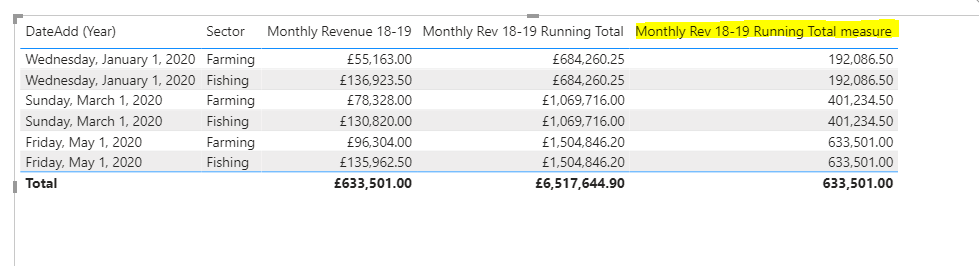
Monthly Rev 18-19 Running Total measure = CALCULATE(SUM(Table2[Monthly Revenue 18-19]),FILTER(ALLSELECTED(Table2),[DateAdd (Year)]<=MAX(Table2[DateAdd (Year)]))
)
Pbix attached.
If this post helps, then please consider Accept it as the solution to help the other members find it more
quickly.


- Mark as New
- Bookmark
- Subscribe
- Mute
- Subscribe to RSS Feed
- Permalink
- Report Inappropriate Content
You can do a running total measure instead like this one. Try it in a table visual with the date column. Since the ALL is changed, it should only remove the filter from that column (e.g., slicers on Sector, etc. should still work). If you make a Month column in your table, and add that to your visual, you should see the Month running total.
VAR thisdate =
MIN ( '4 Rev18-19 (2)'[Date] )
RETURN
CALCULATE (
SUM ( '4 Rev18-19 (2)'[Monthly Revenue 18-19] ),
ALL ( '4 Rev18-19 (2)'[Date] ),
'4 Rev18-19 (2)'[Date] <= thisdate
)
If this works for you, please mark it as the solution. Kudos are appreciated too. Please let me know if not.
Regards,
Pat
Did I answer your question? Mark my post as a solution! Kudos are also appreciated!
To learn more about Power BI, follow me on Twitter or subscribe on YouTube.
@mahoneypa HoosierBI on YouTube
- Mark as New
- Bookmark
- Subscribe
- Mute
- Subscribe to RSS Feed
- Permalink
- Report Inappropriate Content
Hi @mahoneypat
Thanks very much for taking the time to send over that measure.
The measure worked in the sense that filters now work correctly, however, it unfortunately seems to be showing the same values as the monthly revenue field as opposed to the cumulative/running total I am looking to show. (I did try the below with only the date, and "Pats Measure" in the table also)
Any ideas you might have that may have caused this I would be really grateful!
- Mark as New
- Bookmark
- Subscribe
- Mute
- Subscribe to RSS Feed
- Permalink
- Report Inappropriate Content
Hi @Anonymous
I think you should refer to below measure:
Monthly Rev 18-19 Running Total measure = CALCULATE(SUM(Table2[Monthly Revenue 18-19]),FILTER(ALLSELECTED(Table2),[DateAdd (Year)]<=MAX(Table2[DateAdd (Year)]))
)
Pbix attached.
If this post helps, then please consider Accept it as the solution to help the other members find it more
quickly.
- Mark as New
- Bookmark
- Subscribe
- Mute
- Subscribe to RSS Feed
- Permalink
- Report Inappropriate Content
Hi @v-diye-msft
Thank you so much! That worked perfectly, and helped me with the final requirement I had for this report - very much appreciate it!
Thanks to all for your help.


- Mark as New
- Bookmark
- Subscribe
- Mute
- Subscribe to RSS Feed
- Permalink
- Report Inappropriate Content
@Anonymous , you are using all this why it is ignoring the filter.
Also if it is a column, it will not respond to slicer changes.
Can you share sample data and sample output in table format? Or a sample pbix after removing sensitive data.
- Mark as New
- Bookmark
- Subscribe
- Mute
- Subscribe to RSS Feed
- Permalink
- Report Inappropriate Content
Hi @amitchandak
Thanks very much for a quick response.
Do you know of any other way I could achieve a running total without using the all function?
Sure, I have made a sample report with the sectors and values substituted.
Unfortunately it seems I don't have access to attach things to my posts, so I have provided a link to the pbix in google drive here.
Link to a sample excel sheet also here.
Helpful resources

Power BI Dataviz World Championships
The Power BI Data Visualization World Championships is back! Get ahead of the game and start preparing now!

Power BI Monthly Update - December 2025
Check out the December 2025 Power BI Holiday Recap!

FabCon Atlanta 2026
Join us at FabCon Atlanta, March 16-20, for the ultimate Fabric, Power BI, AI and SQL community-led event. Save $200 with code FABCOMM.

| User | Count |
|---|---|
| 39 | |
| 38 | |
| 38 | |
| 28 | |
| 27 |


| User | Count |
|---|---|
| 124 | |
| 88 | |
| 73 | |
| 66 | |
| 65 |


