Don't miss your chance to take the Fabric Data Engineer (DP-600) exam for FREE! Find out how by watching the DP-600 session on-demand now through April 28th.
Learn moreJoin the FabCon + SQLCon recap series. Up next: Power BI, Real-Time Intelligence, IQ and AI, and Data Factory take center stage. All sessions are available on-demand after the live show. Register now
I am trying to store a Calculated Table as a variable to pass later on as a parameter in Calculate() so that a measure is only evaluated for the values in the calculated table.
1. Am I typing something wrong in the DAX to accomplish a Calculated Table with only the unique combinations of Dim1 and Dim2?
2. Does passing a calculated table in a Calculate() parameter filter as I am expecting?
This code does not seem to be doing that, even though I thought it would (The measure does not seem to be filtered).
Thank you for any assistance and if you need more information let me know!
Measure1:=
VAR Filter1 =
CALCULATETABLE (
ADDCOLUMNS (
VALUES ( 'Table1'[Dim1] ),
"Dim 2", VALUES ( 'Table1'[Dim2] )
),
LastDate('Table1'[Date]),
'Table1'[Dim5] = TRUE
RETURN
Calculate(
SUM(Table1[Fact1]),
Filter1
)
Solved! Go to Solution.
Hi Kroth,
>>1. Am I typing something wrong in the DAX to accomplish a Calculated Table with only the unique combinations of Dim1 and Dim2?
Based on my test, you have written the calculate table in the VAR function, the formula will been limiting calculate range(only work on current row).
>> 2. Does passing a calculated table in a Calculate() parameter filter as I am expecting?
Yes, it is possible.
I have modified your formula, please follow below steps:
1. Create table.
2. Modify your measure to match my table.
Test your calculate table formula: (It works well)
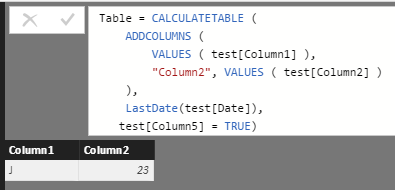
Measure = var fitler1 = CALCULATETABLE (
ADDCOLUMNS (
VALUES ( test[Column1] ),
"Column2", VALUES ( test[Column2] )
),
LastDate(test[Date]),
test[Column5] = TRUE)
return
Calculate(
SUM(test[Column2]),
fitler1
)
3. Add a calculate column to display the result.
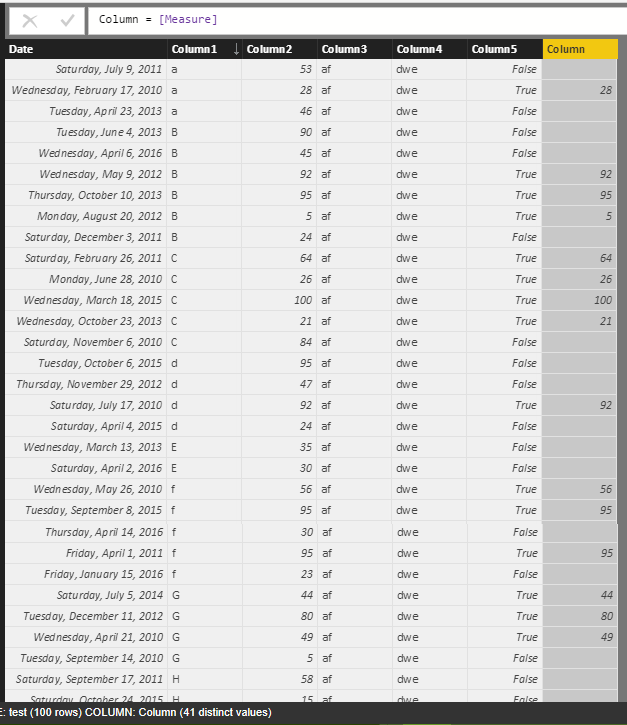
It seems that filter ‘LastDate(test[Date])’ not work. Since you put the code of calculate table in the VAR function, the formula will been limiting calculate range on current row.
4. Modify your code to fix this issue.
Measure = var fitler1 = CALCULATETABLE (
ADDCOLUMNS (
VALUES ( test[Column1] ),
"Column2", VALUES ( test[Column2] )
),
LastDate(ALL(test[Date])),
test[Column5] = TRUE)
return
Calculate(
SUM(test[Column2]),
fitler1
)
Notice: The variable can store the table, but it can't get the columns directly, you can use filter or selectcolumns function to get columns which in the variable table.
Sample:
filter(filer1, [Column1] <> blank)
Regards,
Xiaoxin Sheng
Hi Kroth,
>>1. Am I typing something wrong in the DAX to accomplish a Calculated Table with only the unique combinations of Dim1 and Dim2?
Based on my test, you have written the calculate table in the VAR function, the formula will been limiting calculate range(only work on current row).
>> 2. Does passing a calculated table in a Calculate() parameter filter as I am expecting?
Yes, it is possible.
I have modified your formula, please follow below steps:
1. Create table.
2. Modify your measure to match my table.
Test your calculate table formula: (It works well)
Measure = var fitler1 = CALCULATETABLE (
ADDCOLUMNS (
VALUES ( test[Column1] ),
"Column2", VALUES ( test[Column2] )
),
LastDate(test[Date]),
test[Column5] = TRUE)
return
Calculate(
SUM(test[Column2]),
fitler1
)
3. Add a calculate column to display the result.
It seems that filter ‘LastDate(test[Date])’ not work. Since you put the code of calculate table in the VAR function, the formula will been limiting calculate range on current row.
4. Modify your code to fix this issue.
Measure = var fitler1 = CALCULATETABLE (
ADDCOLUMNS (
VALUES ( test[Column1] ),
"Column2", VALUES ( test[Column2] )
),
LastDate(ALL(test[Date])),
test[Column5] = TRUE)
return
Calculate(
SUM(test[Column2]),
fitler1
)
Notice: The variable can store the table, but it can't get the columns directly, you can use filter or selectcolumns function to get columns which in the variable table.
Sample:
filter(filer1, [Column1] <> blank)
Regards,
Xiaoxin Sheng
Check out the April 2026 Power BI update to learn about new features.
If you have recently started exploring Fabric, we'd love to hear how it's going. Your feedback can help with product improvements.
A new Power BI DataViz World Championship is coming this June! Don't miss out on submitting your entry.
| User | Count |
|---|---|
| 41 | |
| 37 | |
| 34 | |
| 21 | |
| 16 |
| User | Count |
|---|---|
| 64 | |
| 58 | |
| 31 | |
| 25 | |
| 25 |