Join us at FabCon Atlanta from March 16 - 20, 2026, for the ultimate Fabric, Power BI, AI and SQL community-led event. Save $200 with code FABCOMM.
Register now!Get Fabric Certified for FREE during Fabric Data Days. Don't miss your chance! Request now
Hi
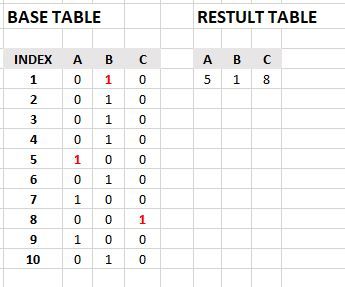
I need help to create the 'RESULT TABLE' with a measure in DAX.
The 'RESULT TABLE' shows the first occurrence of the number '1' in each column
in the 'BASE TABLE' and returns the row number from the 'INDEX' column.
(The number '1' appears only one time in each row in the BASE TABLE).
Thanks for the help
Solved! Go to Solution.
Hi @dpbi
How about
Measure A = CALCULATE ( MIN ( BaseTable[Index] ), BaseTable[A] = 1 ) Measure B = CALCULATE ( MIN ( BaseTable[Index] ), BaseTable[B] = 1 ) Measure C = CALCULATE ( MIN ( BaseTable[Index] ), BaseTable[C] = 1 )
Hi @dpbi
How about
Measure A = CALCULATE ( MIN ( BaseTable[Index] ), BaseTable[A] = 1 ) Measure B = CALCULATE ( MIN ( BaseTable[Index] ), BaseTable[B] = 1 ) Measure C = CALCULATE ( MIN ( BaseTable[Index] ), BaseTable[C] = 1 )
Thank you very much for your fast reply.
Your solution works. Thanks again.
Is their an option to make the calculation in one measure for all the columns?
(thats why i specified that the number '1' appear only once in each row)
Hi @dpbi
Yes we can write ONE MEASURE
Follow these steps
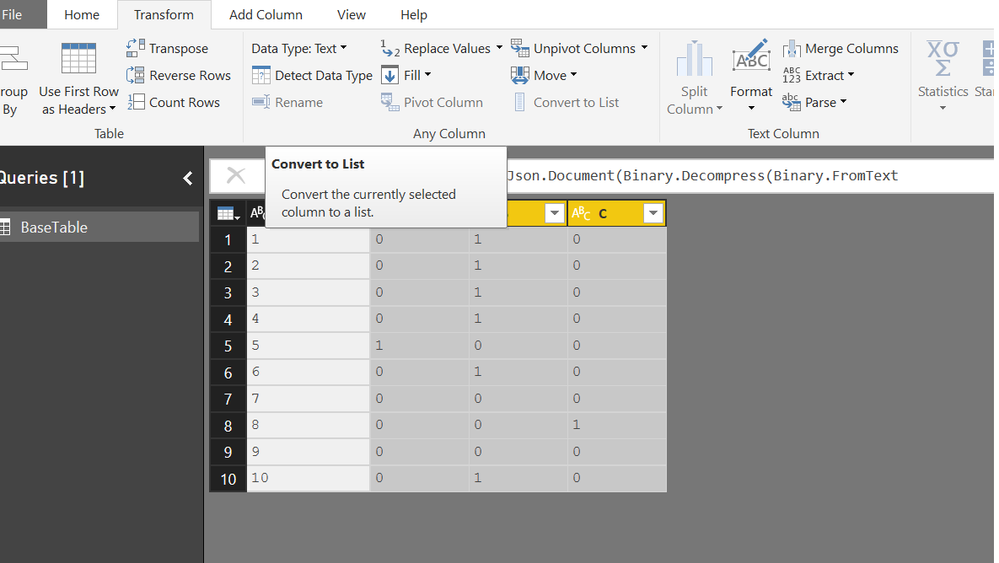
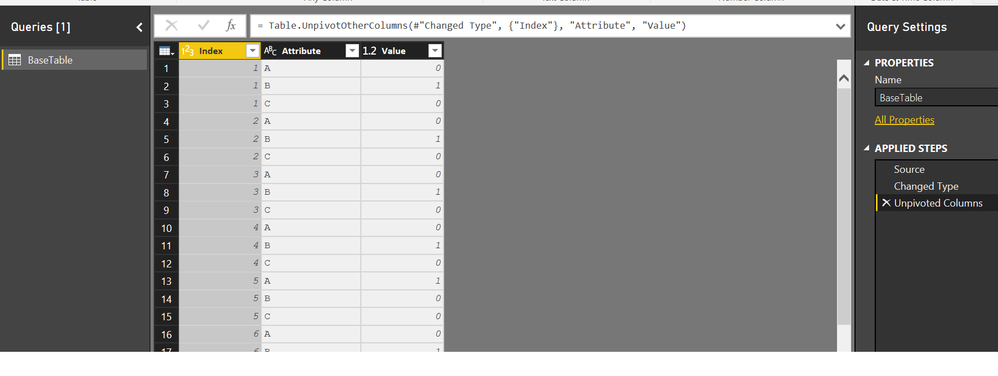
Step #1 Unpivot the 3 Columns
You will get
Now You can write a single MEASURE
Measure =
CALCULATE (
MIN ( BaseTable[Index] ),
FILTER ( ALLEXCEPT ( BaseTable, BaseTable[Attribute] ), BaseTable[Value] = 1 )
)
Thank you very much again.
Fast replies, working solutions.
Well appreciated.
Thanks
Check out the November 2025 Power BI update to learn about new features.
Advance your Data & AI career with 50 days of live learning, contests, hands-on challenges, study groups & certifications and more!