Join us at FabCon Atlanta from March 16 - 20, 2026, for the ultimate Fabric, Power BI, AI and SQL community-led event. Save $200 with code FABCOMM.
Register now!The Power BI Data Visualization World Championships is back! Get ahead of the game and start preparing now! Learn more
Hi,
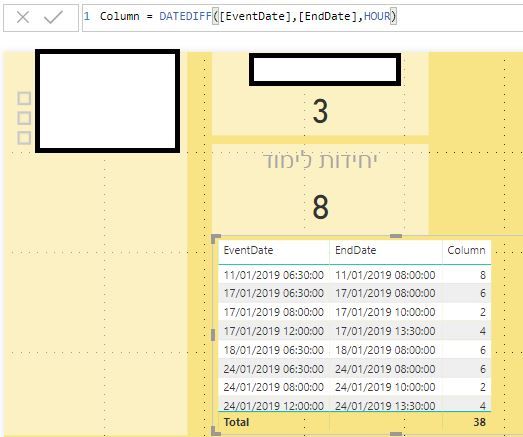
I'm trying to calculate DATEDIFF but getting weird results... I would like to see in "Column" 1.5, 1.5, 2, 1.5 etc.
I'll appreciate your help with that.
Thanks!
Solved! Go to Solution.
Hi @shainis
A few questions:
Can you share the pbix? Are [EndDate] and [EventDate] measures? Can you show their code?
Is what you want to calculate a column or a measure?
In the meantime, try this instead:
([EndDate] - [EventDate]) * 24
which should yield the difference in hours
Hi @shainis
A few questions:
Can you share the pbix? Are [EndDate] and [EventDate] measures? Can you show their code?
Is what you want to calculate a column or a measure?
In the meantime, try this instead:
([EndDate] - [EventDate]) * 24
which should yield the difference in hours
Thanks, @AlB, that worked!
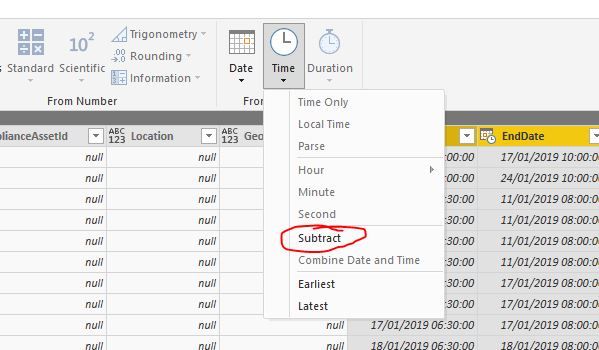
An alternative solution would be to use the Time Subtruct. Both are doing the job.
Thank you!
The Power BI Data Visualization World Championships is back! Get ahead of the game and start preparing now!
| User | Count |
|---|---|
| 39 | |
| 37 | |
| 33 | |
| 33 | |
| 29 |
| User | Count |
|---|---|
| 134 | |
| 96 | |
| 78 | |
| 67 | |
| 65 |