FabCon is coming to Atlanta
Join us at FabCon Atlanta from March 16 - 20, 2026, for the ultimate Fabric, Power BI, AI and SQL community-led event. Save $200 with code FABCOMM.
Register now!- Power BI forums
- Get Help with Power BI
- Desktop
- Service
- Report Server
- Power Query
- Mobile Apps
- Developer
- DAX Commands and Tips
- Custom Visuals Development Discussion
- Health and Life Sciences
- Power BI Spanish forums
- Translated Spanish Desktop
- Training and Consulting
- Instructor Led Training
- Dashboard in a Day for Women, by Women
- Galleries
- Data Stories Gallery
- Themes Gallery
- Contests Gallery
- QuickViz Gallery
- Quick Measures Gallery
- Visual Calculations Gallery
- Notebook Gallery
- Translytical Task Flow Gallery
- TMDL Gallery
- R Script Showcase
- Webinars and Video Gallery
- Ideas
- Custom Visuals Ideas (read-only)
- Issues
- Issues
- Events
- Upcoming Events
View all the Fabric Data Days sessions on demand. View schedule
- Power BI forums
- Forums
- Get Help with Power BI
- Desktop
- DATEDIFF I need to use to calculate averages
- Subscribe to RSS Feed
- Mark Topic as New
- Mark Topic as Read
- Float this Topic for Current User
- Bookmark
- Subscribe
- Printer Friendly Page

- Mark as New
- Bookmark
- Subscribe
- Mute
- Subscribe to RSS Feed
- Permalink
- Report Inappropriate Content
DATEDIFF I need to use to calculate averages
Hello everyone,
I have used this solution to calculate the days between 2 dates: https://community.powerbi.com/t5/Desktop/Measure-to-Calculate-the-number-of-days-between-two-date-co...
It seems to work quite well with +-1 day sometimes, I believe it's because the columns are date/time and it subtracts the hours as well for some of the calculations.
The only problem is that at the bottom of the table appears "1" and not the average.
I have 3 column trials.
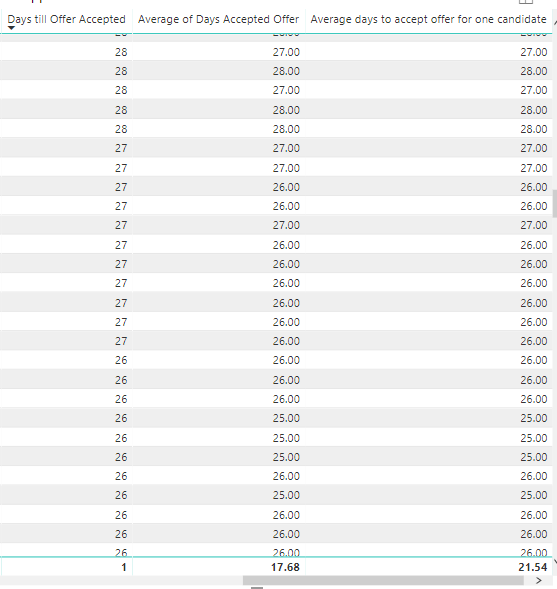
1. Days till Offer accepted -> The DAX formula calculated from the link above:
SWITCH (
    TRUE (),
    MIN('Projects'[start_date]) < MIN('Projects'[end_date]), DATEDIFF ( MIN('Projects'[start_date]), MIN('Projects'[end_date]), DAY ),
    MIN('Projects'[start_date]) > MIN('Projects'[end_date]), DATEDIFF ( MIN('Projects'[end_date]), MIN('Projects'[start_date]), DAY )* -1
)
2. Average of days accepted offer -> A conditional column in power query with this M formula:
Duration.Days(Duration.From([#"end_date"]-[start_date]))
3. Average days to accept offer for one candidate -> An average DAX calculation of the conditional column above that ignores the 0's:
Solved! Go to Solution.


- Mark as New
- Bookmark
- Subscribe
- Mute
- Subscribe to RSS Feed
- Permalink
- Report Inappropriate Content
Hi @Anonymous ,
We can update your measure as below.
Days till Offer accepted =
DATEDIFF (
    AVERAGEA ( 'Projects'[start_date] ),
    AVERAGEA ( 'Projects'[end_date] ),
    DAY
)
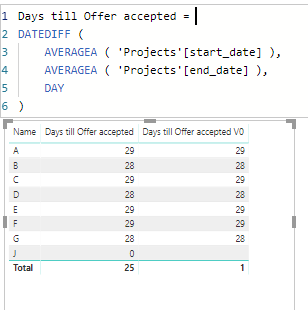
If this post helps, then please consider Accept it as the solution to help the others find it more quickly.
- Mark as New
- Bookmark
- Subscribe
- Mute
- Subscribe to RSS Feed
- Permalink
- Report Inappropriate Content
Hi @Anonymous ,
To update the measure as below.
Days till Offer accepted v2 =
IF (
    ISINSCOPE ( Projects[Name] ),
    FORMAT (
        DATEDIFF (
            AVERAGE ( 'Projects'[start_date] ),
            AVERAGE ( 'Projects'[end_date] ),
            DAY
        ),
        "General Number"
    ),
    FORMAT (
        DIVIDE (
            SUMX (
                ALL ( Projects ),
                DATEDIFF (
                    AVERAGE ( 'Projects'[start_date] ),
                    AVERAGE ( 'Projects'[end_date] ),
                    DAY
                )
            ),
            COUNTROWS (
                FILTER ( ALL ( Projects ), Projects[start_date] <> Projects[end_date] )
            )
        ),
        "General Number"
    )
)

If you want this column to show depends on another filter, you can create another one measure.
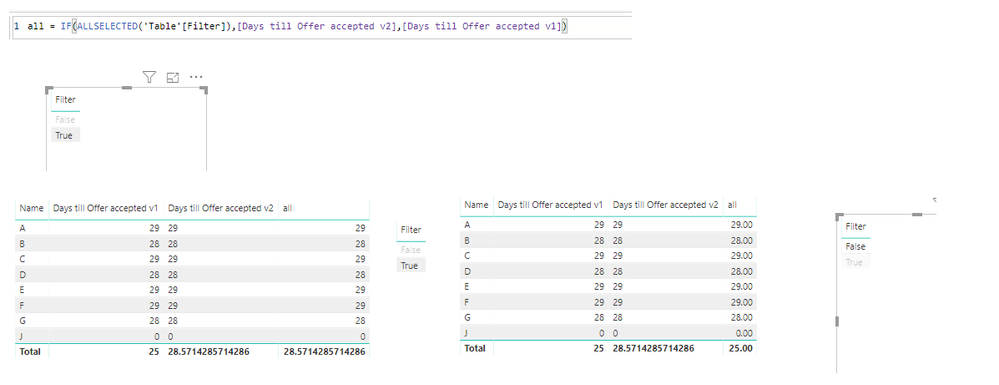
If this post helps, then please consider Accept it as the solution to help the others find it more quickly.
- Mark as New
- Bookmark
- Subscribe
- Mute
- Subscribe to RSS Feed
- Permalink
- Report Inappropriate Content
Hi @Anonymous ,
We can update your measure as below.
Days till Offer accepted =
DATEDIFF (
    AVERAGEA ( 'Projects'[start_date] ),
    AVERAGEA ( 'Projects'[end_date] ),
    DAY
)
If this post helps, then please consider Accept it as the solution to help the others find it more quickly.
- Mark as New
- Bookmark
- Subscribe
- Mute
- Subscribe to RSS Feed
- Permalink
- Report Inappropriate Content
Thank you very much @v-frfei-msft , works very well, can I add a Filter to this formula to ignore all the 0's ?
- Mark as New
- Bookmark
- Subscribe
- Mute
- Subscribe to RSS Feed
- Permalink
- Report Inappropriate Content
Hi @Anonymous ,
To update the measure as below.
Days till Offer accepted v2 =
IF (
    ISINSCOPE ( Projects[Name] ),
    FORMAT (
        DATEDIFF (
            AVERAGE ( 'Projects'[start_date] ),
            AVERAGE ( 'Projects'[end_date] ),
            DAY
        ),
        "General Number"
    ),
    FORMAT (
        DIVIDE (
            SUMX (
                ALL ( Projects ),
                DATEDIFF (
                    AVERAGE ( 'Projects'[start_date] ),
                    AVERAGE ( 'Projects'[end_date] ),
                    DAY
                )
            ),
            COUNTROWS (
                FILTER ( ALL ( Projects ), Projects[start_date] <> Projects[end_date] )
            )
        ),
        "General Number"
    )
)
If you want this column to show depends on another filter, you can create another one measure.
If this post helps, then please consider Accept it as the solution to help the others find it more quickly.
- Mark as New
- Bookmark
- Subscribe
- Mute
- Subscribe to RSS Feed
- Permalink
- Report Inappropriate Content
Thank you very much @v-frfei-msft ! Quite a long formula, but it works! 😄
Instead of Projects[Name] I used the Candidate ID, as it is unique.
Instead of General Number I used "0"
Can you please confirm is that's what I was supposed to do?
I would love to understand the formula if I use it next time 😄 Thank you very much! You are awesome!
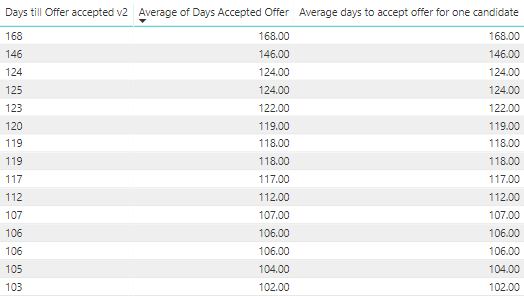
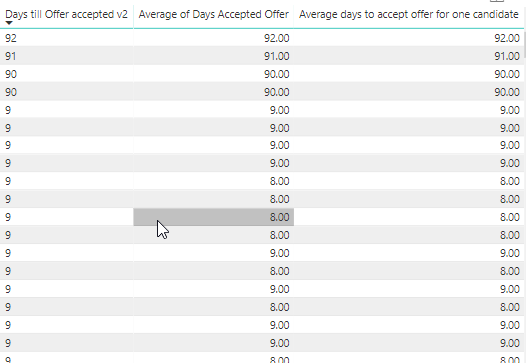
(edited) One other strange thing I've noticed is that the results are not recognized as whole numbers. When I want to sort them descending, they show me the 92, 91 first although the biggest numbers are 168, 146. Is there a solution to this? (Check screenshots below)
Helpful resources

Power BI Monthly Update - November 2025
Check out the November 2025 Power BI update to learn about new features.

Fabric Data Days
Advance your Data & AI career with 50 days of live learning, contests, hands-on challenges, study groups & certifications and more!

FabCon Atlanta 2026
Join us at FabCon Atlanta, March 16-20, for the ultimate Fabric, Power BI, AI and SQL community-led event. Save $200 with code FABCOMM.


