Join us at FabCon Atlanta from March 16 - 20, 2026, for the ultimate Fabric, Power BI, AI and SQL community-led event. Save $200 with code FABCOMM.
Register now!View all the Fabric Data Days sessions on demand. View schedule
Hi,
I have been trying to use the DATEADD function to compute a certain attribute "cost" for the previous Month.
I'm using a horizontal bar graph. The Date Attribute for the table containing cost is not contigous - Table 1 . However I have created a set of disntict dates in another table - Table 2. I have related the two tables as a many to one relation. I use the Date column from table two as a argument to Dateadd. However my the aggregation of the previous cost is wrong.
Solved! Go to Solution.
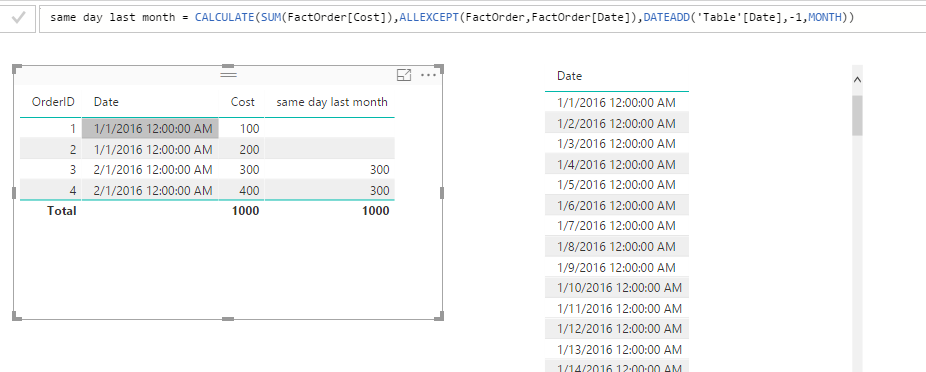
As you said, you fact table has many to one relationship to your date dimension table. Since you have multiple entries for same date in fact table, you need to use ALLEXCEPT() function to group the calculation.
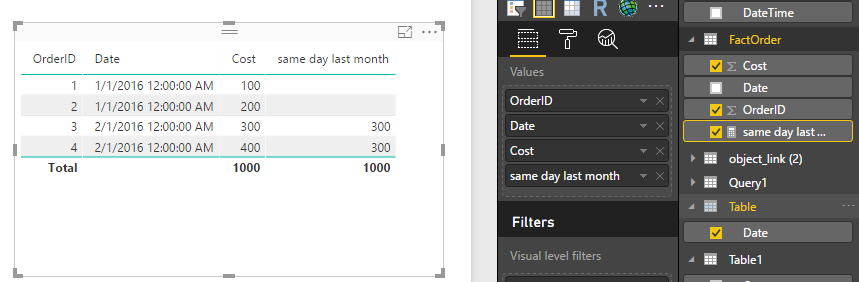
And make sure you include the date field from date dimension into visual.
Regards,
As you said, you fact table has many to one relationship to your date dimension table. Since you have multiple entries for same date in fact table, you need to use ALLEXCEPT() function to group the calculation.
And make sure you include the date field from date dimension into visual.
Regards,
Hi @sa1
In order for the DateAdd to work you need to have a Date table.
You can create one using my blog post here: https://www.fourmoo.com/2016/09/13/power-bi-how-to-easily-create-dynamic-date-tabledimension-with-fi...
Then you can relate your table to this Date Table.
Once you have done that you can then use the DATEADD function using the above created Date table.
Hi,
I already have a table with only Disntict Date Values
Check out the November 2025 Power BI update to learn about new features.
Advance your Data & AI career with 50 days of live learning, contests, hands-on challenges, study groups & certifications and more!