I am working with a stock inventory report and would like to add a what if parameter to allow the report user to pick a number of days by which they change the stock expiry date either positive or negative and the results of this would be displayed on a graph showing when the stock would be unavailable due to expiry. Ultimately, I want to combine this with a sales forecast chart to plot stock expiry against projected sales with a percentage what if parameter on the sales forecast and a number of days what if parameter to adjust the expiry dates.
This is my chart so far with forecast sales and actual expiry dates. I have the percentage sales difference working but am hitting some problems with the expiry date what if parameter.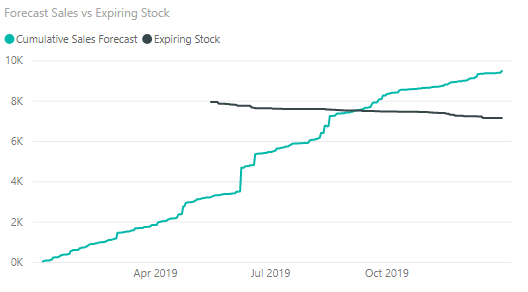
I have a calendar table available and a stock table with stock availability and expiry date columns. The model has a disabled relationship between the expiry date and the Calendar table. I was trying to find the number of days to expiry from the current date using a what if parameter to add or subtract days from the actual expiry date using the following formula.
What If days to expiry = CALCULATE(DATEADD('Calendar'[Date], 'Change in Expiry Date'[Change in Expiry Date Value], DAY) - TODAY(),USERELATIONSHIP('StockPriceData'[Expiry Date], 'Calendar'[Date]),ALL('Calendar'))
When I include the measure in a table it throws an error saying that the DATEADD function needs contiguous data. I was hoping that the use of the Calendar table would get around this issue but it is failing.
Is anyone able to help guide me on a way to achieve the what if scenario on the expiry dates?


