Get Fabric certified for FREE!
Don't miss your chance to take the Fabric Data Engineer (DP-600) exam for FREE! Find out how by watching the DP-600 session on-demand now through April 28th.
Learn more- Power BI forums
- Get Help with Power BI
- Desktop
- Service
- Report Server
- Power Query
- Mobile Apps
- Developer
- DAX Commands and Tips
- Custom Visuals Development Discussion
- Health and Life Sciences
- Power BI Spanish forums
- Translated Spanish Desktop
- Training and Consulting
- Instructor Led Training
- Dashboard in a Day for Women, by Women
- Galleries
- Data Stories Gallery
- Themes Gallery
- Contests Gallery
- QuickViz Gallery
- Quick Measures Gallery
- Visual Calculations Gallery
- Notebook Gallery
- Translytical Task Flow Gallery
- TMDL Gallery
- R Script Showcase
- Webinars and Video Gallery
- Ideas
- Custom Visuals Ideas (read-only)
- Issues
- Issues
- Events
- Upcoming Events
Join the FabCon + SQLCon recap series. Up next: Power BI, Real-Time Intelligence, IQ and AI, and Data Factory take center stage. All sessions are available on-demand after the live show. Register now
- Power BI forums
- Forums
- Get Help with Power BI
- Desktop
- DATEADD Function
- Subscribe to RSS Feed
- Mark Topic as New
- Mark Topic as Read
- Float this Topic for Current User
- Bookmark
- Subscribe
- Printer Friendly Page


- Mark as New
- Bookmark
- Subscribe
- Mute
- Subscribe to RSS Feed
- Permalink
- Report Inappropriate Content
DATEADD Function
I'm hoping someone can help me get past this roadblock. It seems what I'm doing is fairly simple and I may be making it more difficult thatn it should be.
All I'm trying to do is aggregate the sum of the column [S2458 - Enrollment Quantity] for the past 12 months. I currently only have one month's data in the database. Could this be why? Since its not counting the current month? If that's the case, when more data is inputed, will this formula work for what I need?
Enrollment for Previous 12mo - S2458 = CALCULATE(SUM(tbl_FixedCost[S2458 - Enrollment Quantity]),DATEADD(tbl_FixedCost[Billing Date],-12,MONTH))
Solved! Go to Solution.


- Mark as New
- Bookmark
- Subscribe
- Mute
- Subscribe to RSS Feed
- Permalink
- Report Inappropriate Content
Your formula looks very similar to this one here but I suspect that the data model used in that case is different than yours
http://community.powerbi.com/t5/Desktop/Smart-DAX-Last-Year-To-Date/m-p/20099#M6085
Your formula is basically going to filter the dates involved to a specific date, which is probably not what is desired, correct?
I imagine that you are using a measure and that you want to SUM all of the [S2458 - Enrollment Quantity] for the last 12 months inclusive. So, you should be able to do something like:
Enrollment for Previous 12mo - S2458 = CALCULATE(SUM(tbl_FixedCost[S2458 - Enrollment Quantity]),FILTER('tbl_FixedCost', 'tbl_FixedCost'[Billing Date] > DATEADD(TODAY(),-12,MONTH)))Really difficult to give you a definitive answer without knowing your data model, but think of it this way, you need to filter out all of the rows in tbl_FixedCost that have dates greater than Today - 12 months and then SUM the [S2458 - Enrollment Quantity] field for those rows. Your formula, I believe, is basically filtering your table down to a single row, if it exists.
Again, tough to say without more information like whether this is measure context or column context and a little more information about your model. I'm purely speculating here for a large part of this.
Follow on LinkedIn
@ me in replies or I'll lose your thread!!!
Instead of a Kudo, please vote for this idea
Become an expert!: Enterprise DNA
External Tools: MSHGQM
YouTube Channel!: Microsoft Hates Greg
Latest book!: DAX For Humans
DAX is easy, CALCULATE makes DAX hard...
- Mark as New
- Bookmark
- Subscribe
- Mute
- Subscribe to RSS Feed
- Permalink
- Report Inappropriate Content
Your formula looks very similar to this one here but I suspect that the data model used in that case is different than yours
http://community.powerbi.com/t5/Desktop/Smart-DAX-Last-Year-To-Date/m-p/20099#M6085
Your formula is basically going to filter the dates involved to a specific date, which is probably not what is desired, correct?
I imagine that you are using a measure and that you want to SUM all of the [S2458 - Enrollment Quantity] for the last 12 months inclusive. So, you should be able to do something like:
Enrollment for Previous 12mo - S2458 = CALCULATE(SUM(tbl_FixedCost[S2458 - Enrollment Quantity]),FILTER('tbl_FixedCost', 'tbl_FixedCost'[Billing Date] > DATEADD(TODAY(),-12,MONTH)))Really difficult to give you a definitive answer without knowing your data model, but think of it this way, you need to filter out all of the rows in tbl_FixedCost that have dates greater than Today - 12 months and then SUM the [S2458 - Enrollment Quantity] field for those rows. Your formula, I believe, is basically filtering your table down to a single row, if it exists.
Again, tough to say without more information like whether this is measure context or column context and a little more information about your model. I'm purely speculating here for a large part of this.
Follow on LinkedIn
@ me in replies or I'll lose your thread!!!
Instead of a Kudo, please vote for this idea
Become an expert!: Enterprise DNA
External Tools: MSHGQM
YouTube Channel!: Microsoft Hates Greg
Latest book!: DAX For Humans
DAX is easy, CALCULATE makes DAX hard...

- Mark as New
- Bookmark
- Subscribe
- Mute
- Subscribe to RSS Feed
- Permalink
- Report Inappropriate Content
I clueless where to start. I happy to provide more info. Needed.
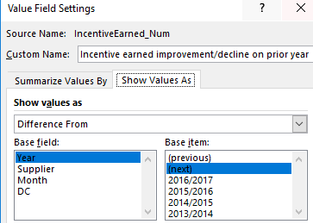
I have a report I want to show current year by month total and I want to compare values with the previous years by month.

On Excel, I used the Value Field Settings to show values as Difference from Based field [Year] and Base items [next]
- Mark as New
- Bookmark
- Subscribe
- Mute
- Subscribe to RSS Feed
- Permalink
- Report Inappropriate Content
You're right, I'm looking an inclusive aggregation of previous 12 months so thank you for that formula, it should work. However, when I try and use it I receive the error for the TODAY() function saying 'The first argument to 'DATEADD' must specify a column'
- Mark as New
- Bookmark
- Subscribe
- Mute
- Subscribe to RSS Feed
- Permalink
- Report Inappropriate Content
@Caitlin_Knox - I'll have to test for a better solution, but one solution is to create a custom column with a formula of:
Today = TODAY()
Then you can just use that column.
Follow on LinkedIn
@ me in replies or I'll lose your thread!!!
Instead of a Kudo, please vote for this idea
Become an expert!: Enterprise DNA
External Tools: MSHGQM
YouTube Channel!: Microsoft Hates Greg
Latest book!: DAX For Humans
DAX is easy, CALCULATE makes DAX hard...
- Mark as New
- Bookmark
- Subscribe
- Mute
- Subscribe to RSS Feed
- Permalink
- Report Inappropriate Content
What's the recommended approach when you need to use DateAdd for a scalar value other than Today() (i.e. something you can't simply turn into a column)?


- Mark as New
- Bookmark
- Subscribe
- Mute
- Subscribe to RSS Feed
- Permalink
- Report Inappropriate Content

- Mark as New
- Bookmark
- Subscribe
- Mute
- Subscribe to RSS Feed
- Permalink
- Report Inappropriate Content
That worked perfect, thank you

Helpful resources

Power BI Monthly Update - April 2026
Check out the April 2026 Power BI update to learn about new features.

New to Fabric Survey
If you have recently started exploring Fabric, we'd love to hear how it's going. Your feedback can help with product improvements.

Power BI DataViz World Championships - June 2026
A new Power BI DataViz World Championship is coming this June! Don't miss out on submitting your entry.

FabCon &SQLCon Highlights
Experience the highlights from FabCon & SQLCon, available live and on-demand starting April 14th.

| User | Count |
|---|---|
| 40 | |
| 37 | |
| 32 | |
| 20 | |
| 15 |


| User | Count |
|---|---|
| 66 | |
| 58 | |
| 31 | |
| 25 | |
| 24 |


