Join us at FabCon Atlanta from March 16 - 20, 2026, for the ultimate Fabric, Power BI, AI and SQL community-led event. Save $200 with code FABCOMM.
Register now!The Power BI Data Visualization World Championships is back! Get ahead of the game and start preparing now! Learn more
Hi,
I am having all sorts of troubles for something that should be easy.
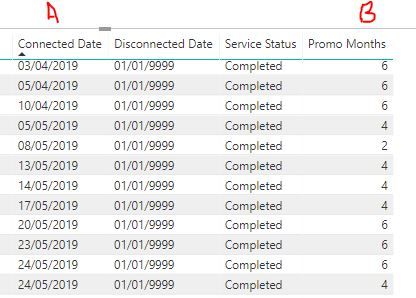
I have a date column, and i simply want to add the number of months shown in another column to the original date.
The Date is in a table called X_Services, the Additional months i want to add is from a related table called "Promo_Months".
In the table X_Services i have the promo_months value show via the related function. Not sure if this is what's causing the issue.
I am using the DATEADD function to no avail, can anyone shed some light on how to successfully achieve this.
I did this and got the result on one occassion, but mysteriously only where the additional months value of 2 was shown .. the rest didn't show?
Solved! Go to Solution.
@ToddMate hi can you share some data (not in pic format, text format) from both tables
and also provide the calculations you are using.
Proud to be a Super User!
@ToddMate hi can you share some data (not in pic format, text format) from both tables
and also provide the calculations you are using.
Proud to be a Super User!
@ToddMate great what was the issue?
Proud to be a Super User!
The Power BI Data Visualization World Championships is back! Get ahead of the game and start preparing now!
| User | Count |
|---|---|
| 39 | |
| 35 | |
| 33 | |
| 32 | |
| 28 |
| User | Count |
|---|---|
| 136 | |
| 96 | |
| 77 | |
| 67 | |
| 65 |