
cancel
Showing results for 
Search instead for 
Did you mean: 

Learn from the best! Meet the four finalists headed to the FINALS of the Power BI Dataviz World Championships! Register now

Reply
Anonymous
Not applicable

DATE RANGE LOOKUP

Hello everyone,


I have two tables like the example below. I want to look up the Campaign into my Product table by the condition that the Launch date is in the period of a Campaign.


I want to use LOOKUPVALUE in DAX but dont know how.


Can we use DAX or another way to solve it?


Thank you


Capture.PNG

1 ACCEPTED SOLUTION
iamprajot
Responsive Resident
Responsive Resident

Here it is, Create a Calculated Column
= CALCULATE(VALUES(Campaign[Campaign]),FILTER(Campaign,'Product'[Launch Date]<Campaign[Stop] && 'Product'[Launch Date]>Campaign[Start]))

View solution in original post

5 REPLIES 5
iamprajot
Responsive Resident
Responsive Resident

Here it is, Create a Calculated Column
= CALCULATE(VALUES(Campaign[Campaign]),FILTER(Campaign,'Product'[Launch Date]<Campaign[Stop] && 'Product'[Launch Date]>Campaign[Start]))
Anonymous
Not applicable

I'm trying to do something similar and for some reason i cannot use the column from the second table in the formula although they have a relationship that is active

Hi,

Share a dataset and show the expected result.


Regards,
Ashish Mathur
http://www.ashishmathur.com
https://www.linkedin.com/in/excelenthusiasts/
Anonymous
Not applicable

Hello Asish, All,


I am facing a similar problem but also failed to implent the suggested solution as I wasn't allows to use my second table in the FILTER formula.


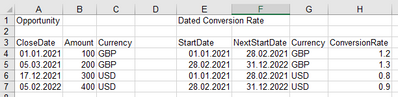
Here my situation. In a nutstell I would like to look-up exchange rates from my table "Dated Conversion Rate" in order to transform my amounts in the Opportunity table into a standard currency (Euro in this case).

Rakshasa_0-1647715415463.png


My experiemts got me to something like:

ER = CALCULATE(VALUES('Dated Conversion Rate'[ConversionRate],FILTER('Dated Conversion Rate','Dated Conversion Rate'[StartDate] < Opportunity[ClosedDate]...

but here PowerBI didn't let my CloseDate from the Opportunity get pulled into the equation.


These two tables do not have a relationship but looking at the original example this also wasn't the case there so hopefully this isn't the problem (if it is I am not sure what to do as I don't really have a nice key due to the nature of my date ranges in the conversion table).


Any help is hightly appreciated.


Sascha.

Anonymous
Not applicable

I think it just was a silly bracket issue. This formula appears to work just fine:

Exchange Rate = CALCULATE(VALUES('Dated Conversion Rate'[ConversionRate]),FILTER('Dated Conversion Rate','Dated Conversion Rate'[StartDate] <= Opportunity[CloseDate] && 'Dated Conversion Rate'[IsoCode] = Opportunity[CurrencyIsoCode] && 'Dated Conversion Rate'[NextStartDate] > Opportunity[CloseDate]))
 
Sascha.

Helpful resources

Announcements
Join our Fabric User Panel

Join our Fabric User Panel

Share feedback directly with Fabric product managers, participate in targeted research studies and influence the Fabric roadmap.

March Power BI Update Carousel

Power BI Community Update - March 2026

Check out the March 2026 Power BI update to learn about new features.