This is best Fabric, Power BI, SQL and AI community event. How do we know? The last event sold out! Save €200 with code FABCMTY200.
Register nowA new Data Days event is coming soon! This time we’re going bigger than ever. Fabric, Power BI, SQL, AI and more. Don't miss out.
Hello,
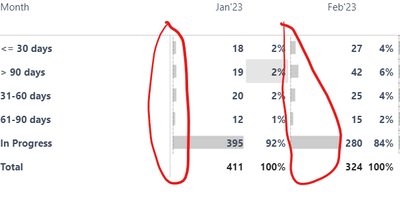
Is there a way where we can customize the color of data bars in the matrix visual? e.g. - in the below visual, I want to show data bar in blue for category <=30. Similarly >90 in Red and so on for the other categories?
Thanks,
Anuj
Solved! Go to Solution.
Hi @itsmeanuj
unfortunately, we don't have an option of conditional formatting for bar colors ( only positive vs negative values).
There is an idea about this issue please void for it : (i voted :))
https://ideas.fabric.microsoft.com/ideas/idea/?ideaid=7251c356-bd01-ed11-b5cf-281878de6c19
You can "play" with the background instead or
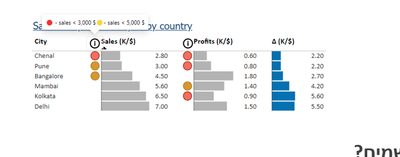
If you want to add some "alert" for special categories you can add to it icon.
Like here:
Pbix with my example is attached
If this post helps, then please consider Accepting it as the solution to help the other members find it more quickly
Hi @itsmeanuj
unfortunately, we don't have an option of conditional formatting for bar colors ( only positive vs negative values).
There is an idea about this issue please void for it : (i voted :))
https://ideas.fabric.microsoft.com/ideas/idea/?ideaid=7251c356-bd01-ed11-b5cf-281878de6c19
You can "play" with the background instead or
If you want to add some "alert" for special categories you can add to it icon.
Like here:
Pbix with my example is attached
If this post helps, then please consider Accepting it as the solution to help the other members find it more quickly
Check out the May 2026 Power BI update to learn about new features.
Sign up to receive a private message when registration opens and key events begin.
If you have recently started exploring Fabric, we'd love to hear how it's going. Your feedback can help with product improvements.
| User | Count |
|---|---|
| 31 | |
| 26 | |
| 23 | |
| 22 | |
| 13 |
| User | Count |
|---|---|
| 62 | |
| 47 | |
| 27 | |
| 23 | |
| 19 |